Welcome to ExtremeHW
Welcome to ExtremeHW, register to take part in our community, don't worry this is a simple FREE process that requires minimal information for you to signup.
Registered users can:
- Start new topics and reply to others.
- Show off your PC using our Rig Creator feature.
- Subscribe to topics and forums to get updates.
- Get your own profile page to customize.
- Send personal messages to other members.
- Take advantage of site exclusive features.
- Upgrade to Premium to unlock additional sites features.


kithylin
-
Posts
24 -
Joined
-
Last visited
-
Days Won
1 -
Feedback
0%
-
My Vega64 is great now. I just have one last comment. And.. a little off topic here. I know this is a Vega64 thread but you seem to know an awful lot about AMD cards. I own a Sapphire Vapor-X OC R9 290X 8GB card (the special ones with the 20-phase VRM) that's water cooled under a custom water block in a different computer. I have cooked up my own custom bios and programmed it into that thing and get it running stable for a few years with things like 1.400v voltage on the core, 1600 mhz clock speed and such. But for some reason that I don't understand the custom bios on that card is only applied when I use a specific range of drivers (spanning about 8 months) combined with Windows 7. If I use it in Windows 10 with later drivers then literally everything I put into the custom bios is completely ignored and it just runs at stock speeds. Do you happen to know what that would be, or perhaps maybe cook up a custom registry file for me for that card too? Since it's essentially restricted to Windows 7 only right now due to issues described above it functions as my "retro computer" at the moment. I occasionally use it to play older games or games that won't work correctly under Windows 10. EDIT: Yes it's high voltage and yes it uses a lot of power but it's still a fun card. I've had it with the custom bios, water block, and that voltage and overclock since 2016 (I bought it new in 2015 and used it air cooled at first for a while until blocks came out for it) I still game on it occasionally. It's been fine all this time with no issues.
-
Yes I meant 1.15v, typo on my part. Apologies. I thought the original bios from Sapphire was limiting it to 300W? That's what Techpowerup says for the bios for this card, and it was stick at 299W on factory default clocks out of the box. I'm confused a bit how it can suddenly overclock so much higher but (apparently?) use less power than it did stock? That doesn't seem to compute in my mind. I did see it occasionally scoot over to 315W a few times but I would of expected it to be a lot higher?
-
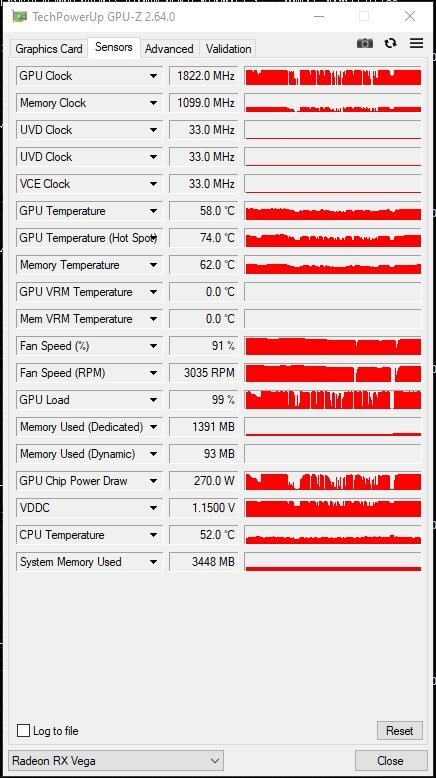
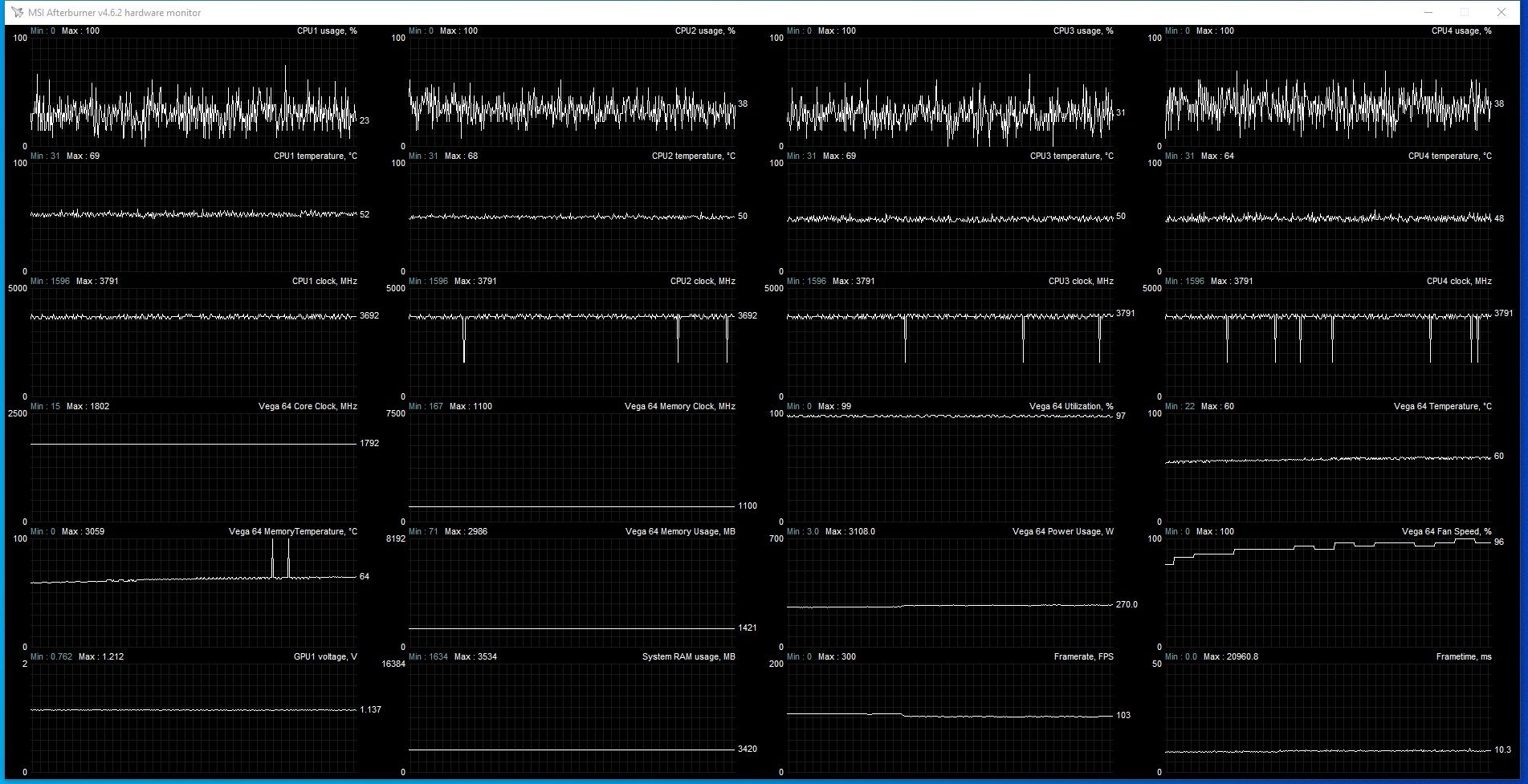
I'll try to get that for you later, maybe tomorrow. The vcore seems to only ever go to 1.500v according to GPU-Z and MSI Afterburner logging though. I've tried increasing the slider in MSI-AB but it just crashes. I was going to ask about that power usage. One of the "tricks" with Nvidia cards was to bypass the shunt resistors which would have the cards showing that they were using (random for example) 80 watts when they were really using like 200 watts as a way to bypass power limits on Nvidia. Did you do a similar trick here for Vega64? Did you change something so it reports like -40% less power than it's actually using? Or is it actually only using 270 watts when the software says it's using 270 watts, even with your modded registry file?
-
Here's some screenshots for you. GPU-Z to record hot spot and MSI Afterburner logging, sampling rate 200ms.

-
Well I have it set there in MSI Afterburner but for some reason it actually runs like 1755 or 1775 in games that I saw and it doesn't even do that in 3dmark, I suspect because the system is bottlenecked a lot. It is odd how setting it that high in afterburner doesn't let it actually go that high, at least not yet in the games I tried. I'll try some more games on it later today when I have more time.
-
I played with it earlier just trying to load it up and see what it could do. I played half-life 2 (normal version) with vsync off and forced the game to 8x supersampling AA in the AMD control panel just to force an artificial load on it and got it up to 1851 Mhz core clock stable on stock air cooling. It averaged around 63-65c core temps, looks like Sapphire's cooler design is awesome. My little test system right now is just having it paired with a I5-3570K, which yes I know is a huge bottleneck, I'll pair it with a faster computer later to really stretch it's legs. This is just for testing. AMD Radeon RX Vega 64 video card benchmark result - Intel Core i5-3570K Processor,Dell Inc. 0YXT71 WWW.3DMARK.COM Intel Core i5-3570K Processor, AMD Radeon RX Vega 64 x 1, 16384 MB, 64-bit Windows 10}
-
I thought things would take longer but surprisingly things finished faster and some people just canceled on me, work done.. so anywhere here's your requested RPM view for this Vega64. Now I can have a little time to play around with this card, it's just a side project to see what it can do.
-
I understand and thank you but it'll be a few days now until I can get the vega64 back into a computer and try this and get the fan RPM for you. I'll get back to you when I can.
-
It's this card: NITRO+ RX VEGA64 8G HBM2 WWW.SAPPHIRETECH.COM NITRO+ RADEON RX VEGA 64 8GB I actually had to swap the Vega64 out of the computer in the other room because it's not supported by Kohya AI training software so I had to use a GTX 1080 instead. I'll work on getting another spare computer set up and put the Vega64 in it to get it running so I can check software and flash it and stuff. It might be tomorrow or the day after for that though, so I don't know the maximum RPM right this second. EDIT: This card uses 3 x 8-pin PEG Power connectors so it should be no problem with a higher power limit bios. Sapphire limited it to 300W though despite this.
-
I've attached the bios. I've tried other things in the past. I browsed all the Vega64 bios's on the TechPowerup GPU Bios database and found one that supposedly has +30 watts more than my card's 300W power limit in it's bios. But every time I tried to cross-flash it into my card the AMD Flash Tool kept coming up with "Vendor ID Mismatch" and denied me. I spent an entire 2 days one time scouring through google and even using ChatGPT to try and find some command-line option to force the bios in and nothing I could do worked. I had even tried 24 different versions of the AMD Flash tool and none of em worked. I tried booting to a DOS bootable USB stick and doing a DOS flash without the OS running and that failed too. I thought we were supposed to be able to cross-flash Vega64... ???? I don't know. I attached my bios extracted from this card with GPU-Z and I hope you can help me. If you could just modify the bios to raise the power limit to say 400W or 450W that would be fantastic. And maybe please point me to the exact download for the AMD Flash tool version that would let me flash your modified bios onto the card? Any help would be appreciated. I pretty much gave up on ever overclocking this card until I found this thread at random last night. Vega 10.zip
-
I know this is an older topic today and I hope the moderators will understand my responding to it as there is basically no other information on the internet about this. So my message goes to HeyItsChris (if you're still here): I own a Sapphire Nitro Vega64. Do you have a way for me to either flash a custom bios into it or a registry tweak or something to basically remove or eliminate it's power limit so I can actually overclock it some?
-
If we get Dark mode free I might consider it more. Although if there was some way to get people to commit to a group buy on computer hardware that might be something that would entice a lot of folks in here. Maybe reserve the ability to participate in the group buy to people that have at least 50-75 posts or something though. I don't know if or how you could ever organize something like that. But if you could that would be amazing.
-
I haven't fixed my avatar because I'm not 100% sure I want to participate over here just yet.
-
Ah this is great news. Thank you for this.
-
So the official subscriptions page is different from what's actually in the premium packages ??? That's so confusing. Instead we have to go find a random forum thread describing it somewhere else? That's all sorts of janky. Also we have to pay money for a basic thing like dark themes that most other forum websites give us for free? I'm trying really hard to like this place over OCN but this is all kinds of BS.