Welcome to ExtremeHW
Welcome to ExtremeHW, register to take part in our community, don't worry this is a simple FREE process that requires minimal information for you to signup.
Registered users can:
- Start new topics and reply to others.
- Show off your PC using our Rig Creator feature.
- Subscribe to topics and forums to get updates.
- Get your own profile page to customize.
- Send personal messages to other members.
- Take advantage of site exclusive features.
- Upgrade to Premium to unlock additional sites features.


tictoc
-
Posts
647 -
Joined
-
Last visited
-
Days Won
43 -
Feedback
0%
Content Type
Forums
Store
Events
Gallery
Profiles
Videos
Marketplace
Tutorials
Everything posted by tictoc
-
No idea if this will work, but you could just try the Quadro drivers without a BIOS flash, and then turn off TCC with nvidia-smi. Open a shell (CMD or Powershell) as an administrator List GPU devices to get the GPU_ID of the device with the Quadro drivers: nvidia-smi -L Turn off TCC: nvidia-smi -g GPU_ID -dm 0 **GPU_ID will be the number of the device from the previous command** Reboot
-
Interesting. I don't know what would be in the Tesla driver that would restrict mining. One thing that might be holding it up is the ECC on the memory. The M40 isn't really a proper Tesla, and it only has ECC on the memory not the cache or registers, so that extra trip to the memory shouldn't nerf mining that hard. The memory clocks are quite a bit lower, but you could edit those in the BIOS. To run the Titan X BIOS you would need to Hex edit the device ID, and I'm not sure how the Titan firmware would handle the ECC. ? *Edit* You could try a Quadro M6000 BIOS. That card is effectively the same as the M40, but with display outputs. No verified M6000 12GB BIOS on TPU, but there is a PNY from the community: https://www.techpowerup.com/vgabios/173217/173217
-
I don't see the point in flashing the Titan X BIOS. You have full control over power and clocks, so a Titan X BIOS isn't really going to give you anything, unless I'm missing something...
-
Excellent. Nice to see that card stretching its legs. Looks like you have a bit of headroom on both temps and power.
-
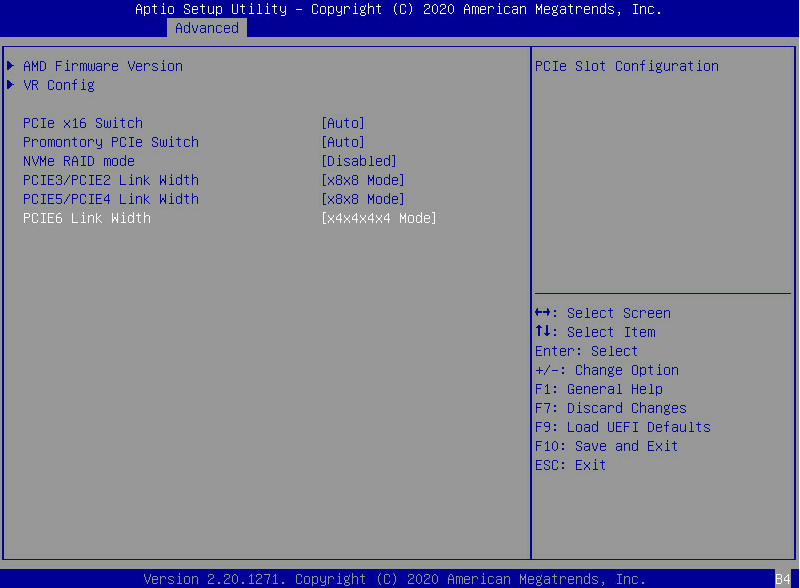
Small update on the bifurcation options. The implementation in the BETA BIOS that I am running seems to be 100% complete. The slots that are electrically x16 all work in x4x4x4x4 mode, and the x4x4x8 splits also work correctly. This is a huge improvement especially on this platform. The 2970WX and the 2990WX CPUs have four NUMA nodes, with two NUMA nodes having direct access to memory and certain PCIe slots. With proper bifurcation on all the slots, there is much more flexibility when running VMs. It is now much easier to pin high performance VMs to the proper NUMA node, without having to swap devices from slot to slot. The only real limitation now is due to the fact that slots 3 and 5 are only x8 electrically. At the end of the day it probably doesn't really matter. With all the bifurcation options working, the use case where this might matter is going to be a niche, of a niche, of a niche, use case, and there are reasonably priced EPYC options available.
-
You need to use an older version of nvflash (v5.287) with the cert check bypassed: https://www.techpowerup.com/download/bios-modding/
-
The wee little units are actually pretty great on less powerful GPUs. I've had a 980 up doing some testing and those 15 second TPF units (don't remember the project # p13447) are like 1.2M ppd on the 980.
-
Yes, you should be able to tweak the BIOS with Maxwell BIOS Tweaker. No need to do the modern day silliness of cross-flashing BIOS, since these cards are from a time when NVIDIA actually let their customers do whatever they wanted to do with their property. First I would try raising the power limit with nvidia-smi, and also see what application clocks are available. I only played around with Keplar era Teslas, but the Maxwell cards can have their BIOS tweaked.
-
I'm guessing you didn't mess with the terminals on the heatkiller blocks, but if you did, that's another possible leak location. It's easy to pinch the o-rings on those terminals if the o-rings aren't fully seated in the slot. Hope you get it sorted out, and I'm excited to see that machine up and running.
-
Right now it is nowhere. Although, there is one user on one project that made an EHW team.
-
Did you hit all the fittings with a spray bottle and soapy water while you had it under air pressure? That's the quickest way (but can be a bit messy) to find the leak outside of filling up the loop. I don't ever leak test any of my systems on air. I usually just run the pump on a separate power supply, or jump the 24 pin with only the pump plugged in, spread some paper towels around possible drip locations, and run the loop with distilled.
-

ehw foldathon ExtremeHW Folding@Home Competition, May 27th - 29th, 1 AM UTC
tictoc replied to axipher's topic in Folding@Home
In Q_Cruncher You can exclude me from the prize drawing. -
That is pretty normal for the latest WUs on AMD GPUs. Some WUs are a little better at utilizing the GPU, but that is about average for most WUs.
-
Are we still taking the OS into account for the multiplier, or are we just using the All OS average PPD?
-
Sorry for continuing the OT. What @Avacado said for 2.0 x16 vs 3.0 x16. I don't have a thread, but I did some testing for the first Community Folding Project thread. I use nvidia-smi to log GPU data. Some of the queries will be dependent on the GPU architecture, the driver that is being used, and the OS (Windows or Linux) being used. Once upon a time PCIe utilization by percentage was reported by the driver (via nvidia-smi), but that is no longer the case (NVIDIA said it was noisy and not accurate). Now you can only get the Tx and Rx throughput in MB/s.
-
Linux and Windows performance with AMD GPUs is pretty much equal now. What are you using for a hypervisor? I regularly passthrough some different AMD GPUs for testing, and the overhead is negligible. All of my testing has been with ESXi or KVM.
-
I tested this last year with a 2080 Super. Performance would be somewhere between the 3.0 x1 and 3.0 x4 results, so probably a 15-20% hit in ppd. OS: Arch Linux Kernel: 5.6.14 Driver: 440.82 GPU: RTX 2080 Super p13406 (core_22) PCIe 3.0 x16: TPF - 01:09 | ppd - 2,512,601 || PCIe Utilization - 18% | GPU Utilization - 97% | GPU Power - 220W | Clocks - 1935core|7500mem PCIe 3.0 x4: TPF - 01:12 | ppd - 2,357,211 || PCIe Utilization - 34% | GPU Utilization - 95% | GPU Power - 217W | Clocks - 1935core|7500mem PCIe 3.0 x1: TPF - 01:28 | ppd - 1,744,509 || PCIe Utilization - 50% | GPU Utilization - 84% | GPU Power - 190W | Clocks - 1935core|7500mem PCIe 2.0 x1: TPF - 01:50 | ppd - 1,248,271 || PCIe Utilization - 55% | GPU Utilization - 77% | GPU Power - 168W | Clocks - 1965core|7500mem
-
GPU projects have started for the BOINC Pentathlon, so my output is going to drop to zero for the next 7 days. After that I'll start testing a few different GPUs to see what card is the best.
-
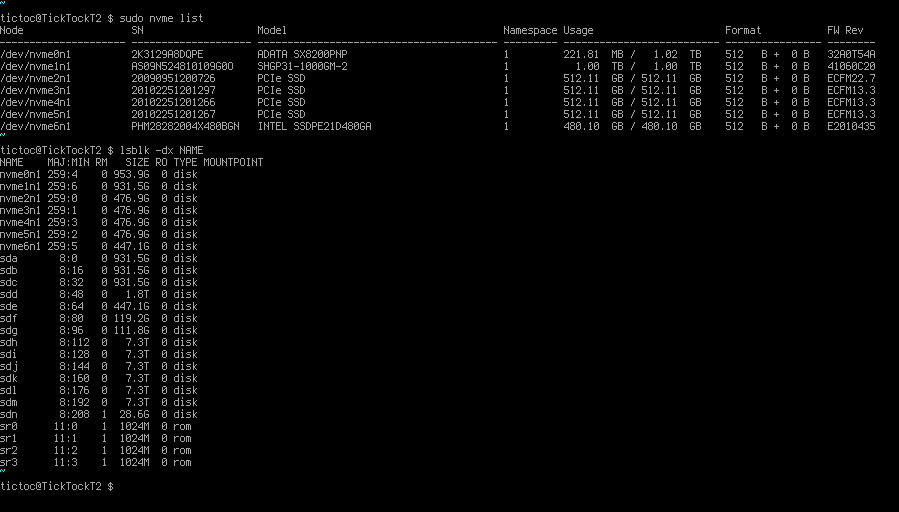
Beta BIOS #6 looks to be a winner. In addition to the x4 split now working, there are also x8x4x4 and x4x4x8 splits for PCIE2/3 and PCIE4/5. This should make it possible to split all the slots, including the two slots that are x8 electrical. I haven't fully tested all the options but this works. Using some old drives to make sure that the final storage configuration will work. Drive layout: 6x SATA HDDs on an HBA in PCIe slot 5 4x SATA HDDs on the mini-sas connector (chipset) 2x SATA SSDs (chipset) 1x SATA SSD (Asmedia SATA DOM) 4x NVMe SSD on an ASUS Hyper M.2 X16 v2 in PCIe slot 6 2x M.2 NVMe SSD (onboard slots) 1x U.2 Optane 905p on a PCIe adapter in PCIE slot 3 All of the above is detected and working with 2 GPUs also installed in PCIe slots 2 and 4. Only empty slot is the top x4 slot which is wired to the chipset.

-
Sweet, then I can do whatever is best in the Wildcard slot. @BWG I promise to switch GPUs no more than once per week.
-
I don't think the Radeon VII is going to be a very good card in this comp (probably should get it back on money making duty). There aren't really any recent entries on LARS, and if there were, the multiplier for this card would probably be something more like 4.4. The actual average ppd is probably down something like 20-25%, compared to what it was a few months ago. I'll be testing out some other GPUs over the next few weeks, but maybe a GTX 980 or an R9 290 makes more sense. @Avacado no matter what I do you will be folding on an NVIDIA GPU correct, and @axipher do you think you'll stick with the 5700?
-
Congrats on the major milestone.
-
Just a small short rest.
-
That is a bummer on the GPU block. I have been mostly all Heatkiller for the last little bit, but they never made a Radeon VII block. I always go with Acetal/copper blocks when possible, since everything I build is more about performance and reliability then looks. Right now it's a little tough, since it's mostly get what you can get, as soon as you can get something. Hopefully the RMA goes quick and you get the new block soon.
-
My output will be down for the next 2 weeks due to the BOINC Pentathlon. At some point in time it will probably drop to zero for 5-7 days.