Welcome to ExtremeHW
Welcome to ExtremeHW, register to take part in our community, don't worry this is a simple FREE process that requires minimal information for you to signup.
Registered users can:
- Start new topics and reply to others.
- Show off your PC using our Rig Creator feature.
- Subscribe to topics and forums to get updates.
- Get your own profile page to customize.
- Send personal messages to other members.
- Take advantage of site exclusive features.
- Upgrade to Premium to unlock additional sites features.
J7SC_Orion
-
Posts
2,211 -
Joined
-
Last visited
-
Days Won
96 -
Feedback
0%
Content Type
Forums
Store
Events
Gallery
Profiles
Videos
Marketplace
Tutorials
Everything posted by J7SC_Orion
-
Alphacool 3070 block - Replacement o-ring size?
J7SC_Orion replied to Sir Beregond's topic in Water Coolers
...I don't know that specific block, but if you have a spare compression fitting (ie. 1/2 id), they have an o-ring on the thread side which has worked for me before as a replacement for another purpose. -
Forums first comp: CPUz Benchmark
J7SC_Orion replied to Storm-Chaser's topic in Benchmarking General
...that pic was from my work space - but I haven't used that pot in a while; best to employ them when a new setup is on a test-bench. -
...in case you need a much higher flow rate after all...
-
Noice additions ...you really are very serious about playing Crysis at 4K ?! I've been eyeing that Alphacool 1080mm rad for a future build and I'm looking forward to your feedback on it.
-
Forums first comp: CPUz Benchmark
J7SC_Orion replied to Storm-Chaser's topic in Benchmarking General
...yes, I was being a bit facetious re. 'new fangled', given the context... an easier way to get down to - 185 C more or less -
Forums first comp: CPUz Benchmark
J7SC_Orion replied to Storm-Chaser's topic in Benchmarking General
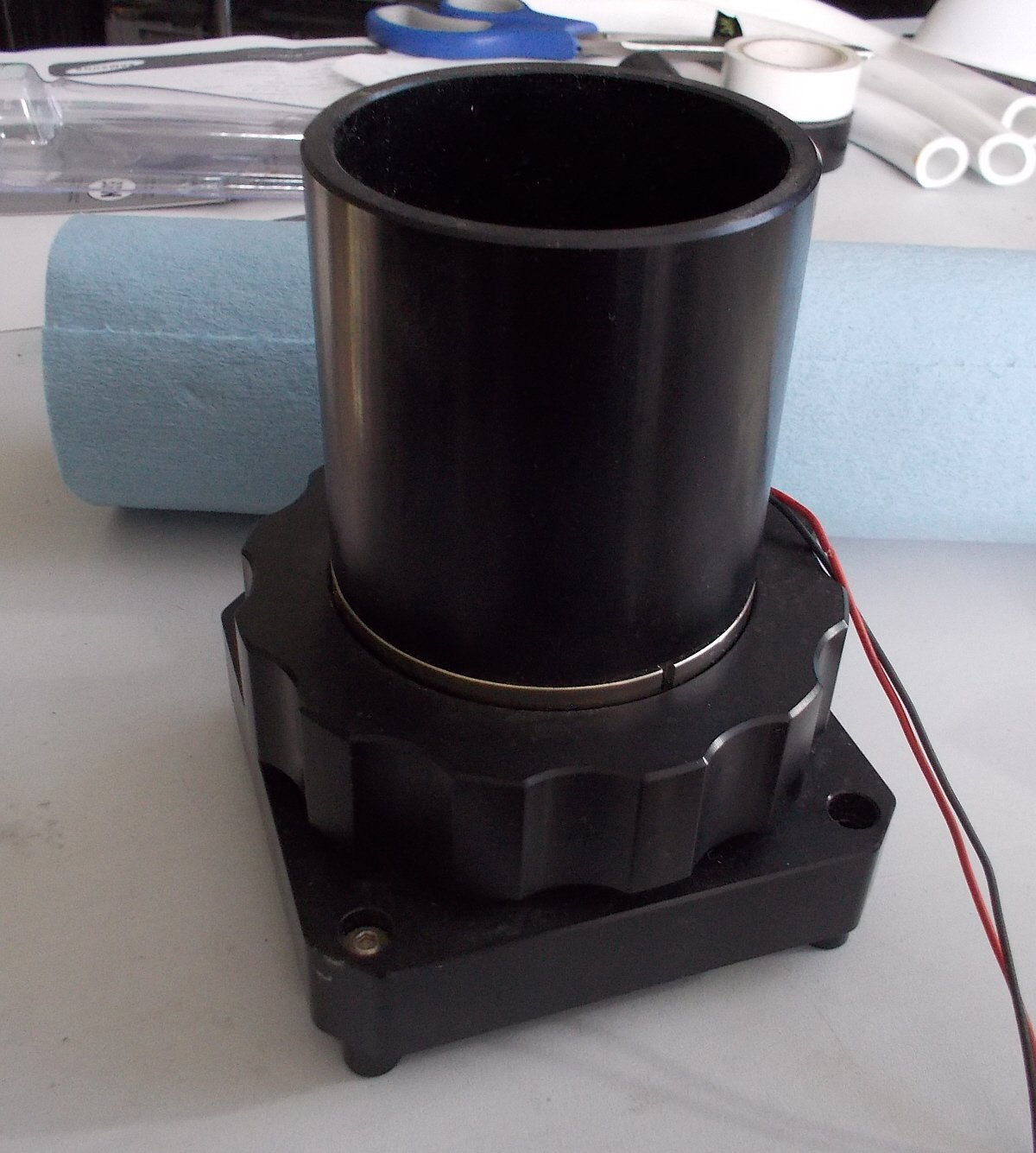
...just a simple EK pot (w/ heating element for thawing) for DICE and LN2...this thing is the smaller of two I used way back when I did HWBot, but it is still pretty heavy (nickel-coated copper base). -
The PhaseChiller heat exchanger project...
J7SC_Orion replied to J7SC_Orion's topic in Exotic Coolers
...I have been checking Amazon for an additional heat exchanger...you can't just dump the copper head of the chiller into water (tried that years ago) because it will just form a clump of ice around the head which acts as insulation... For now, in addition to the items depicted in the first post, I have been using 2x BlackIce 180x60+ high-fpi full-brass rads I have...the idea of this 'on the back burner project' (pardon the pun) is to use existing bits that are just laying around. Still, and inexpensive heat exchanger or two which I can flange to the chiller head is on the menu... -
Forums first comp: CPUz Benchmark
J7SC_Orion replied to Storm-Chaser's topic in Benchmarking General
...but blue shop towels are smooooth and velvety to the touch and they hold together much longer -
Forums first comp: CPUz Benchmark
J7SC_Orion replied to Storm-Chaser's topic in Benchmarking General
...check out this 'new-fangled invention'
-
Forums first comp: CPUz Benchmark
J7SC_Orion replied to Storm-Chaser's topic in Benchmarking General
...apart from AMD driver updates etc, the problem is Microsoft Win 10 updates - some are necessary, others just drill deeper into your personal files...hard to tell which one is which when unblocking updates for truly important ones....KB123...321 doesn't really say very much... All that said, I keep a 'ghosted' drive from early of a completed and tested new setup handy, ie. one which isn't subsequently polluted with all this stuff. -
Forums first comp: CPUz Benchmark
J7SC_Orion replied to Storm-Chaser's topic in Benchmarking General
...part of the problem is that modern chip design (CPU and even GPU) rely on branch prediction and longer pipelines to gain 'IPC'. Greatly oversimplified, but this is however also where a lot of vulnerabilities are injected...on the Ryzen 5k series, L3 cache speeds have now lost close to 40% just due to mitigations, similar if not worse story for past Intel. Even NVidia has had issues and fixes with / for that. As a result, performance gains require an extra wallop of PL, unfortunately. ...while on a different layer, I wonder how long it will take before resizable_BAR and DirectStorage are found to have related weaknesses. -
Forums first comp: CPUz Benchmark
J7SC_Orion replied to Storm-Chaser's topic in Benchmarking General
I think you're right about the culled 12900K, so KS is really a price hike in disuguise...at the end of the day, the 12900KS (and for that matter the AMD 5800X3D) are a blip, a sideshow until the main event later in 2022 (subject to various crisis not messing up the supply chains): The release of AMD's AM5 and Intel's Raptor Lake, then on to Meteor Lake (and whatever AMD offers in return). By that time, more mature high-speed, low-latency DDR5 should also be floating about, and PCIe 5.0 GPUs and NVMEs will demand attention... -
Forums first comp: CPUz Benchmark
J7SC_Orion replied to Storm-Chaser's topic in Benchmarking General
@Bastiaan_NL , @Avacado , @Mr. Fox ...for your perusal... ...or Raptor Lake ? -
I've used PBO on both my 3950X and 5950X (Asus CH8 wifi, Asus CH8 Dark Hero) for a year + - , zero problems so far, though I actually leave the PPT/EDC/TDC values on auto for both. FMax enhancer does work well with my 3950X, but not so much with my 5950X (though doesn't seem to hurt much, either)
-
Forums first comp: CPUz Benchmark
J7SC_Orion replied to Storm-Chaser's topic in Benchmarking General
...yeah, re. creating a new account, you have to be careful with that re. HWBot rules, at least that was the case years ago...worth checking. It used to be the case that you could transfer your scores 'once' into a new-name account. This is different from changing teams in your existing account / name and taking the points with you. -
Nice ! I also enjoy working with those bigger sheets of thermal pads above, especially for custom solutions. FYI, just in case you haven't already got it, for sub zero, art eraser and LET (liquid electrical tape at auto supply stores) always worked well for me....(melted via a low-setting heat-gun) Vaseline also does the trick, but over time, it becomes a mess with all kinds of dust etc sticking to it, especially if you forget to clean everything up after a long session and put it aside for cool-down (err, warm-up).
-
Build Log - Sir B's Black/White/Gold O11-Dynamic
J7SC_Orion replied to Sir Beregond's topic in Desktop
...forgot to mention a quick tip before: Once you configured your system, set up your CPU, RAM and GPU to your liking and did a few benches, you might want to use a similar or identical drive and 'ghost' your setup (ie. Macrium), for future comparison purposes. ...the more patches and updates AMD and Windows deliver, the slower things like L3 get with otherwise identical settings. With an original setup drive, you can differentiate what are hardware changes and what are software / OS patch related impacts. L3 in particular gets affected by a lot of chipset driver and OS patch 'fixes'...per below, same settings (slower clock was in one was due to some other background item). EDIT @Sir Beregond ...further to my comment yesterday and low 1% / 10% frame-time issues in games when oc'ing RAM beyond a certain point that still appears stable in benchies, this came out today by coincidence. While the vid is about DDR5, DDR4 can show similar impacts. ...you can try a big monster app such as Microsoft FS2020 if you have a decent internet connection (because the connection can also lead to stutter) to test out your RAM oc.
-
Forums first comp: CPUz Benchmark
J7SC_Orion replied to Storm-Chaser's topic in Benchmarking General
I guess some of us have to stick with the 400,000 core model... -
pc gamer Intel releases the ATX 3.0 power supply spec
J7SC_Orion replied to ENTERPRISE's topic in Hardware News
I think it is going to be a while yet before ATX 3.0 will be fully released, much less become the exclusive standard. In the meantime, welcome to "dongle-world..." ...what troubles me a bit though is the timing as we seem to be moving into periods with potentially more supply-chain disruptions the world over (including Asia where most PSUs come from). -
Forums first comp: CPUz Benchmark
J7SC_Orion replied to Storm-Chaser's topic in Benchmarking General
...good, because 180W peak is what my 3950X 16c/32t uses for 27280 in CinebenchR23 which uses the regular AVX. 5950X records 260W peak for 32311 (see earlier posts). -
Build Log - Sir B's Black/White/Gold O11-Dynamic
J7SC_Orion replied to Sir Beregond's topic in Desktop
...that's why one does leak testing in the first place - and I like the bath-towel precaution Once you got the leak taken care of and you're setting up your system, Ryzen RAM tuning awaits . As far as I recall, you have a GSkill Neo 3600 CL16 kit (2 sticks x16?) for your 5900X ? It might be worth your while to see if the IMC will go above 1900 / DDR4 3800, ie. via using really loose timings such as 18-18-18-38 tRC 56. In practice, it won't make that much difference as long as you can reach 1800/3600 but still, you'll never know until you try to max your IMC w/o going overboard on voltages. I can get to IF 2000 / DDR 4000 on mine, but there's always a bit of a tradeoff between timing and latency for daily apps. The top one below is an older 3866 4x8 kit at an actual 1900/3800, center is a newer 4000 kit at an actual 1933/3866, and bottom is the 4000 kit at 2000/4000. When setting the newer-gen AM4s up, I tend to have SoC < 1.1v (per above, Zen timings)...while it is safe even a bit above that, there are a lot of short voltage spikes happening which can go unnoticed by HWInfo et al (same w/ CPU and GPU - especially the latest crop w/ aggressive boost algorithms). Excessive SoCv is one good way to shorten the life span. Another quick tip is re. tRC and tFAW...for stress testing and benches, I can run them much tighter than I actually do...that is because with some games, low 1% and 10% can stutter just a bit more if those are too tight (even if it all passes stress testing). Weekend coming up - have fun on your build !
-
Forums first comp: CPUz Benchmark
J7SC_Orion replied to Storm-Chaser's topic in Benchmarking General
Yeah, it only works under select circumstances (and only on Asus CH) for the Ryzen 3k series - it is actually counterproductive on Ryzen 5k, at least when I compare my Ryzen 3k with my 5k. I would focus on your heat generation issue (180W) for improvements. -
Forums first comp: CPUz Benchmark
J7SC_Orion replied to Storm-Chaser's topic in Benchmarking General
fMax by the Stilt in the Asus Bios is s.th. slightly different from adding boost in the bios, though related - but it doesn't apply to most other mobos. 180W / 90C / 1.525v ? Wow. Yeah, if you can get temps down into the high 70s / low 80s that should help. -
Forums first comp: CPUz Benchmark
J7SC_Orion replied to Storm-Chaser's topic in Benchmarking General
Nice work ! FYI, I don't know of your Gigabyte Aorus Pro has s.th. like 'fMax' (per Asus X570 CH8) but that would help a bit w/ single score Cinebench (on Ryzen 3K, not 5K). Also, on my 3950X, I run a very slight undervolt offset (-0.00625) for best results, stock bios settings otherwise.