Welcome to ExtremeHW
Welcome to ExtremeHW, register to take part in our community, don't worry this is a simple FREE process that requires minimal information for you to signup.
Registered users can:
- Start new topics and reply to others.
- Show off your PC using our Rig Creator feature.
- Subscribe to topics and forums to get updates.
- Get your own profile page to customize.
- Send personal messages to other members.
- Take advantage of site exclusive features.
- Upgrade to Premium to unlock additional sites features.
J7SC_Orion
-
Posts
2,211 -
Joined
-
Last visited
-
Days Won
96 -
Feedback
0%
Content Type
Forums
Store
Events
Gallery
Profiles
Videos
Marketplace
Tutorials
Everything posted by J7SC_Orion
-
4K & 1440p gaming - Select CPU and GPU generations
J7SC_Orion replied to J7SC_Orion's topic in PC Gaming
...officially, FS2020 doesn't support SLI Crossfire, but there was undocumented SLI/NVLink feature for NVidia drivers called 'CFR' ('checkerboard') for the RTX2k GPUs and that works with FS2020... -
4K & 1440p gaming - Select CPU and GPU generations
J7SC_Orion replied to J7SC_Orion's topic in PC Gaming
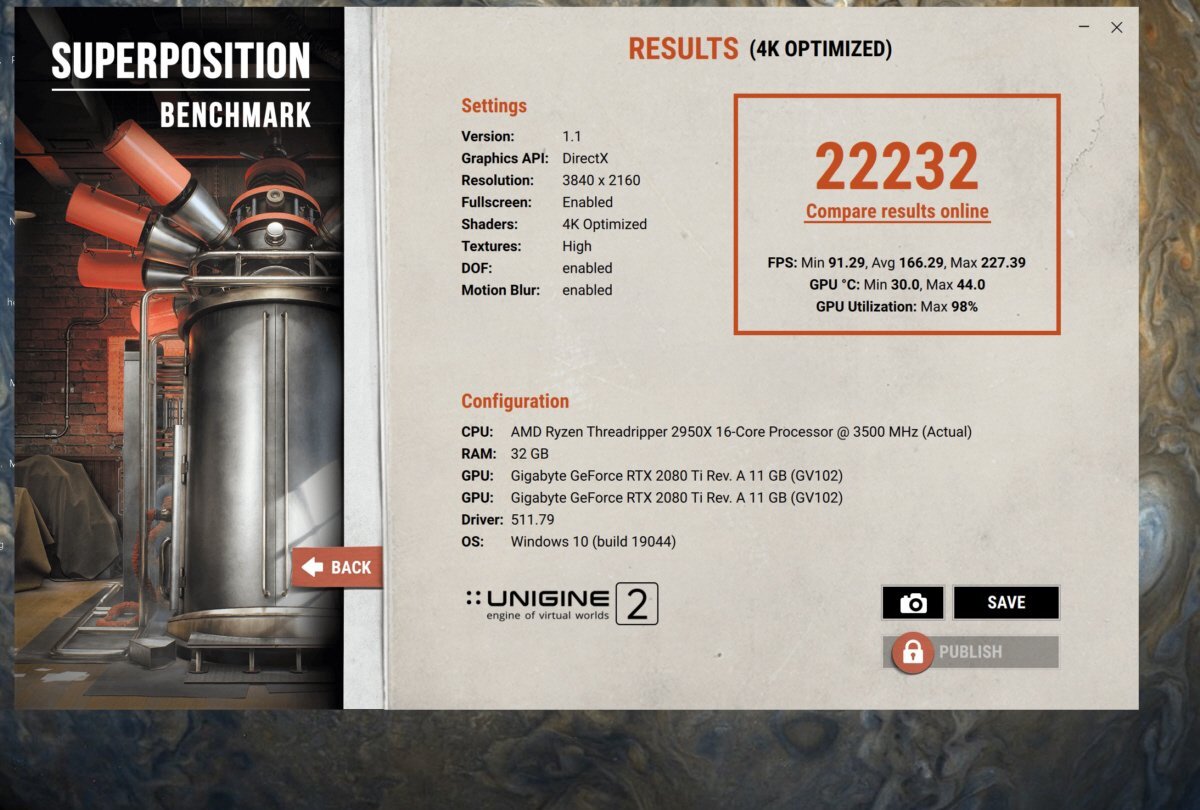
...like everything higher - fps, altitude, sense of humour FYI, while the original posts refers to game-stable-clocks, I decided to do a full-on run with the 2x2080Ti...24C and over 1200W system power draw ...will see what I can do w/ updated Superposition4K runs for the 3090 and 6900XT later...
-
4K & 1440p gaming - Select CPU and GPU generations
J7SC_Orion replied to J7SC_Orion's topic in PC Gaming
...switched to 3840x2160 - and now everything is moving too fast back down to earth...
-
4K & 1440p gaming - Select CPU and GPU generations
J7SC_Orion replied to J7SC_Orion's topic in PC Gaming
The AMD card should do very well in FS2020 and that app's quirks. Not sure about FS2020 VR, though - I heard of folks with AMD 6xx XT and 3090 claiming it's messy / lots of stutter....could be their network connection though. FYI, I tried running FS2020 / 8K render on my 3090 setup recently ~ 20-30 fps max... -
4K & 1440p gaming - Select CPU and GPU generations
J7SC_Orion replied to J7SC_Orion's topic in PC Gaming
...the machine w/ the 6900XT doesn't have FS2020 loaded...it is my primary work machine though it does have Steam on. FS2020 has a gazillion giant patches and it isn't very well optimized re. CPU threads - but still, my fav gaming activity - and on a 48 OLED and hi-res, it is worth it. Cyberpunk2077 isn't too shabby, either. -
4K & 1440p gaming - Select CPU and GPU generations
J7SC_Orion replied to J7SC_Orion's topic in PC Gaming
...you already tried another HDMI 2.1 cable ? I had a bad HDMI cable before that had visual issues/impacts. Anyhow, I'm on the latest driver that just came out a few days ago... -
4K & 1440p gaming - Select CPU and GPU generations
J7SC_Orion replied to J7SC_Orion's topic in PC Gaming
...may be a setting either in the AMD menu or the LG ? FYI, I just used the 6900XT on the same LG C1 OLED (both GPUs are connected to each of the two monitors). 4K HDR YT vids are working great on the 6900XT... -
4K & 1440p gaming - Select CPU and GPU generations
J7SC_Orion replied to J7SC_Orion's topic in PC Gaming
No issue w/ HDR on mine...YT vids look gorgeous as well. Only real issue is the screenshots of HDR content when shared on a non-HDR monitor. -
4K & 1440p gaming - Select CPU and GPU generations
J7SC_Orion replied to J7SC_Orion's topic in PC Gaming
...as mentioned, you can re-set it to 3840x2160 in the LG software though apparently, subsequent LG 'updates' will set it back to default...either way, I prefer the 4096x2160 because our 4K tv box (also over the same fibre connection as the internet) outputs at 4096x2160. Of MUCH MORE INTEREST is this > ultrawide setting on LG OLED 48 (at least with a RTX3k) -
4K & 1440p gaming - Select CPU and GPU generations
J7SC_Orion replied to J7SC_Orion's topic in PC Gaming
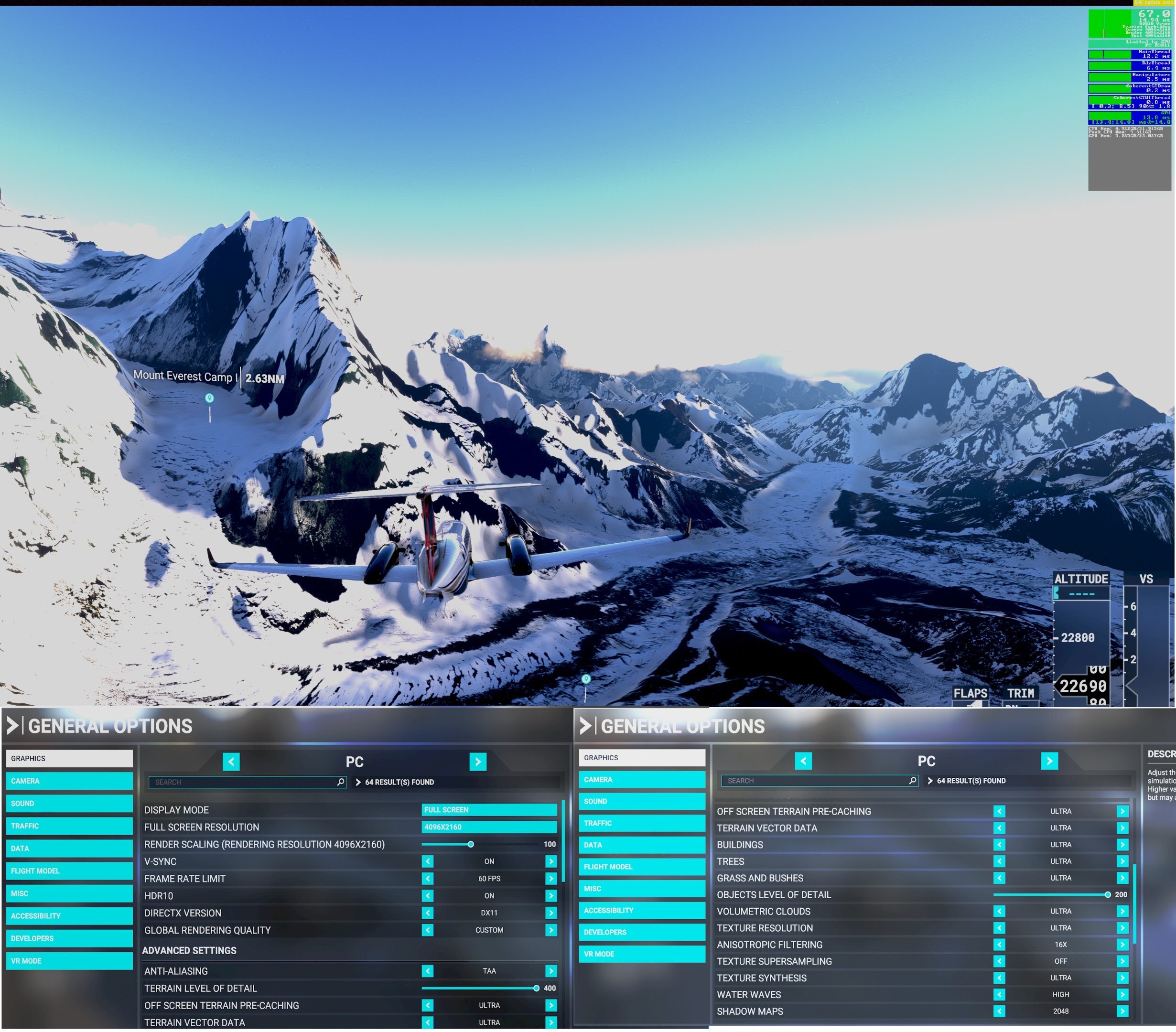
The big LG's are indeed 4096x2160, though they also run 3840x2160 just fine. Some LG owners mod the TV software via CRU to make 3840x2160 the default, but I prefer the max pixel count . I don't mean to wax on lyrically about the C1 48 OLED, but it is simply incredible at 120Hz HDR, Dolby Vision/Atmos, HLG and on and on. The response in gaming is also as near-instantons as I've ever experienced. Below is an excerpt from FS2020 with the settings used, and powered by the 520W 3090...because I have HDR on, the screenies look a bit bleached, but the real thing looks breathtaking. BTW, I use similar settings for the IPS HDR 55 powered by the older 2xRTX2ks which really wake up at 4K+ via SLI/NVL/CFR. 'Max' fps is supposed to be 60 in FS2020, but who cares. BTW, DX11 in FS2020 still beats the DX12 beta....hopefully they'll fix that one of these years
-
4K & 1440p gaming - Select CPU and GPU generations
J7SC_Orion replied to J7SC_Orion's topic in PC Gaming
...yeah, it all adds up: ~ 8.29 mpix 3840x2160 4K (sort of) ~ 8.85 mpix 4096x2160 4K (definitely) ~ 14.75 mpix 5120x2880 5K (mostly) ~ 33.2 mpix 7680x4320 8K (says Jensen) ~ 132.7 mpix 15360 × 8640 (military grade) I game mostly at 4096x2160 on the C1 (120Hz OLED), and the w-cooled 3090 Strix can easily handle that (same for the 6900XT which uses that as a 2ndary monitor)...FS2020 can exceed 70 fps at 4096x2160, in spite of its 60 fps 'limit'. I've run 5K a few times in other apps, including with the 6900XT, but mostly just for kicks. I guess when the RTX4K and RDNA3 series come out, we'll be treated to a more serious marketing campaign towards 'ready for 8K gaming' . FYI, a friend of mine runs a specialty software firm that is working on 16K compression algorithms...10 G networking better get a move on -
...3D cache really came from enterprise system requirements - the latest AMD EPYC line has options for 3D cache. It makes sense if you have to move massive amounts of data in and out of RAM. But there are also disadvantages, especially re. clocks, heat and exotic cooling. All that said, most upcoming Intel and AMD desktop gens all seem to have much more cache onboard, whether in '3D' piggyback fashion, or more traditional manufacture.
-
4K & 1440p gaming - Select CPU and GPU generations
J7SC_Orion replied to J7SC_Orion's topic in PC Gaming
...that's how it goes ! Monitor upgrades really drove my latest GPU purchases, not gaming or benching per se. Once you have a big 4K+ 120Hz monitor, you want a GPU that can properly drive it in games re. min fps (I restrict max fps to 350, given the 1000+ fps in some game menus ). On another note, the 2x 2080 Ti SLI/NVLink setup really only 'wakes up' at 1440 and above, perhaps because they're held back by the 2950X at lower resolutions. -
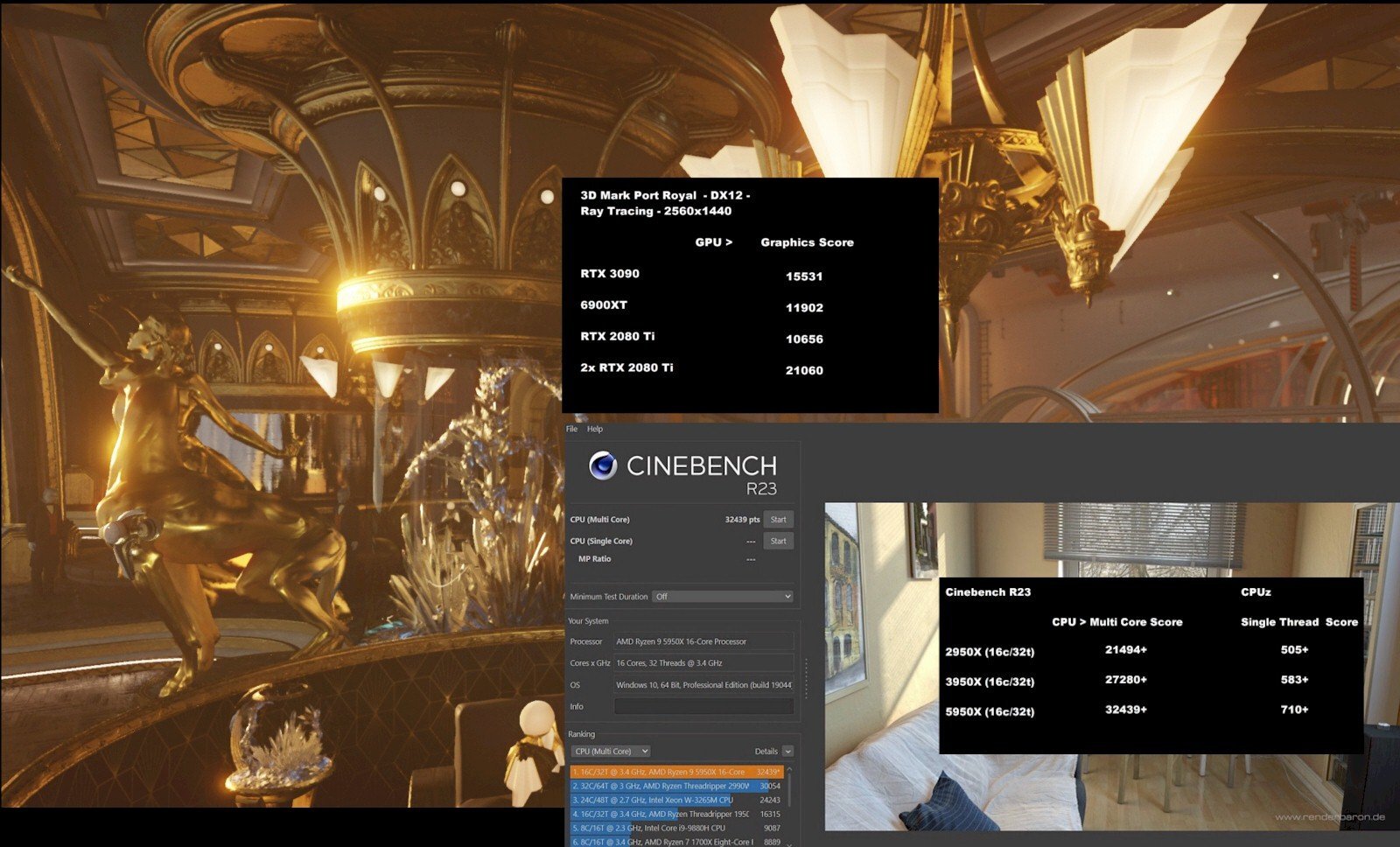
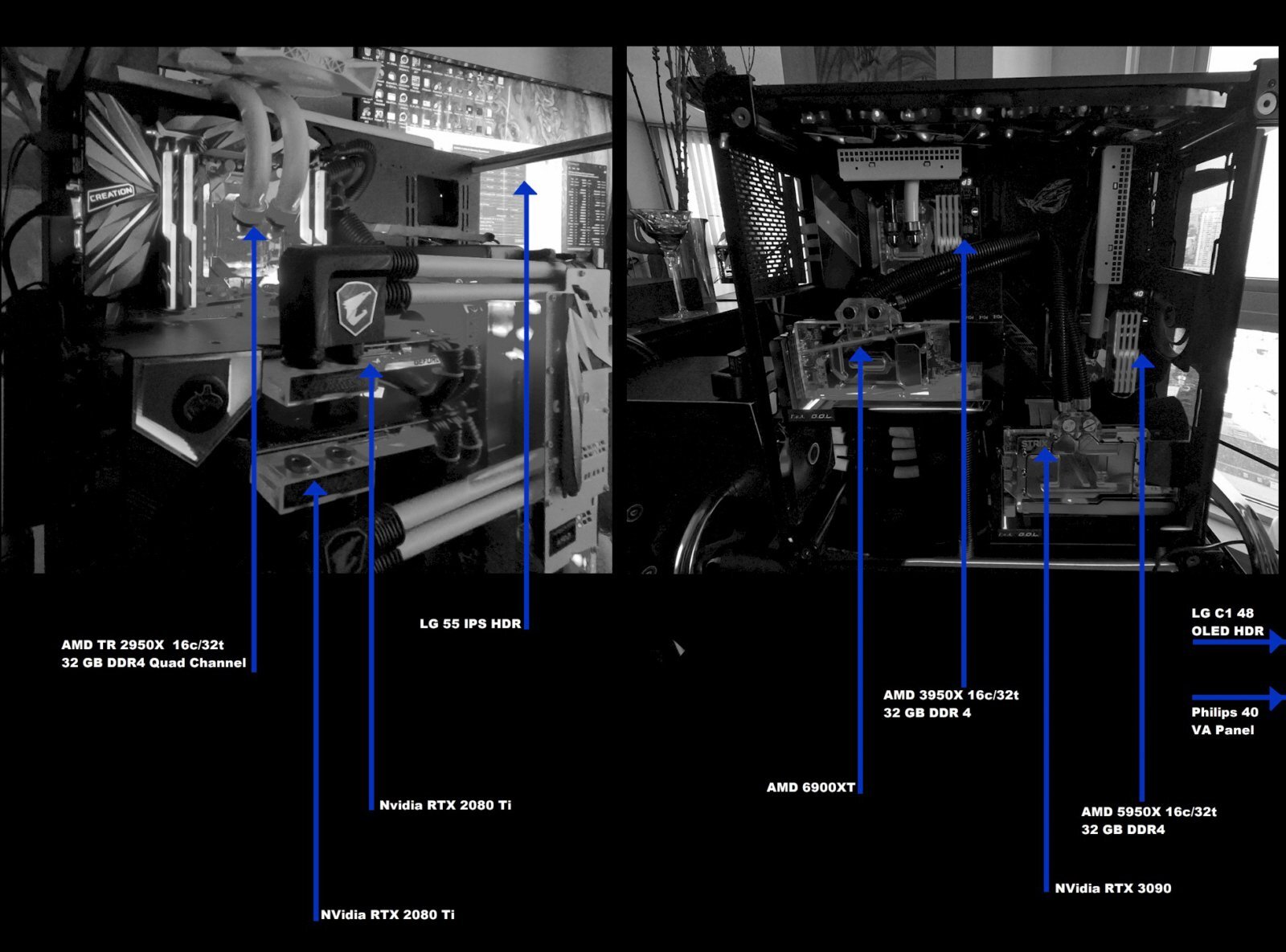
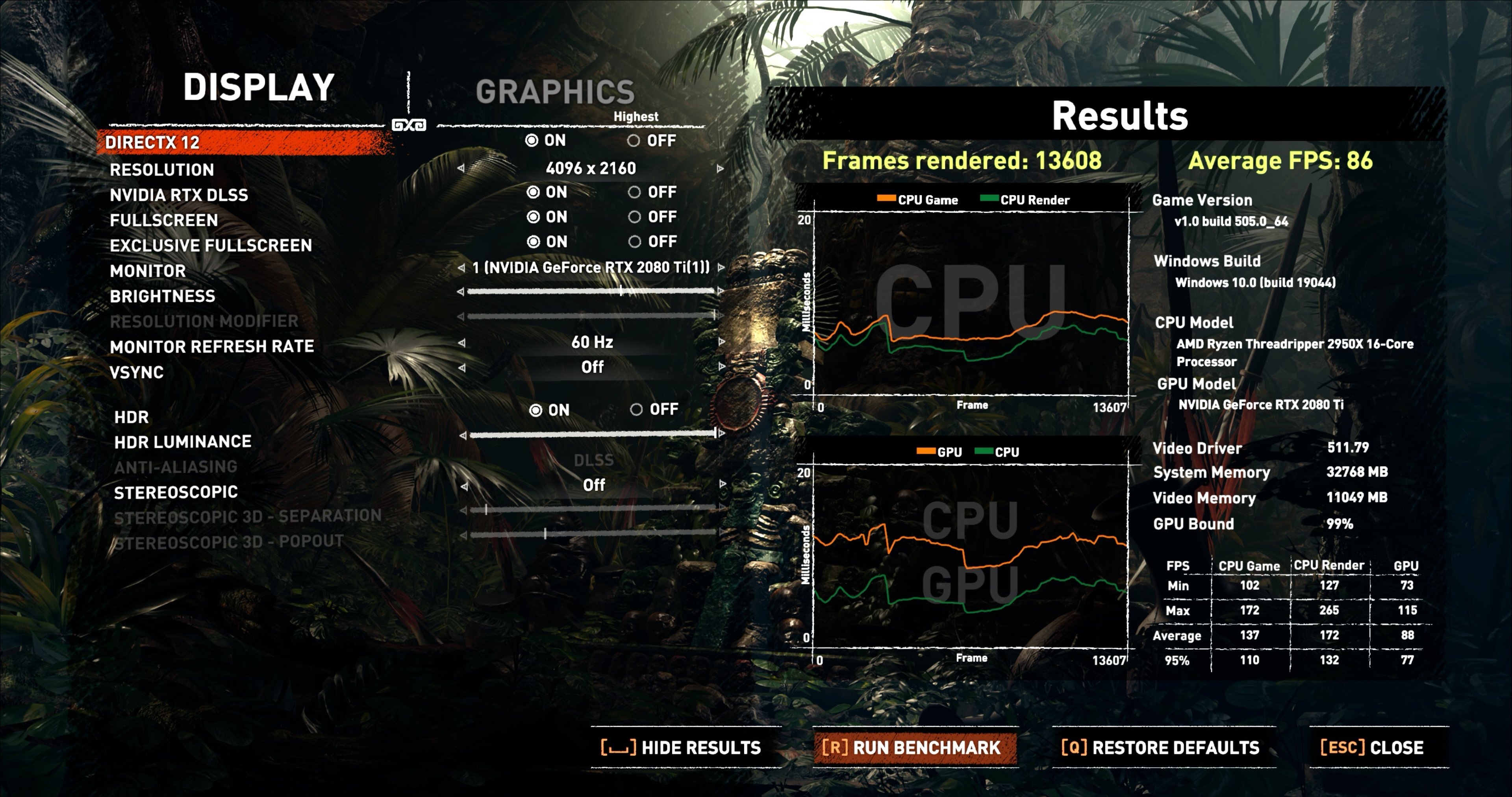
Hello folks ...When wanting to game at 4K (and at times 1440p) with decent framerates, it doesn't always have to be the absolute latest CPU and GPU generation, IMO. To that end, below are some select comparisons for three AMD CPU generations - a 2950X, a 3950X and a 5950X, paired with 2x 2080 Tis, a 6900XT and a 3090. These three systems have different functions for my work and play, and all three are fully custom water-cooled. I recently upgraded everything to 4K monitors/TVs (40 inch, 48 inch, 55 inch) and compared these setups - the 2950X / 2x 2080 Ti combo was built in late 2018, while the other two stem from 2021...I was a bit surprised how well the older 2950X combo held up. While it can clearly not compete with the latest gens in terms of absolute 'peak' numbers, it is often more than enough to afford reasonably smooth gameplay, even with ray tracing. As it is connected to a 4K 60 Hz tv, the minimum requirements re. the rest of the system are not as demanding as for example the setup that serves a 48 inch 120Hz OLED. Please note that these are not meant as a hardcore benchmark comparison; GPU clocks used are game stable (rather than full bench mode) and temps remain low. The purpose is to see whether 'last gen' tech in terms of CPU and GPU can still deliver decent 4K (and 1440p). While not included below, the original test bench for the 3090 acquisition was actually an Intel i7 5960X 8c/16t Haswell-E setup from 2014...even that then-seven-year old system managed to break 15,000 with a stock air-cooled (now water-cooled) 3090. Generally speaking and from my subjective perspective, those wishing to game (mostly) at 4K and who have a decent 8c/16t processor with good 32GB of RAM are better off spending their money on a good GPU rather than the latest CPUs and mobos, especially with an eye on upcoming next-gen CPU releases. Single-core performance does of course also matter a lot in gaming, and in my opinion, a 8 core CPU which can manage at least a single thread score of 480 and up in CPUz should be good enough when paired with a GPU that will run 4K easy...after all, at the higher resolutions, CPU performance is relatively less of an issue. ...a quick note on the 2080 Ti SLI/NVLink system include below....surely, folks will groan that 'SLI is dead', and support for it in new games has clearly been waning. Nevertheless, a surprisingly large number of games (DX11, even DX12 RTX/DLSS) I play still work very well in SLI/NVLink, especially at 4K. Wherever possible, I use an undocumented driver feature that allows for SLI-CFR ('checker board') which doesn't do micro-stutter, for example, though the relevant drivers are getting a bit long in the tooth... With that in mind, here are the setups and select DX11 and DX12 bench results... Edit - some Superposition 8K runs for 'the usual suspects'...
-
Comparing Shadow of the Tomb Raider benches of different GPUs
J7SC_Orion replied to J7SC_Orion's topic in PC Gaming
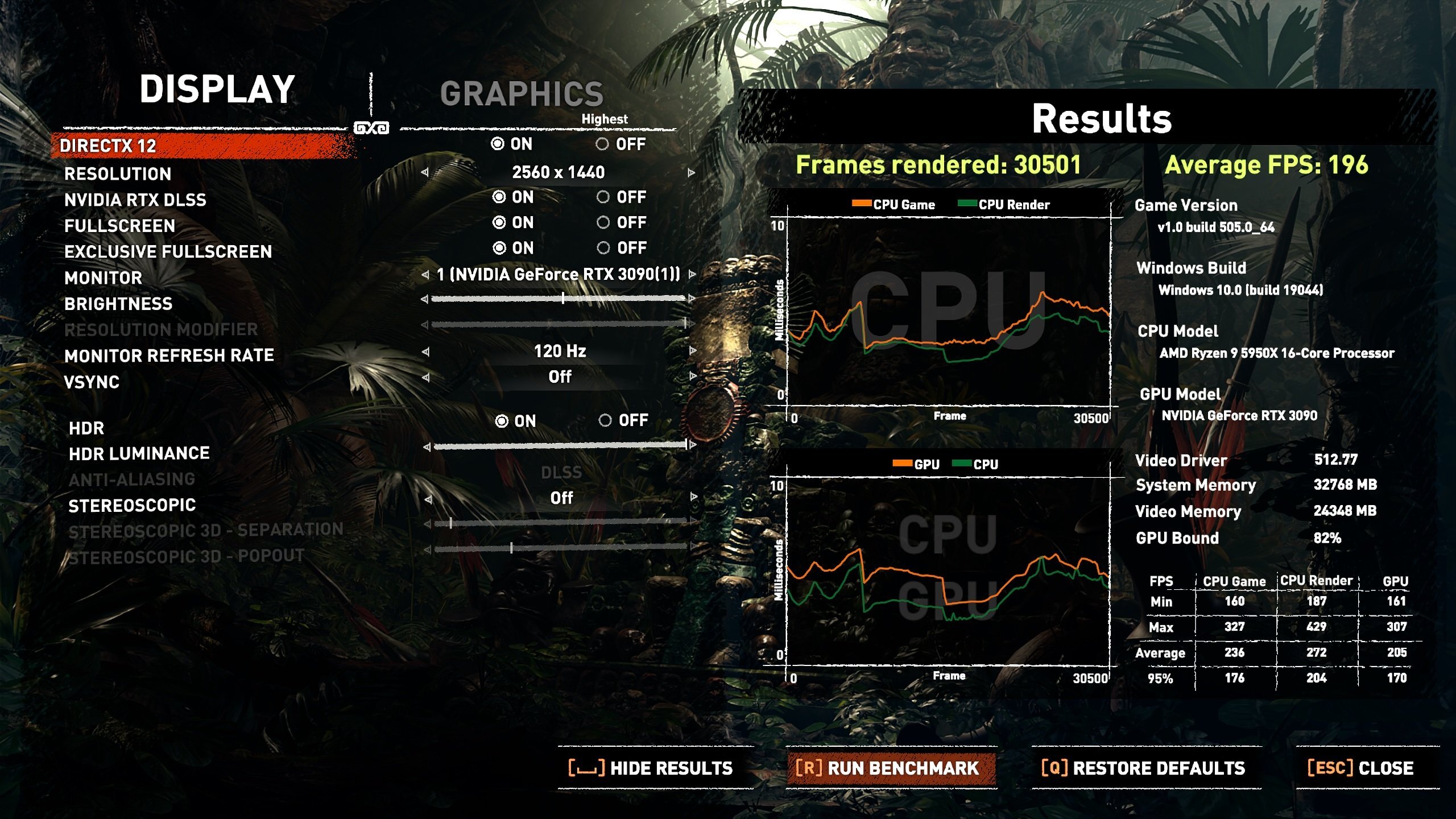
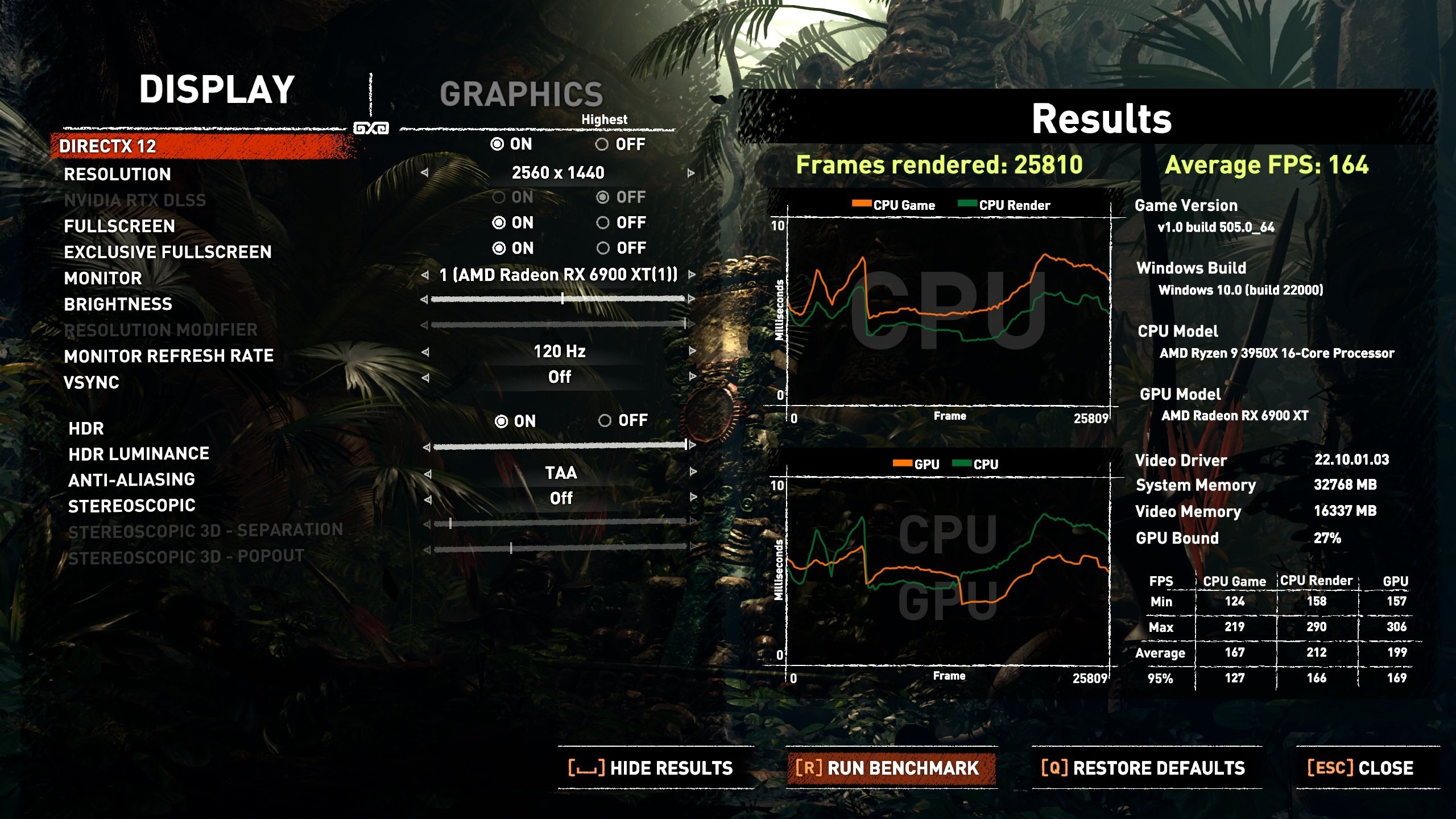
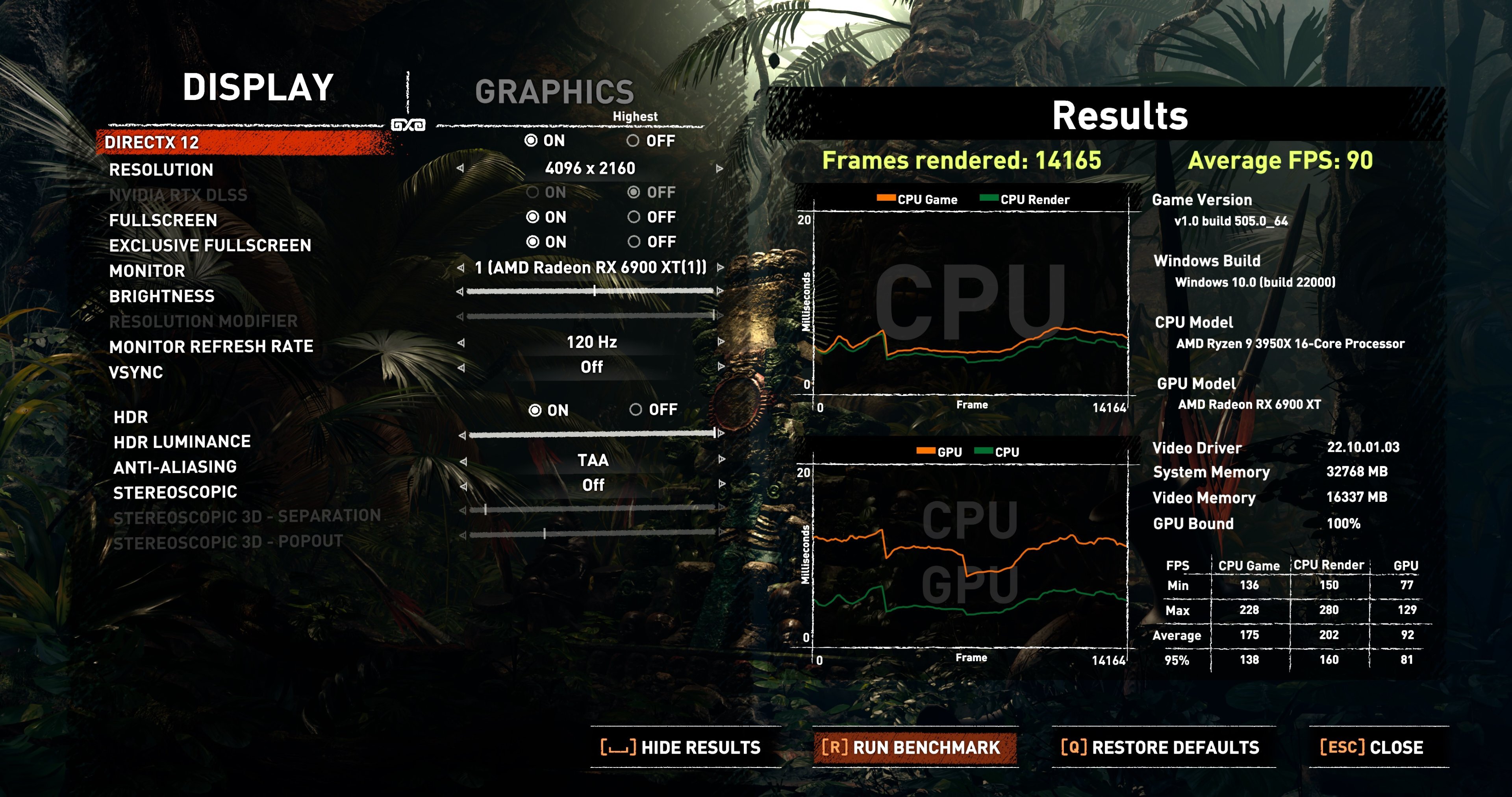
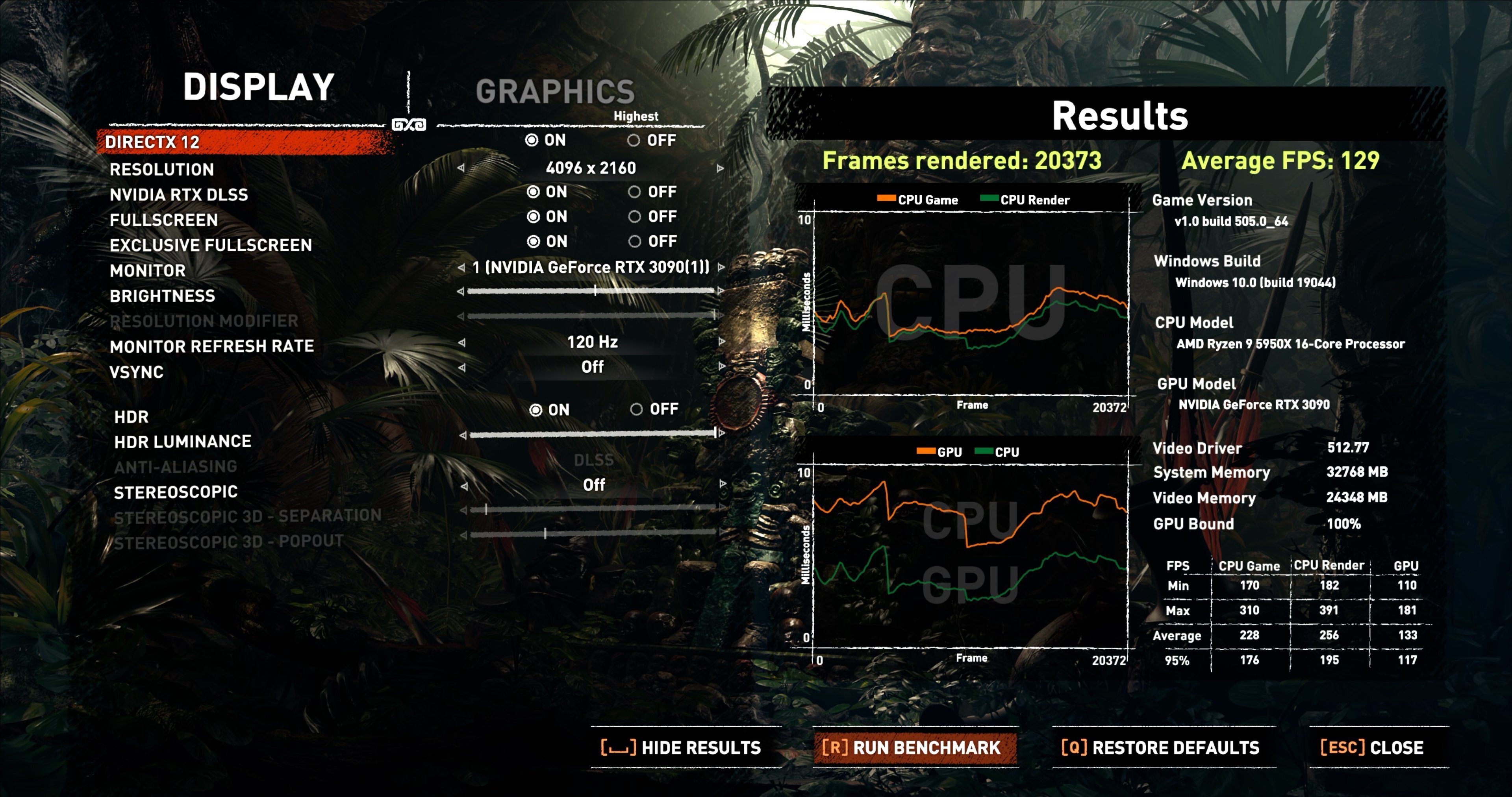
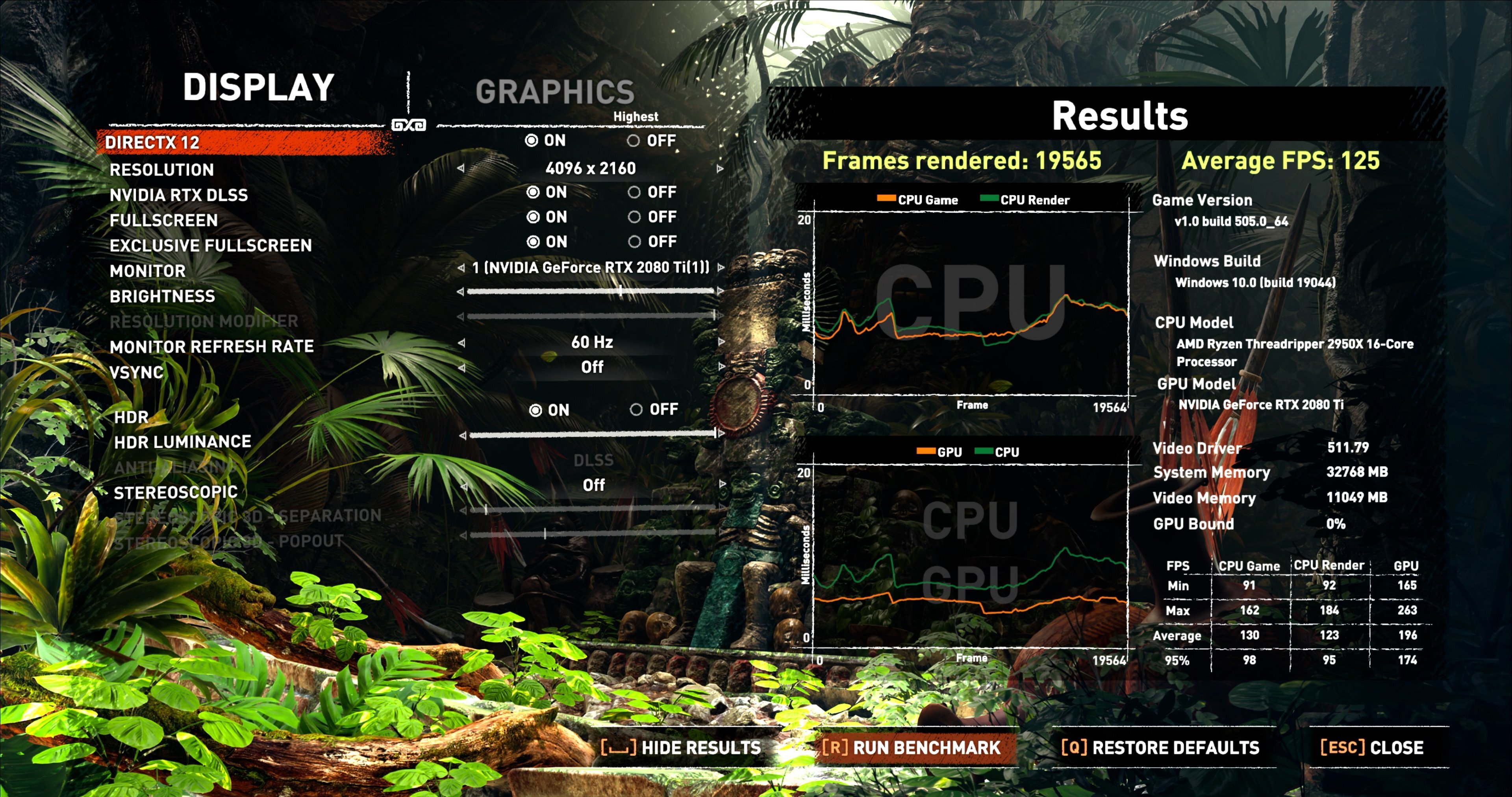
...screen is 48 inch C1 OLED - it's not narrow Here are some 1440 results for the 3950X / 6900XT and 5950X / 3090...at this resolution, the difference in CPUs plays more of a role, but the right-hand column in the lower right table suggests that the GPUs are fairly close, once taking the RTX/DLSS into account...apparently, there's an AMD FX CAS patch available for Shadow of the Tomb Raider, but for now at least only for the full game, not the demo...Then again, to help 'equalize', the 6900XT had a better -than-stock PL, and both cards pulled around the 410W mark for this 1440 test according to HWInfo...
-
wccftech AUO Demos newest 480Hz refresh rate laptop & desktop displays
J7SC_Orion replied to bonami2's topic in Hardware News
I use the 48 inch C1 OLED (4K/120 Hz) and the difference really is startling...I rather have a 120Hz OLED than a 168+ Hz regular setup. -
wccftech AUO Demos newest 480Hz refresh rate laptop & desktop displays
J7SC_Orion replied to bonami2's topic in Hardware News
...if only they could bring out a 77 inch 8k OLED w/480 Hz refresh... -
Comparing Shadow of the Tomb Raider benches of different GPUs
J7SC_Orion replied to J7SC_Orion's topic in PC Gaming
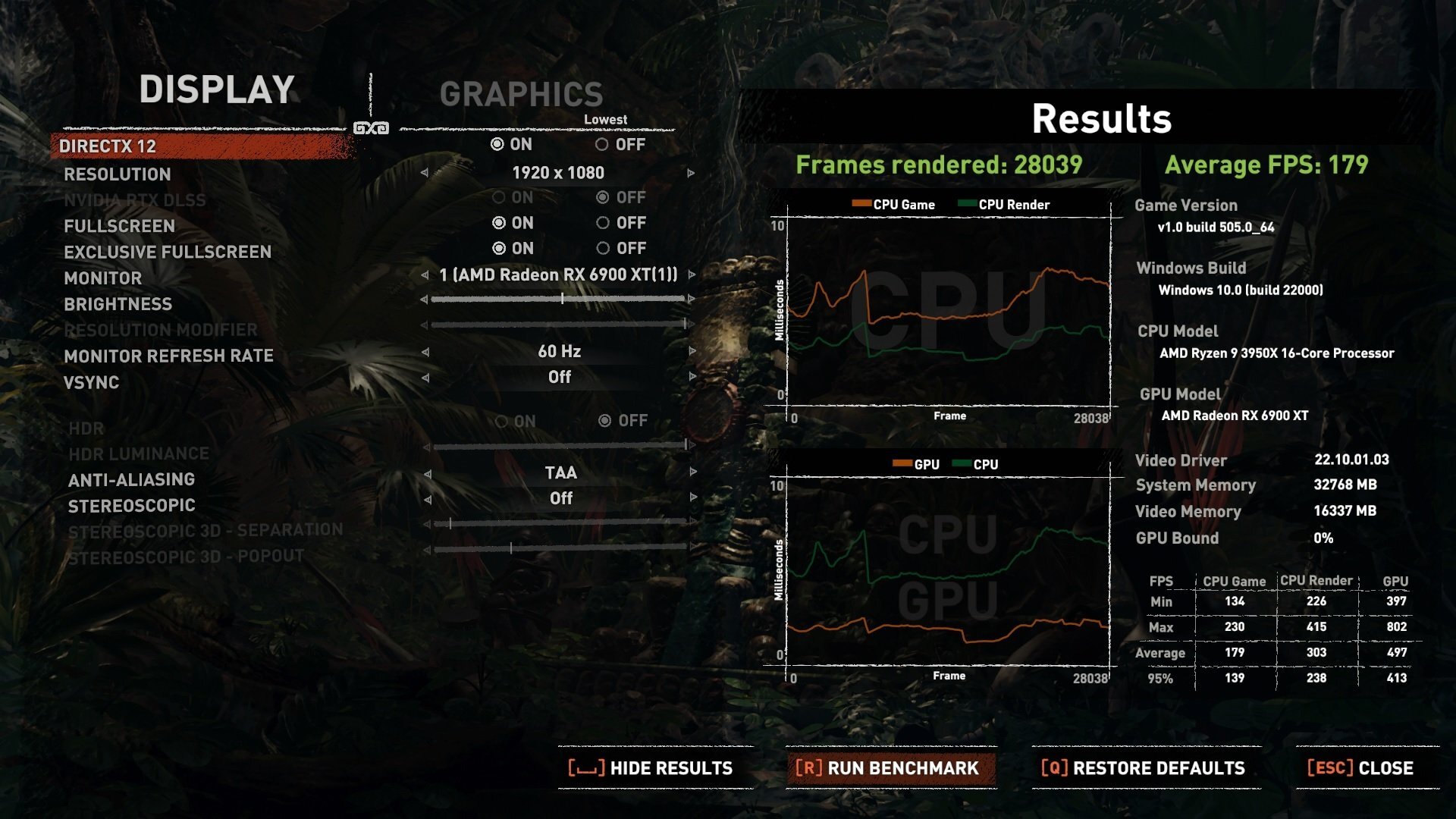
Good idea...The Shadow of the Tomb Raider bench has that little table at the bottom right which does provide some CPU and related sub-system data anyway, but for the fun of it, I ran my 3950X and 6900XT at the same 1080P / 'lowest' setting... ...ohh, my eyes - game looks very different ...I'll try to run 1440 'highest' on both this setup and the 5950X / 3090 later to add some data points to the OP.
-
Comparing Shadow of the Tomb Raider benches of different GPUs
J7SC_Orion replied to J7SC_Orion's topic in PC Gaming
...quick addendum: I tried the Shadow of the Tomb Raider bench in DX12 with free sync enabled on the 6900XT (as opposed to 'disabled' above). The difference was only one FPS. That said, on a big OLED, everything is perfectly smooth and DX12/HDR/sync is a real treat to watch; big visual difference to DX11... -
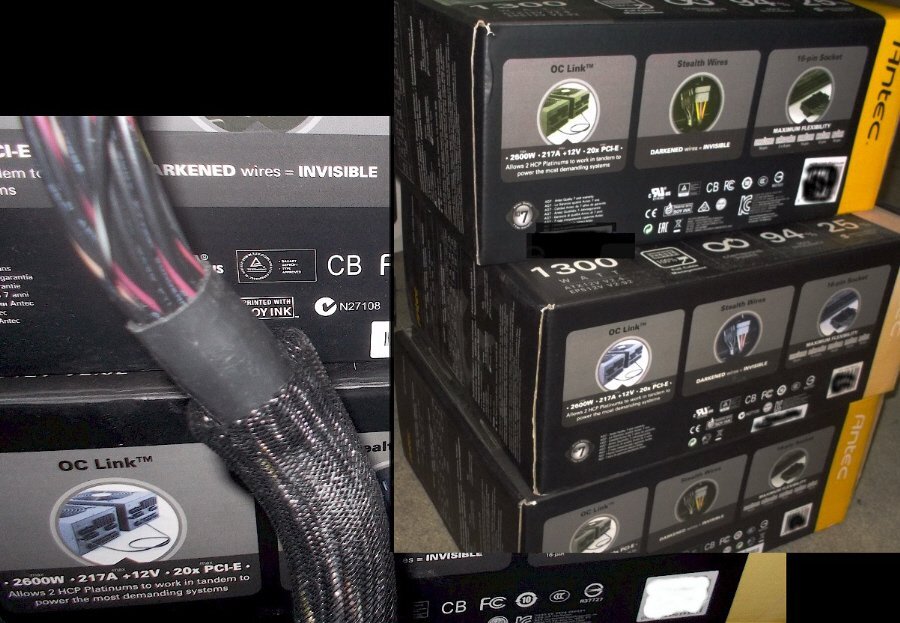
...good thing I still have a couple of these in storage (2600W / via 2 PSUs and OC Link). Also, HWBot tip for home user: washer / dryer in the laundry room have some real nice power... As to the "4090", this seems to be a much more differentiated card from the 4080 compared to the 3090/Ti and 3080/Ti in the current gen. It also leaves lots of room for RTX 4K in-between models at/near the top end...Super Ti anyone ?
-
Comparing Shadow of the Tomb Raider benches of different GPUs
J7SC_Orion replied to J7SC_Orion's topic in PC Gaming
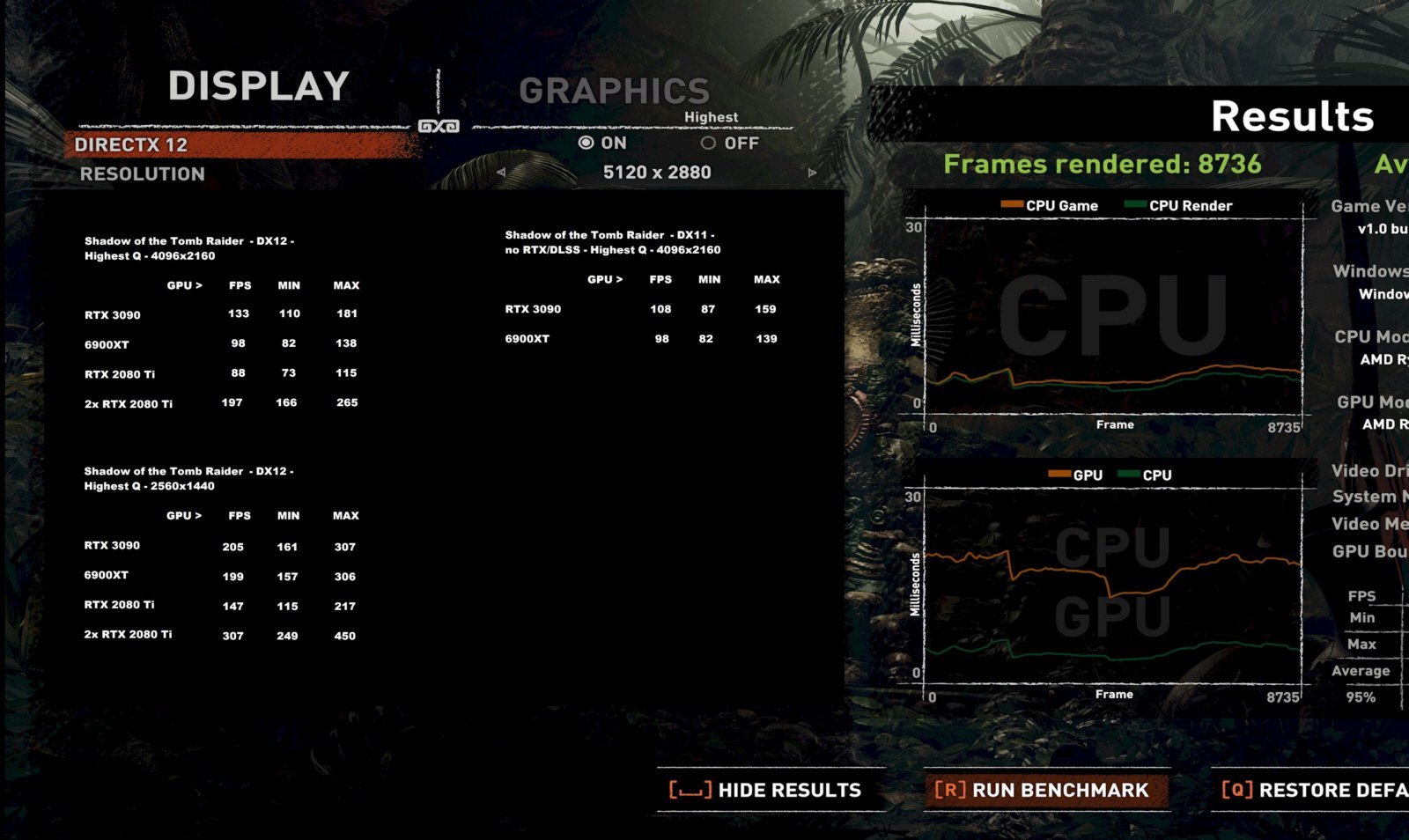
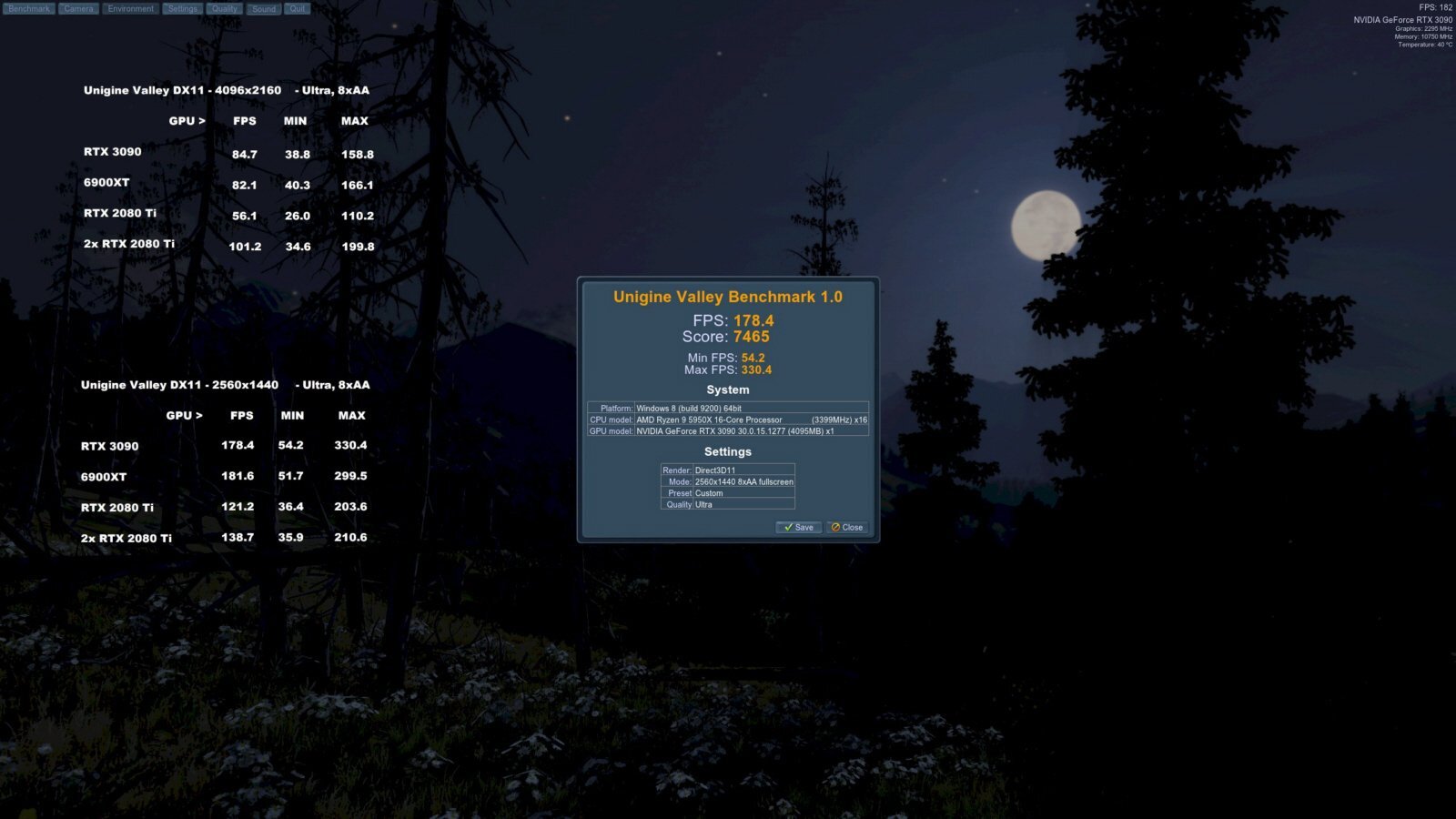
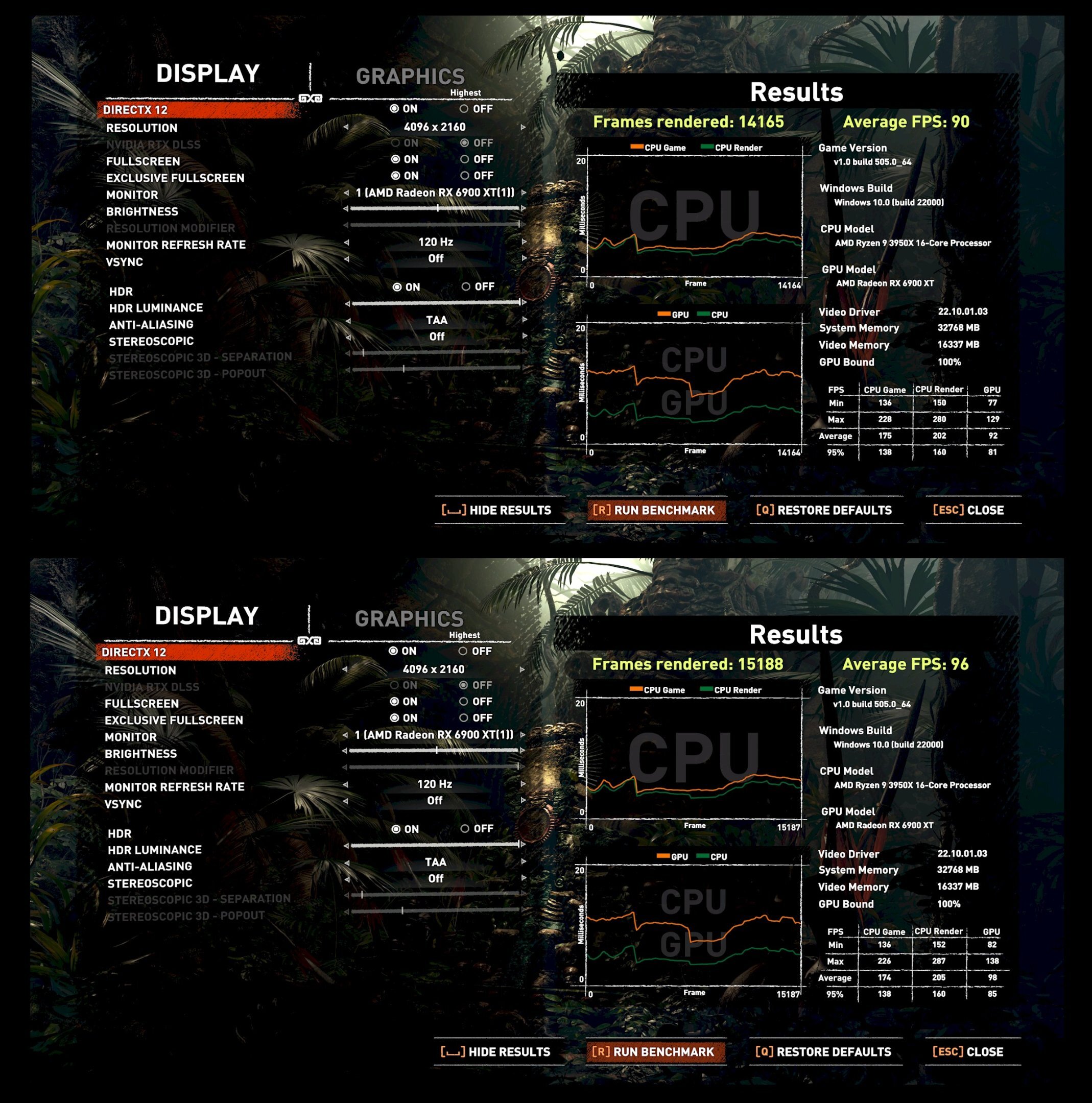
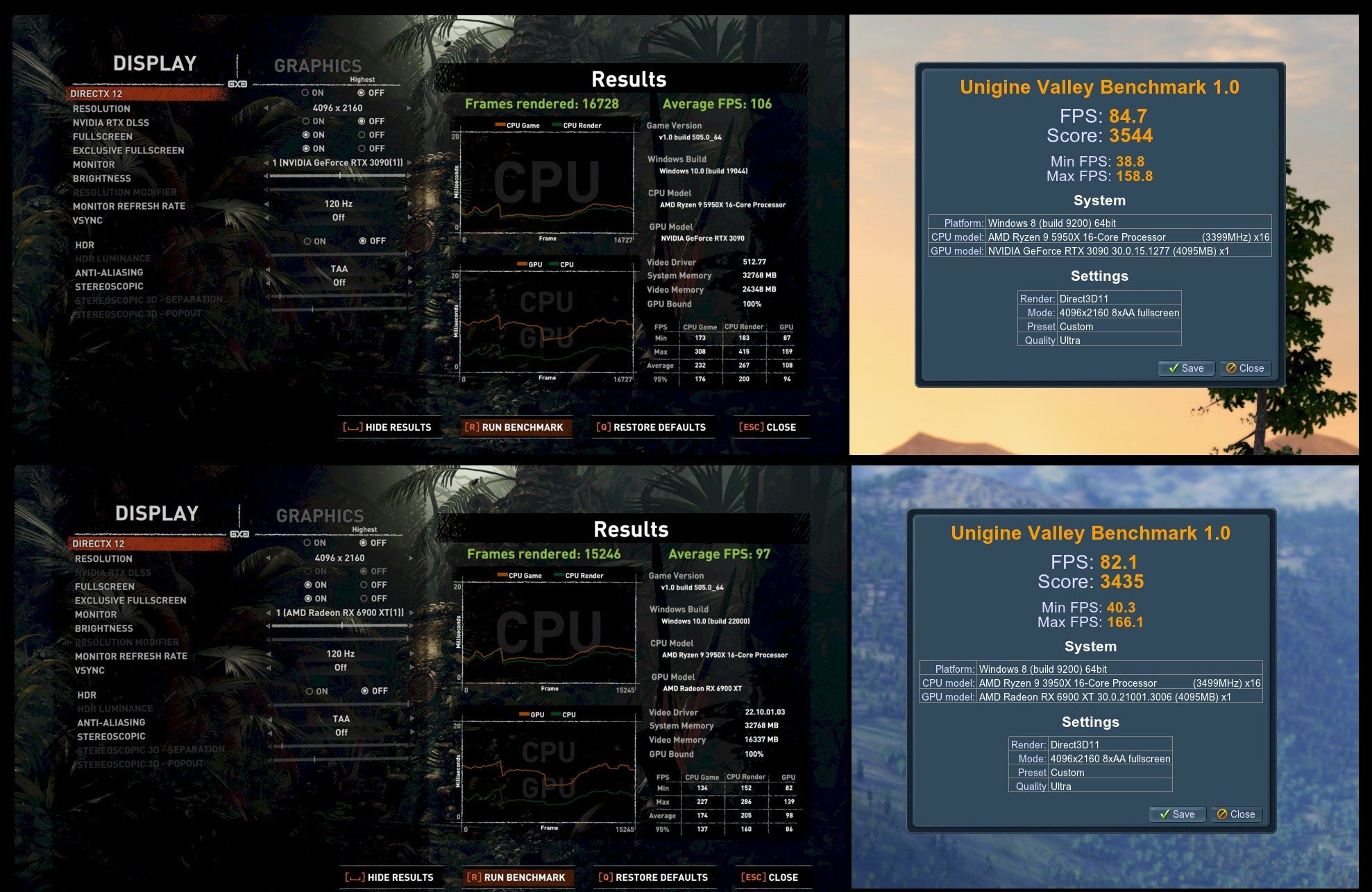
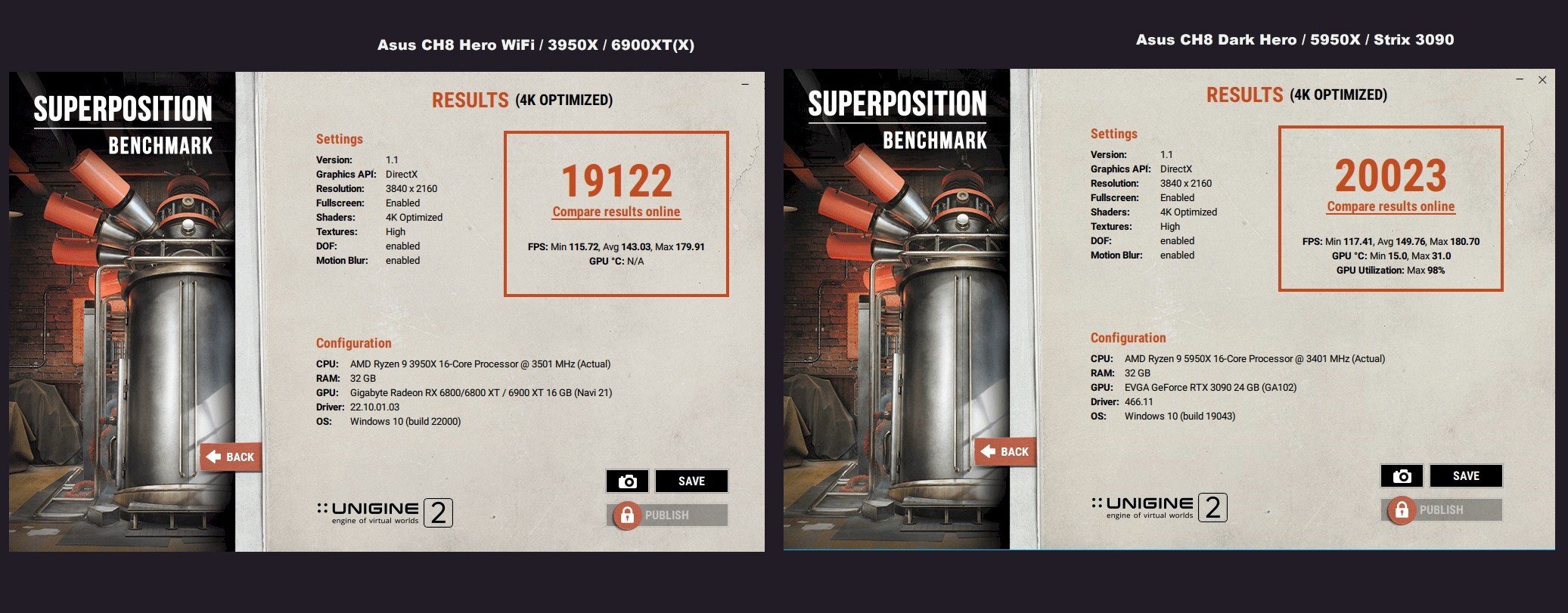
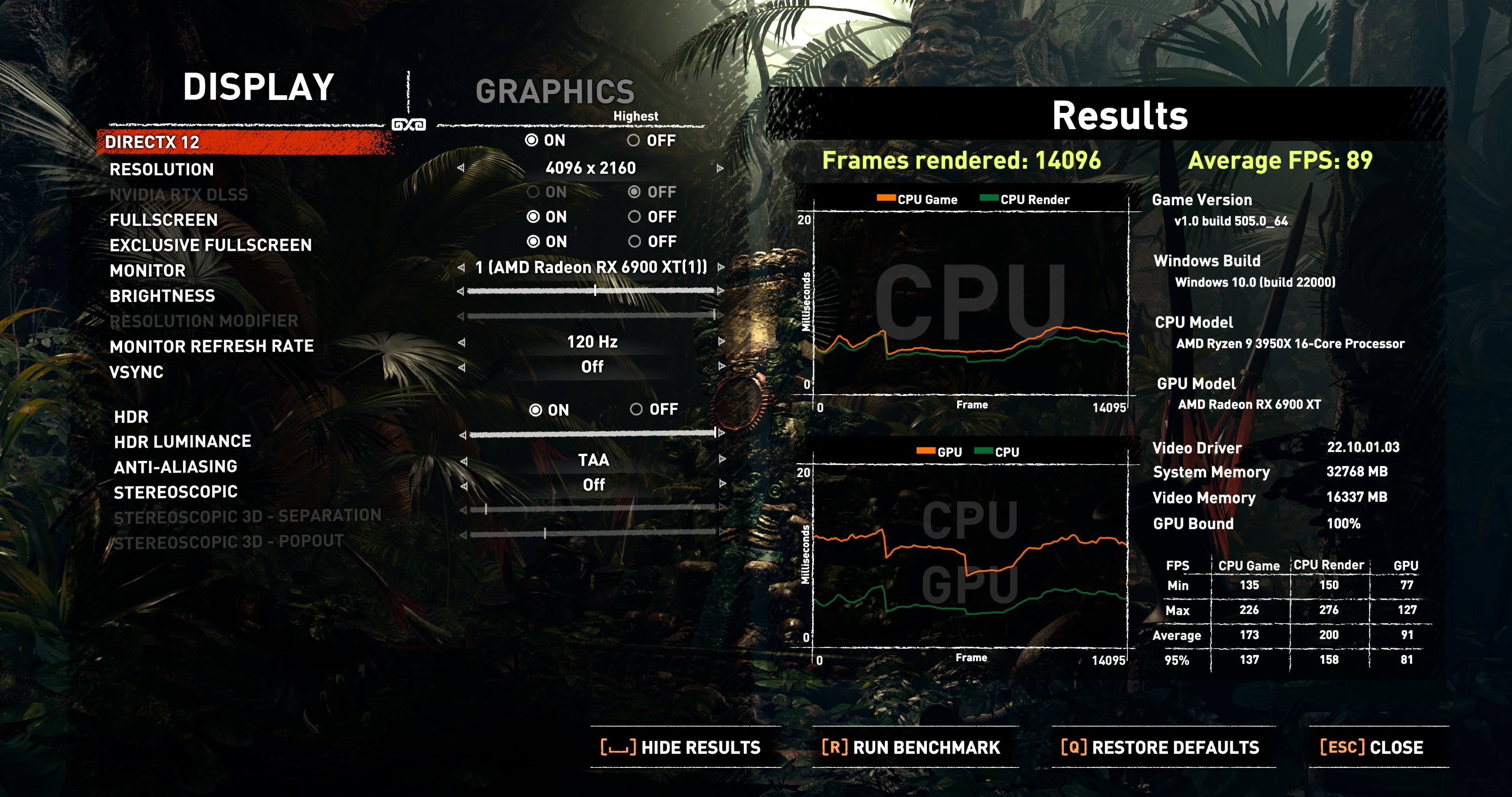
...4K and ray tracing are least favoured for the 6900XT - nevertheless, it can hold its own, settling in somewhere around a RTX 3070 - 3080. In Port Royal (which is 1440, ray tracing), my 6900XT / 3950X hits 11902, which is incidentally the fastest such combo at 3D Mark. Then again, my 3090 / 5950X combo hits 15,531 in that bench...but in Time Spy (non-extreme, DX12, 1440), the 6900XT / 3950X hits over 24.1k graphics score, while the 3090 / 5950X comes in at just over 23k max... ...but back to Shadow of the Tomb Raider - here are two DX runs of the 6900XT. Both with the same mild oc clocks as above, but one of them has the '6950XT' PL and a few other mods at 450 W limit instead of 300 W limit (actual was 413 W for the second run): I then switched both cards to DX11 / 4096x2160 and no DLSS/RTX...I also ran the ancient but fun Unigine Valley. Enhanced bios for the 6900XT but same mild oc clocks as before...3090 also at its mild oc from above, but stock bios. The gap between the two gets a lot closer w/o ray tracing and if the 6900XT is allowed to draw similar power...the 3090 still has the edge (never mind its custom bios not used here, or full-tilt clocks), but they're in the same ballpark...the RDNA2 VRAM bottleneck shows a bit for the AMD at this resolution even with the edge in rasterization at lower resolutions. ...and finally, Unigine Superpostion 4k w/ full clocks and stronger (but still non-XOC) bios
-
Comparing Shadow of the Tomb Raider benches of different GPUs
J7SC_Orion replied to J7SC_Orion's topic in PC Gaming
...it's not a perfect comparison, but the Shadow of the Tomb Raider benchmark only has ray tracing AND DLSS as a single option and I definitely wanted to test everything max, including with ray tracing, at 4096 x 2160. As stated before, I believe that the 6900XT used ray tracing but not Super Resolution 'on' in the driver. I reran the 6900XT just now with Super Resolution engaged, per below - not much of a difference. Still, quite a respectable result. The 6900XT/6950XT have a tougher time with 4K in general, due to the much narrower VRAM bus (even w/ InfinityCache), but at 1440p and below, they start to pull ahead. The other thing worth noting is the peak power consumption ! ---------- max per Shadow of the Tomb Raider bench --- max stock bios --- max custom bios Strix 3090 --- 413 W --- 450 W --- 525W/1000W 6900 XT --- 298 W --- 303 W --- 450 W / 600 W (MPT) 2080 Ti (1x) --- 361 W --- 380 W --- 380 W 2080 Ti (2x) --- 718 W --- 760W --- 760 W
-
Build Log - Sir B's Black/White/Gold O11-Dynamic
J7SC_Orion replied to Sir Beregond's topic in Desktop
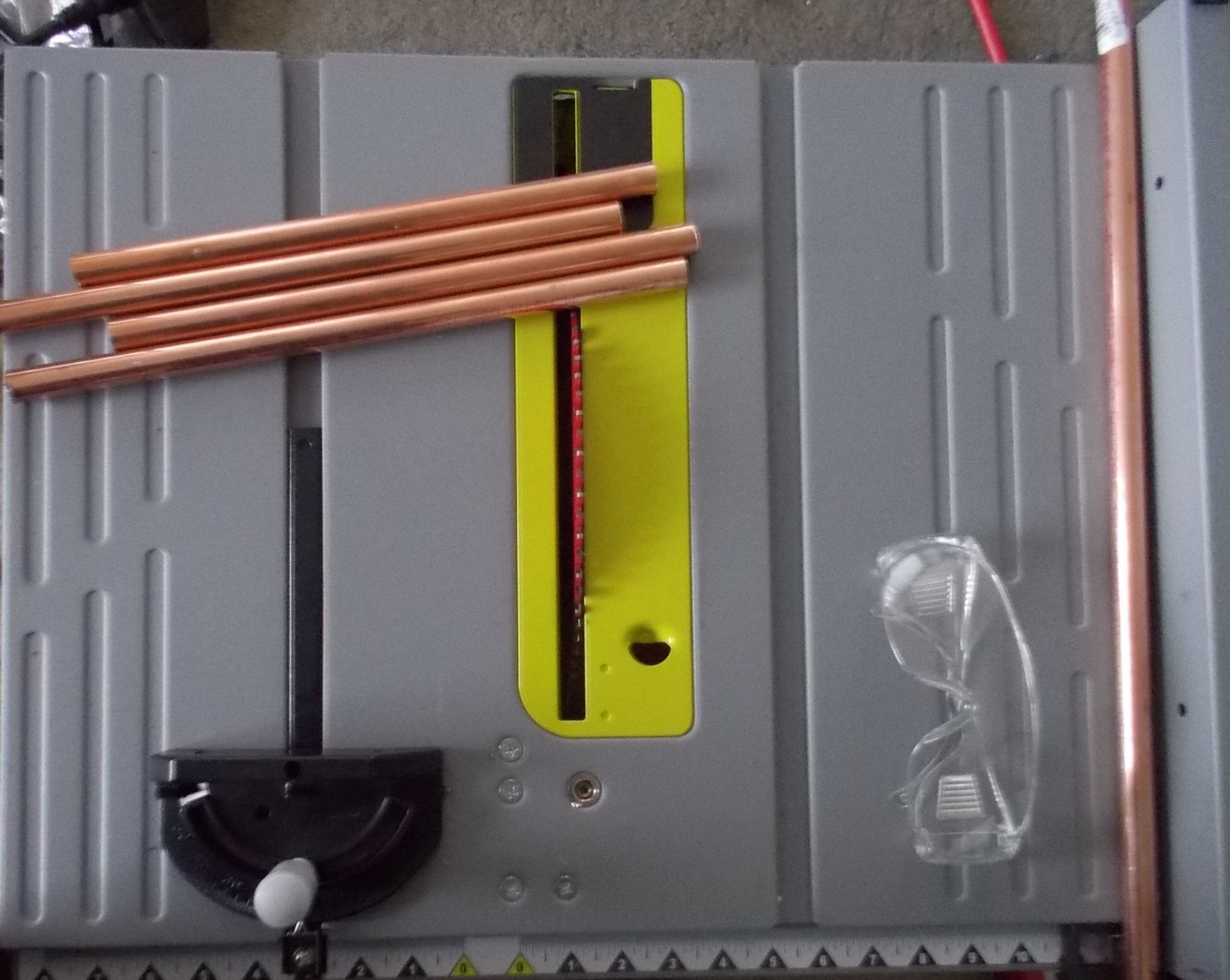
...as posted a page or so back, I've also used a table saw before w/ a metal cutting wheel (ie.. for the w-cooling copper tubing of the dual 2080 Ti build in 2018/19)...makes a heck of a racket, though --- but via the guides, the cut is perfectly straight and quick...a bit of overkill, IMO, because the Dremel w/ metal cutting wheel does a fine job on copper tubing as well.
-
Comparing Shadow of the Tomb Raider benches of different GPUs
J7SC_Orion posted a topic in PC Gaming
In case you're wondering about your GPU and whether to upgrade...some simple comparisons (incl. 1x, 2x 2080 Ti, 6900XT, 3090) in spoiler below using the Shadow of the Tomb Raider DX12 Benchmark at 4096x2160. FYI as background, I use three different machines for work, for play and our media room. That includes a TR2950X w/ 2x 2080 Ti, a 3950X w/ a 6900XT and a 5950X w/ a 3090 Strix OC. I upgraded the latter two over a year ago as I found great deals (below MSRP) for the 3090 Strix and 6900XT before the horrible 'price hump'. The latter two are connected to a 48 inch 4K 120 Hz OLED, while the 2080 Tis power a 55 inch 4k / 60 Hz IPS. All benches were done with max eye candy ('highest' settings), including HDR. v-sync was off to level the playing field, though I normally have it on. Each system had a mild 24/7 oc ('game' instead of 'bench') and used the stock bios instead of higher-powered ones, so its not a 'max bench result' comp. Also, all GPUs below are custom w-cooled. Re. the 6900XT at 4096x2160, it obviously did not benefit from the DLSS which is bundled w/ ray tracing in the STR benchmark. I do believe that the ray tracing was used as default by the 6900XT, but am not entirely sure. 3090 2x 2080 Ti 1x 2080 Ti 6900XT
-
Build Log - Sir B's Black/White/Gold O11-Dynamic
J7SC_Orion replied to Sir Beregond's topic in Desktop
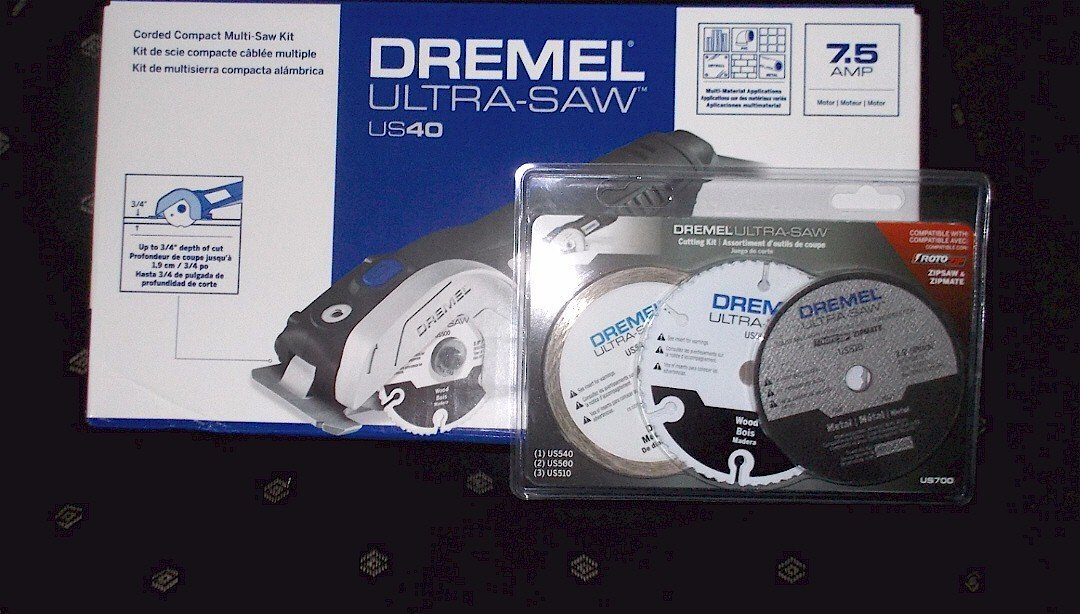
I had mounted the Dremel in a vice and rolled the tube all the way around. But when doing it the other way (mounting the tube in the vice instead) you can then use the flat side of the Dremel wheel after to make it perfectly flat / even, then sand. However, this bigger Dremel monster w/ much bigger wheel I got since then would make it all the way through, depending how you handle the guard...


.png.fab977faa7b36ad8516a66b3e5329e51.png)
.png.d6ec112931f7825f7539070cc0e7d20f.png)
.png.34fd308c2527fd550214d020faa8e8b6.png)