Welcome to ExtremeHW
Welcome to ExtremeHW, register to take part in our community, don't worry this is a simple FREE process that requires minimal information for you to signup.
Registered users can:
- Start new topics and reply to others.
- Show off your PC using our Rig Creator feature.
- Subscribe to topics and forums to get updates.
- Get your own profile page to customize.
- Send personal messages to other members.
- Take advantage of site exclusive features.
- Upgrade to Premium to unlock additional sites features.

Snakecharmed
-
Posts
288 -
Joined
-
Last visited
-
Days Won
16 -
Feedback
0%
Content Type
Forums
Store
Events
Gallery
Profiles
Videos
Marketplace
Tutorials
Everything posted by Snakecharmed
-

Replacing Desktop With Laptop, Recommendations?
Snakecharmed replied to ENTERPRISE's topic in Laptops/Tablets & Phones
I would consider a smaller form factor as well for your only laptop since it will now be an all-purpose machine that you'll also take with you wherever. 17+" laptops are heavy and unwieldy. I consider them to be small form factor desktop replacements with limited, almost emergency-use portability. They are not good couch laptops. Also, I agree, literally using a laptop in your lap is not a pleasant experience. Not only is your body picking up all the radiant heat and exhaust, your skin or clothes don't aid the laptop's cooling either. My main laptop was a Lenovo ThinkPad for many years and both of them, despite being 15.4" and 15.6" respectively, were heavy, thick, and not pleasant to carry from one room to another, never mind travel with in a bag. My current laptop is way nicer to carry around despite still being 15.6". It's 4.3 lbs (1.9 kg) instead of the 5.75 (2.6 kg) of the ThinkPad W520. For comparison, my work MacBook Pro 16 (2019) is also 4.3 lbs. The 17-18" laptops that have been mentioned in this thread are bricks. The XMG Neo 17 is the lightest at 6.17 lbs (2.8 kg) and the Alienware m18 is a portly 8.90 lbs (4.04 kg). That doesn't even take into account their power supplies either. -
Replacing Desktop With Laptop, Recommendations?
Snakecharmed replied to ENTERPRISE's topic in Laptops/Tablets & Phones
I don't know why nobody wants to address the elephant in the room: the massive bloatware that comes with the laptops sold by the likes of pre-built manufacturers, especially from some brands who are notorious for that crap. With my B650E motherboard, I was so pissed off reading about Asus Armoury Crate while I waited out the pathetically long install time that I ended up nuking my whole Windows installation and started over from scratch (I didn't get that far in, I might have only lost an hour of customization time). At first, I figured I'd just give the software a spin to see if it was useful or any good, but I never did because of how slow it was to install—enough time for me to read how many people hated it and how it deposited orphaned files and even ghost processes after uninstalling. I made sure Armoury Crate was set to disabled in the BIOS prior to the SSD reformat. Anyway, that's how Asus lost my repeat business long before their AMD EXPO VSOC nonsense. I'm not giving them the benefit of the doubt when it comes to laptops either considering their intentional handicapping of their TUF Gaming and ROG Zephyrus lines' cooling designs back in 2020. I don't consider Razer nor Alienware any better in the bloatware category. I don't accept it on a desktop build and I don't find it more acceptable on a laptop either. Anyway, here's my recommendation considering that you're in the UK. Better to configure your own (and even omit the OS and all the user-serviceable hardware altogether if you'd like) instead of letting an OEM charge you for unwanted or substandard crap you don't want in your laptop. XMG | The best gaming laptops from Germany WWW.XMG.GG At XMG, we are passionate gamers and tech nerds, and we know first-hand what features matter most in the best mobile gaming laptops. -
So,Break then replace when the fans start leaving?
Snakecharmed replied to schuck6566's topic in Chit Chat General
All VS does is destroy forum communities. There's no enhanced experience for them to offer when premium forums—the best offering in their upsell—are generally useless and unpopular if the forum owner hasn't defined a use for them, and they often end up being gossip circles if they get used at all. However, VS is so disliked by forum users in general that there isn't even a community remaining to prop up a premium gossip forum unless the gossip is to detail all the ways VS sucks. A forum doesn't work when the people who run it have no idea what the hell it's even about and aren't interested in tailoring it to the community's needs. Even subreddits have more customization, which says a lot about the potential for a VS forum because most subreddits suck. There is no reward for the admins who run a VS forum. They're not part of the community, and so it feels more like a job to them (and it literally is). But who wants to work at a job where the community you serve hates you, and you're not empowered to actually help them anyway? It's an endless circle of hatred. VS is trying to generically monetize forums and it's going over about as well as Yahoo Answers or Quora. -
I ordered mine from Overstock late last year. Right now, I see them available on Amazon with a 10% off coupon. I wish the Leap was designed to fit an OEM headrest after purchase like the Series 1 though. I wouldn't bother trying to fit this thing onto the Series 1 when it has a properly matched headrest. Is it not actually in stock on either of these sites? https://www.thebackstore.com/steelcase-series-1-headrest-only.html https://bybluebox.com/products/steelcase-series-1-headrest This site is showing a 4-month backorder which matches what I saw from an Amazon Marketplace seller showing 4-5 months. https://smartfurniture.com/products/series-1-headrest-by-steelcase/
-
I never looked into how those knockoff racing seats are made but aside from not liking the PU leather material these chair manufacturers often use to cover the chairs, I would have just as well used an actual front bucket seat out of my car since I've been wanting for years to upgrade them with Corbeau or Procar seats. Ultimately though, I don't think the features of a racing seat are beneficial to sitting at a desk and there are plenty of articles and YouTube videos that point out issues with gaming chairs. Secretlab seems to be the only gaming chair company that has addressed some of those issues, but other issues are simply a byproduct of the bucket seat design.
-
I'm 5' 9" with a somewhat skinny but otherwise normal build. I have a 6' 2" friend who tried out the chair and really liked it too, although my headrest is positioned way too low for him since it basically digs into his shoulder blades with how I use it as a neckrest. I guess one's preferred sitting posture matters too, because I could see how some people might find the Leap to put too much pressure in the wrong spot on their back or something. I figured out what kind of posture the Leap was trying to encourage and realized it felt pretty good when my body was being supported in that way, so I adapted to it. Whenever I had an Aeron chair at work, it felt like I was just sitting on top of it rather than conforming to it. With my previous old office store chair, I was more comfortable balling up in it rather than stretching out like I do in the Leap. I guess the only thing I might like the Leap to have is a recline lock, but not having one is fine too since it keeps my lower back muscles engaged when reclining. As for the Knoll chair, the more I look into it, the more ridiculous it seems. I just find the marketing for the Generation to be hilarious. If you're doing this regularly, you don't need a chair. You need a chiropractor and/or an exorcist. It's like, really, we're completely ignoring the fact that these chairs swivel while treating climbing on the back of the chair like a child on a couch to be a normal adult human posture that can be comfortably held for more than 5 seconds at a time.
-
So this is what the jerry-rigged Engineered Now H3 headrest looks like on my Leap V2. It's really no different than any other example where someone did this, but the mineral gray is a little lighter than the chair, and it looks slightly less jerry-rigged (not by much though) with stainless rather than plastic zip ties. It's very secure though and also doesn't void the 12-year Crandall warranty. The headrest also has tension screw adjustments to lock the tilt position in place. The biggest adjustment I had to get used to was using the headrest as a neckrest because it's farther forward than where you would want a typical headrest to be positioned. However, it works better this way because the mesh contours well to my neck and also further stretches out my neck and upper back muscles. Despite having worked in an office for about 15 years, most of those companies didn't have very good chairs. The only other "good" chair I can compare the Leap V2 to is the Aeron, and it's not even close. One of the Leap's strengths is the versatility of its armrests and it reminds me of why I could never get an Aeron perfectly set up to my liking. The Leap's armrests are independent from the seat back and the heights are notched. Being independent from the seat back makes reclining less awkward and easier to adjust quickly. I also don't like infinitely adjustable armrest heights because it's tedious to get them perfectly level with each other. These are major drawbacks with the Aeron's armrests and I realized they were part of the reason I couldn't get the Aeron dialed in. I also never really liked the mesh seat or the hard plastic edge of the seat frame. This also applies to the Knoll Generation, which Sir Beregond mentioned in another thread was the worst chair he sat in. Some reviews have mentioned that the Generation's armrest anchor points feel loose, which reminds me of some worn out Aeron armrest adjustment tracks and tension wheels I've had the displeasure of using. It also doesn't make sense to me to tie an armrest to a seat back. Its armrest position when reclining looks uncomfortable and kind of absurd.
-
I found the Aeron generally unremarkable. All the ones I've ever sat in were fine unless they were damaged or broken, but I never could get them dialed in perfectly. I just looked up the Knoll Generation. Looks like a love it or hate it proposition. The shape of the back is pretty insane. I also have concerns about the completely foldable upper back. It looks like if it doesn't conform to your body (or more accurately, the other way around) perfectly, it's not going to be a comfortable fit at all. Some people have said the armrests are the worst part of the chair, which is a nonstarter for me when the armrests on the Leap are so good. No adjustable lumbar support on the Generation either, but it'll adjust your kidneys for you!
-
I've had mine for 8 months now and it's the most underrated quality of life purchase I've made in the last few years. I was not very familiar with office chairs despite working in an office for years, largely because most of them had second-hand Aerons in varying conditions at best, or some random POS chairs at worst. I had never sat in a Steelcase chair until I got my Leap V2. The lumbar support on it is exceptional and the extra thick seat pad makes bottoming out practically impossible. I did end up jerry-rigging an Engineered Now H3 headrest for the Aeron to my Leap. Even though it's jerry-rigged, it's pretty solid and I didn't cause any damage the chair to void the warranty. I also learned to use the headrest as a neckrest for optimal posture. It also stretches out my neck and upper back that way. I bought a new chair mat to upgrade from a polycarbonate mat that's been picking up more and more cracks lately. I like polycarbonate mats much more than PVC mats, but once you pick up one crack in them, they start going south quickly. The first polycarbonate mat I had for 7 years, and the most recent one made it to 4.5 years. I seriously considered a tempered glass mat, but for the size I want, they're heavy, cumbersome, expensive, and a bit fear-inducing because you still need to take some precautions with them even though shattering is generally very unlikely to happen. I ended up going with this Anji Mountain bamboo chair mat. Wayfair currently has the best price on these, which is something I don't say very often.

-
I saw a listing of the JayzTwoCents video on YouTube this morning before it got pulled and even opened it to see that it was someone else on his team—his camera guy, from what I understand—doing the actual review. I didn't actually watch it though. At the time, the comments weren't blistering...yet, but there were already some criticisms about how it was so incongruent from other 4060 Ti reviews. I told my friend that the 3060 Ti I sold him for $300 at the beginning of the year actually gained value after this release. Probably not literally true, but figuratively? Sure. The 4060 Ti provides no meaningful gain in games you would plan to play with a mid-range card like that, and regardless of new vs. used, it's 33% more than what he paid for the 3060 Ti. The second-hand market pricing adapts to the perceived value of the latest generation, and the 3060 Ti isn't looking any worse or more outdated after this release. How is the 4060 Ti actually slower than a 1080 Ti from 2017 at 4K? Even the 3060 Ti outperformed the 1080 Ti in practically every scenario. I don't like how a 128-bit memory bus reads on a spec sheet and I've always had a bias against GPUs with them. In terms of direct successors of a card I once owned, this is along the lines of the memory bus being slashed from the GTX 760 to 960, but worse. The results here are truly embarrassing considering what's at stake nowadays.
-
So that damn noise is coming from the motherboard. I realize now that it only started happening after I upgraded the BIOS to 1414 and made the manual adjustments to the CPU SOC voltage and memory voltage. My previous -25 PBO Curve Optimizer and 105W Eco Mode settings from before the BIOS upgrade didn't result in this noise. Here's what I've found to not work so far: Disconnecting the hard drive Swapping PSUs Running Auto SOC and RAM voltages with EXPO enabled Downgrading to 1222 BIOS (won't boot—this would have revealed a lot if it worked) Upgrading to 1602 BIOS Disabling EXPO (and consequently lowering voltages on the SOC and RAM to 1.0-1.1 V) Reducing PBO Curve Optimizer offset back to -20 At idle after leaving the rig alone for an extended period of time, the noise is gone. It reintroduces itself while it's in use without a clear pattern. It can happen now when I'm just typing in this form and have very little else running, or it can be during a heavy workload, or neither, or both. It sounds like a hard drive seek that lasts for a second. Sometimes it stops there, but if it's in a repetitive state, it will be quiet for at least 3 seconds before making that seeking noise again. There are times when the noise only happens once, and there are times when it happens dozens of times consecutively with that 3+ second break between each instance. The sound never occurs while in the BIOS, and I think that matters because that's when the voltages stay consistent and aren't fluctuating from actual use. I've never experienced coil whine in the traditional or closer-to-literal sense, but this has the makings of what I've found to be another form of a coil whine sound that people have described as a hard drive seeking. I've read that it's been observed with PSUs and in one instance, the ASRock X670E PG Lightning. Since it's been over a decade since I last built a rig for myself and had to deal with the consequences of electronic interference in modern rigs, I'm sure are few of you are thinking this: Apart from further messing around with the voltages, I do want to test the GPU as a potential culprit as well, because that's really the only remaining thing I can test, but that thing was heavily used before I bought it and I also briefly had it in my previous rig with no issues. I am very confident that it's not a problem with any of the fans in the case because it's just not a sound that a fan would make, and a fan wouldn't know it's in the BIOS or not because its speed can be adjusted whenever. If I've exhausted testing for all possible culprits and/or variables and the noise is still there, I'll plan to RMA this motherboard if the loudness and frequency of occurrence remain excessive. As an aside, the new 1602 BIOS with AGESA 1.0.0.7 and 48/24 GB DIMM support does seem to bring quicker cold boots and reboots. Also, after a few hours of trial and error, I will say that the noise is less frequent and less loud with 1602, although still not to the point where I'm satisfied. I did change one thing compared to before which was drastically lowering the SOC voltage by accident while using a negative offset rather than a fixed value. Now it's at 1.20 V instead of the 1.28 V it read at previously with my manual adjustments to properly get it under 1.30 V. The Asus BIOS cap was really putting it at 1.32 instead of 1.30. I don't know if any of that plays a factor in reducing the loudness or how much I hear it. After all this, at least I failed to pull the trigger on a new hard drive and didn't pull the trigger on a new PSU because both of those would have been a waste of money. That's the story of anything I troubleshoot: it's never the easy nor the obvious, and at least the first 2-3 things I check are guaranteed to not be the smoking gun.
-
Asus capped the SOC voltage to 1.30 V in their latest BIOSes for all Ryzen 7000 CPUs, not just the X3Ds, but it was still a bit over in HWiNFO on my motherboard, reading as high as 1.328. I manually lowered it to 1.25 and now it settles in at 1.272. It's still way over what other OEMs are doing with their AMD EXPO-enabled vSOC settings though. Before I updated the BIOS, I had the vSOC on Auto. The BIOS identified it as 1.32 V and it read as high as 1.38 in HWiNFO. That's pretty ridiculous and reckless on Asus's part considering other manufacturers were running around 1.20 V with EXPO enabled.
-
Well, here's something annoying. Lately, my CWT-built 2018 Corsair RM850x has been making stupid sounds similar to a hard drive seeking, and it's distinct enough to be different and also more annoying than my actual hard drive. It doesn't happen all the time, but when it does happen, at its worst, it can be pretty rhythmic and consistent like a hard drive defrag operation. I can't pinpoint the conditions when it occurs though other than I think it starts at a mid-level power load, but of course it's a known problem after finding out there were some other users with similar complaints over the years who ended up RMAing their units. Of course, I also only find out about this via Google long after buying the product and thinking all the professional reviews covered all the bases on what a great PSU it was. I'll be bringing my Seasonic-built Corsair AX850 Gold from my previous rig into this one over the weekend. I paid $81 on eBay for this unused RM850x which really isn't much more than the $60 or so I would have paid for a used Seasonic Focus 750 as a backup. I guess that makes this fine for a backup power supply that I won't really care about, although I was seriously considering getting a Seasonic Prime 850 Titanium last night because the RM850x's rhythmic "drive seek" noise was pissing me off. Seasonic is probably the closest thing I have to brand loyalty in the DIY PC space. In the meantime, I guess I'll just have to keep the music on more frequently. I also spent $75 on two cans of new old stock spray paint last week as extra supply because the paint I used for my case has been discontinued for probably a few years now. After dusting off the work that I last did in 2015, the "bad" spray job I did on the top of the wraparound panel wasn't as bad as I remembered. The main repair I need to do is respray the top of the case with clearcoat to fill in the pit marks that originally resulted from spraying a can that sputtered from being dangerously low on paint, then sand it all down evenly and polish. The pitting was deep enough that I couldn't reliably buff the top even flatter because it was already glass smooth otherwise. Not much in the way of other updates at the moment, but I did increase my PBO Curve Optimizer negative offset from -20 to -25. There may still be more headroom, but I haven't tested it out yet. I hit 28146 in Cinebench R23 multi-core, which is exceptional for a 7900X at a cTDP of 105W considering most reviews put an uncapped 7900X at 28500-29500 and there are users out there who have manually tweaked their 7900X far more extensively than I have at the 105W power limit and are topping out in the upper-27000s. In fact, my previous best from three weeks ago was 27744.
-
I would be wary of what you see in the product description of these Chinese-marketed products though. They're confusing at best and blatantly misleading at worst. In the bulletpoints at the top of the Amazon product description, it says: The product's ambiguous nonstandard notation (104 Mbp/s) notwithstanding, the transfer speed cannot be 5 Gbps (625 MB/s) to an SD card. They have their own bus. The adapter may provide 5 Gbps of available bandwidth via USB 3.0/3.1 Gen 1/whatever, but the SD card bus and the card will limit the maximum throughput of the card. The fastest commercially available SD card bus is UHS-II which has a half-duplex throughput of 312 MB/s, and is only available for SD cards that are most commonly used in and marketed for professional digital cameras with 4K video recording. Even the fastest general purpose SD card is on UHS-I, so unless you use UHS-II cards, I wouldn't go out of my way to seek a UHS-II card reader if it's not the most vital feature of this USB hub. UHS-II cards physically have a second row of contacts, and if a card reader doesn't have them, then they fall back to UHS-I which maxes out at 104 MB/s half-duplex (or whichever lower-spec bus the card reader supports). There is an approved UHS-III standard defined by the SD 6.0 spec that maxes out at 624 MB/s full duplex and actually would saturate a USB 3.0 5 Gbps interface. No UHS-III cards or readers currently exist on the market though. There is also an SD Express bus that uses a single PCI Express lane, but those aren't currently implemented as multi-input hub solutions and again, there are no cards.
-
Technically, none. Has the card reader throughput been your sticking point? That is almost never specified by the manufacturer or reseller of the hubs. Otherwise, you've described practically any $30 MacBook Pro hub out there. I assume you're talking about SD cards, otherwise I'd imagine you would have specified which one. SD card reader interfaces aren't rated by USB bus speeds. They have their own bus interfaces and all the commercially available ones are slower than USB 3.0. The fastest is UHS-II which theoretically tops out at 312 MB/s. UHS-III cards aren't on the market yet. The better question is, what's your fastest SD card? Because if it's not UHS-II, you're needlessly looking for a needle in a haystack. Either way, this is the best you'll be able to do. https://www.amazon.com/Dual-Slot-Reader-10Gbps-Adapter-TF4-0-Compatible-Windows/dp/B0BLCF8YDP/
-
Rush B Сука блядь!
-
Okay, this size comparison is what I was looking for. Visual TV Size Comparison : 45 inch 21x9 display vs 48 inch 16x9 display WWW.DISPLAYWARS.COM Visual size comparison of a 45 inch 21x9 display vs 48 inch 16x9 display If you ignore the bendable feature, the 45" Corsair is otherwise pretty pointless. Over time, people are less inclined to make frequent adjustments to their space if they can be avoided. I used to pull my TV wall mount to my desk in the morning and retract it back to the wall at the end of the workday. Now I don't even bother unless the TV is actually in the way of me getting between my desk and the wall. Seriously, for the price of that Corsair, I'd pick up two 42" LG C2s and call it a day.
-
I was using the original 2015 34" Acer Predator X34 (they've reused the X34 model number more than once) prior to this LG UltraGear 38GN950-B. The X34 had a 3800R curve, which was barely even noticeable. This 38GN950-B has a curve of 2300R, which is pretty much at my limit for a curved screen that doesn't bother me. The majority of curved monitors today sport a 1900R or tighter curve. They're completely useless to me outside of gaming, and I don't consider them true game-changers for gaming either. My biggest gripe with curved ultrawide LCD monitors though is their bottom-of-the-barrel quality control. If you don't send your first one back, you scored a minor miracle. The bendable 45" OLEDs could have been worth considering if they didn't have such an abysmally low resolution. It's so low that it doesn't belong on a desk, at which point, you've lost the benefit of a curved screen. If it doesn't belong on a desk, then other solutions are far superior.
-
I demand that 45" ultrawides have a higher resolution than 3440x1440.
-
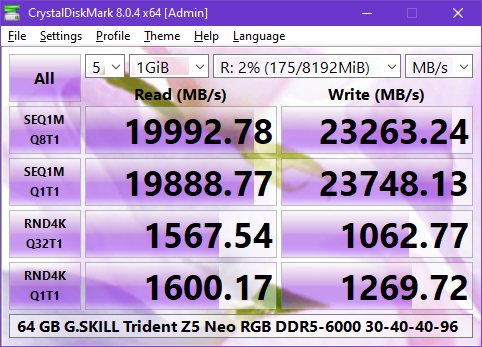
Show Me Your Zen3 Ramdrive CrystalDiskMark
Snakecharmed replied to BWG's topic in Benchmarking General
I doubt anyone will mind a necropost, but this is a niche benchmark test and now I have something to add even if it's not Zen 3. RAM disk benchmarks are fun because of how stupid off-the-charts they are. I've been doing them since I was on Sandy Bridge. I also have a practical use for them as scratch disks in Adobe CC apps as well as session-based temp storage, like for downloading and running program installers. The RAM disk app you use makes a big difference. When I first started using RAM disks, I used Dataram RAMDisk, which resulted in much slower sequential read speeds compared to SoftPerfect RAM Disk, to the tune of 6725 MB/s sequential read vs. 10874 on the same 16 GB Corsair Vengeance LP DDR3-1600 RAM. It's kind of wild to think that PCIe Gen 4 NVMe SSDs can outpace Dataram's read speed on those Corsair sticks now. Years ago, SoftPerfect RAM Disk was the fastest RAM disk app out there, and I haven't checked recently to see if anything has surpassed it, so here it is again on Zen 4.
-
I have a 7900X but the best practices are largely unchanged from the 5000 series from what I've learned. Curve Optimizer with negative offsets is the easiest way to get a baseline, and then you can fine-tune individual cores if you want to get the most out of every core. When I installed the 7900X, I set it to 105W Eco mode immediately. I got whatever I got in the CPU-Z benchmark and didn't think anything of it, even to the point of not remembering to compare it in that CPU-Z benchmark thread that we had here last year. Last week, I read a little about undervolting to drop the temperatures, then saw what people were doing with the 7000 series. I started with -15 in Curve Optimizer which checked out fine and then went to -20, which resulted in the best single and multithreaded CPU-Z score yet. The 7900X with the generational uplift despite four fewer cores is almost matching the 5950X multi scores in CPU-Z. I haven't gone beyond -20 or tried to find the limits of each core yet, largely because I haven't had to, but I figure I'll get around to it as the weather and the ambient room temp gets warmer. I haven't even looked at CPU offset voltage or boost clock override and it doesn't look like there's any real reason to do so unless you've gotten everything there is to get out of Curve Optimizer.
-
The latest LG C-series model is the C3 which debuted last month. The digit represents the model year. That means new old stock of C2s should be on clearance now. The best time to pick up a C2 is probably within the next couple of months while the more reputable retailers and even LG direct still have the C2 available. Once they fully shift to selling the C3, the remaining smaller retailers who still have stock of the C2 will jack up the prices on their meager inventory.
-
I looked up the old model number for this computer and found this ad in a Google Books scan of the Jan 22, 1996 edition of InfoWorld. I got this PC in May of that year. I'm not really sure why they opted to depict the P5-150 instead of the 166 XL other than perhaps avoiding a copy layout issue trying to wrap text around the much taller XL model tower case. Anyway, beyond the specs, I'm a little surprised that 4+ months after the Windows 95 launch, they were still offering 3.11 by default instead of 95. That obviously changed by May when I got it. One thing I will say about those old days is that once again, timing was everything. Dell and HP had yet to gain the level of market dominance where they introduced proprietary case-specific hardware in their prebuilt systems. In 1995, this system would have been Baby AT and I would have tossed it following my 1999 or 2001 custom builds because I was way too young to care about case modding back then. If it was a couple years later, Gateway went away from these tanky case designs and I certainly wouldn't have kept one of their later and flimsier cases for 20+ years.
-
I finally put on a case badge. My original plan was to have this done on a vinyl decal, but I realized partway through putting together the inquiry to the vinyl shop that it wasn't going to work. The actual Cobra emblem has too many fine details for a double layered, 1.2" square vinyl cutout with a metallic silver or chrome bottom layer. Even a black inverse print on metallic silver or chrome vinyl using a vector image of the emblem would have resulted in a loss of detail because vector renderings aren't as finely detailed as the actual metal emblem. All the vector images I've found also don't seem to get the belly of the cobra exactly right either. I ended up printing this myself with my color laser printer on adhesive-backed heavy glossy paper stock that was meant for CD/DVD labels and then cut it to size with a straight edge and utility knife. It turned out pretty good, but lacks the wow factor that I originally wanted. It's not reflective like it would be if it were inverse printed on vinyl. Well, at least it's not blank anymore, and it's something other than the P5-166 XL that was there before the paint job.
-
guru3d AMD 7800X3D reviews/benchmarks out now
Snakecharmed replied to UltraMega's topic in Hardware News
I'm not a fan of the core parking concept for the dual-CCD X3D chips. The way it's been described, it seems that it may prevent actually using the CPU as a 12 or 16-core if you wanted to run background production processes while gaming. After all, why would you want those other cores to do nothing if you actually have something for them to do? As for the 7800X3D or the 7900X, if you never do any production work on your PC, then you could go for the X3D. Otherwise, I find that more and higher-clocked cores are far more valuable and noticeable for a mixed workload. I'll notice faster file decompression on a large archive or a video encoding completed a few minutes sooner. I probably won't notice a 30 FPS difference in a game when the lower result is still well past 144 or even 100. Also, all these CPU gaming benchmarks purposely create CPU-bound scenarios that aren't reflective of an enjoyable, or in my case, a remotely feasible gaming experience. I have never gamed at 1080p on desktop because I went from CRT to 1200p and now only have 3840x1600 or 4K to work with depending on whether the game is optimized for keyboard/mouse or controller. As for the 7900X3D, it does appear to occupy no man's land. I can't make a case for it versus the 7800X3D nor the 7900(X) when taking price into consideration.