Welcome to ExtremeHW
Welcome to ExtremeHW, register to take part in our community, don't worry this is a simple FREE process that requires minimal information for you to signup.
Registered users can:
- Start new topics and reply to others.
- Show off your PC using our Rig Creator feature.
- Subscribe to topics and forums to get updates.
- Get your own profile page to customize.
- Send personal messages to other members.
- Take advantage of site exclusive features.
- Upgrade to Premium to unlock additional sites features.

b.png.80b04aaf8286f036d8734ef1982d0113.png)
Mr. Fox
-
Posts
495 -
Joined
-
Last visited
-
Days Won
33 -
Feedback
0%
Content Type
Forums
Store
Events
Gallery
Profiles
Videos
Marketplace
Tutorials
Everything posted by Mr. Fox
-
b.thumb.png.0bbda2ec32c1a1aa86fc47d4201e73d3.png)
Firestrike & Timespy Benchmarking Megathread
Mr. Fox replied to NavJack27's topic in Benchmarking General
Yes, you can disable HT in the BIOS on the P-cores, but that leaves a lot of horsepower on the table and lowers your average overall CPU core clock speed due to having half as many threads whose clock speeds factor into the CPU average clock. With all cores enabled and HT enabled on the P-cores the 13900K is 32 threads (24 threads with HT disabled). The E-cores are actually Atom cores and they do not support it. They are also inferior and won't overclock as high as the P-cores. They even have their own SP-rating on a ROG mobo. I wish they were all P-cores. That would be better. -
Firestrike & Timespy Benchmarking Megathread
Mr. Fox replied to NavJack27's topic in Benchmarking General
Yup, too many cores/threads seems to confuse Firestrike and 3DMark 11. It also helps to enable the legacy CPU option in the BIOS and use the Scroll Lock key to totally disable the e-cores in Firestrike Test 1. For some reason, Test 1 runs way faster with only 8 cores. Hit Scroll Lock again between Test 1 and 2 to re-engage the e-cores. I believe Test 1 favors CPU core clock speed over core count more than Test 2. -
Firestrike & Timespy Benchmarking Megathread
Mr. Fox replied to NavJack27's topic in Benchmarking General
I have a water block that should be arriving on Thursday. Will be fun to see how much further I can push it with chilled water. MSI Suprim Liquid X cooling isn't that much better than air cooling. Mr. Fox`s 3DMark - Fire Strike score: 68881 marks with a GeForce RTX 4090 HWBOT.ORG The GeForce RTX 4090 @ 3126/1513MHzscores getScoreFormatted in the 3DMark - Fire Strike benchmark. Mr. Foxranks #9 worldwide and #8 in the hardware class. Find out more at HWBOT. NVIDIA GeForce RTX 4090 video card benchmark result - Intel Core i9-13900K Processor,EVGA Corp. Z690 DARK KINGPIN WWW.3DMARK.COM Intel Core i9-13900K Processor, NVIDIA GeForce RTX 4090 x 1, 32768 MB, 64-bit Windows 11} -
Maybe I should start my own rather than adding to everyone elses
Mr. Fox replied to Nikado7's topic in New Members
Discovering that you are not a girl probably put some of them into the state of flux. -
Maybe I should start my own rather than adding to everyone elses
Mr. Fox replied to Nikado7's topic in New Members
Welcome, bro. Nice to see you over here, bud. -
Firestrike & Timespy Benchmarking Megathread
Mr. Fox replied to NavJack27's topic in Benchmarking General
I think something with O&O Shutup disables System Restore. I always have to manually re-enable it after running the CTT script. The antimalware executable I believe is separate from Defender. It is either SmartScreen (which I disable) or the Malicious Software Removal tool. If you run the Defender removal script and reboot you should see a good drop in services and system resources. I went for almost a decade with no antivirus and still do not rely on it. I view it as mostly unnecessary. I had used ESET for years and think it is good, but I like the free version of Panda the best. Most of the time I have it disabled. You should be able to use Autoruns to disable AquaSuite or anything else that runs at startup. It may also show up in MSCONFIG if it runs as a Service. -
Firestrike & Timespy Benchmarking Megathread
Mr. Fox replied to NavJack27's topic in Benchmarking General
Everything I own is multi-boot with each OS having its own NVMe drive. I find it easier to do that than dealing with the consequences of allowing a payload of garbage. My work desktop boots W7, W10 LTSC 2021, W11 Enterprise and KDE Linux. My benching rig boots W7, W10 LTSC 2019, W10 LTSC 2021, W11 Pro and KDE Linux. My laptop that spends most of its life as a dust collector boots W10 LTSC 2019, W11 Pro and Zorin OS (Linux). Each machine has one crash dummy OS that allows Micro$lop to molest it with cancer updates and other filth and the others are kept free of cancer updates and optimized for maximum performance and functionality. I generally do not view anything that needs to be downloaded from the Micro$lop Store as being a contributor to functionality. I automatically regard it as rubbish until I see evidence to the contrary, so having the Store on W10/W11 is essentially irrelevant. Not having the Store helps keep things clean and bloat-free. Ideally, I'd only boot one OS that is Linux, but there is enough missing in terms of software that I need or want to use that is not available on Linux that I haven't found a good way to make it my only OS. I'd have to replace my benching hobby with something else, but gaming on Linux is on par with Windows. Most of the "Windows-only" titles I have tested work great on Linux using Proton. -
Firestrike & Timespy Benchmarking Megathread
Mr. Fox replied to NavJack27's topic in Benchmarking General
You're welcome. Yes, it does. I use it on all versions of Windows 10 and 11 (Pro, Enterprise and LTSC) with success. -
I think the exact cause is still not verified, but the last video from KrisFix-Germany seems to indicate the possibility that most (if not all) of the affected GPUs came from the same vendor in China that may have been selling retired mining GPUs. I believe that all or most of them worked for a while in the hands of the buyer before the cores fractured. They were all abnormally clean so it may have been something with the cleaning/refurbishment process that contributed to the failures. We may never know for certain. Kris had to dig the information out of the customers that were willing to provide information to help with his investigation of the cause. Some were unresponsive.
-
/img/logo.png Mr. Fox`s Cinebench - R23 Multi Core with BenchMate score: 44871 cb with a Core i9 13900K HWBOT.ORG The Core i9 13900K @ 5900MHzscores getScoreFormatted in the Cinebench - R23 Multi Core with BenchMate benchmark. Mr. Foxranks #38 worldwide and #27 in the hardware class. Find out more at HWBOT. /img/logo.png Mr. Fox`s Cinebench - R20 score: 17043 cb with a Core i9 13900K HWBOT.ORG The Core i9 13900K @ 5828.3MHzscores getScoreFormatted in the Cinebench - R20 benchmark. Mr. Foxranks #38 worldwide and #29 in the hardware class. Find out more at HWBOT.
-
I did not find a thread for Cinebench. Hopefully, this is not a duplicate. Post 'em here folks...
-
Firestrike & Timespy Benchmarking Megathread
Mr. Fox replied to NavJack27's topic in Benchmarking General
3DMark 11 Physics Score https://hwbot.org/submission/5187366 | https://www.3dmark.com/3dm11/15562679 -
Firestrike & Timespy Benchmarking Megathread
Mr. Fox replied to NavJack27's topic in Benchmarking General
I forgot to mention, run as admin. -
Firestrike & Timespy Benchmarking Megathread
Mr. Fox replied to NavJack27's topic in Benchmarking General
Sure. Happy to share that. I don't remember where I got it, so I can't give credit where it is due. Edit: run from admin command prompt Remove Defender.zip -
Firestrike & Timespy Benchmarking Megathread
Mr. Fox replied to NavJack27's topic in Benchmarking General
I use that for my daily driver OS. I just remove Winduhz Defender completely using a script (I use Panda so Defender is worthless other than for stealing CPU clock cycles) and run Chris Titus' debloat script and remove all worthless services (like Intel ME garbage - not an issue on Ryzen, Windoze Touch/Tablet services, etc.) and it has no impact on functionality and performance other than improving both. Even services that are necessary for some things like Micro$lop Office (click-to-run crap) I temporarily turn off with a single mouse-click using ESO. This is a really nifty utility. You can create 4 profiles with varying levels of garbage disablement. Easy service optimizer v1.1 WWW.SORDUM.ORG Easy service optimizer (Eso) is a portable freeware to optimize Windows services , By disabling unnecessary services, the performance can be improved -
Firestrike & Timespy Benchmarking Megathread
Mr. Fox replied to NavJack27's topic in Benchmarking General
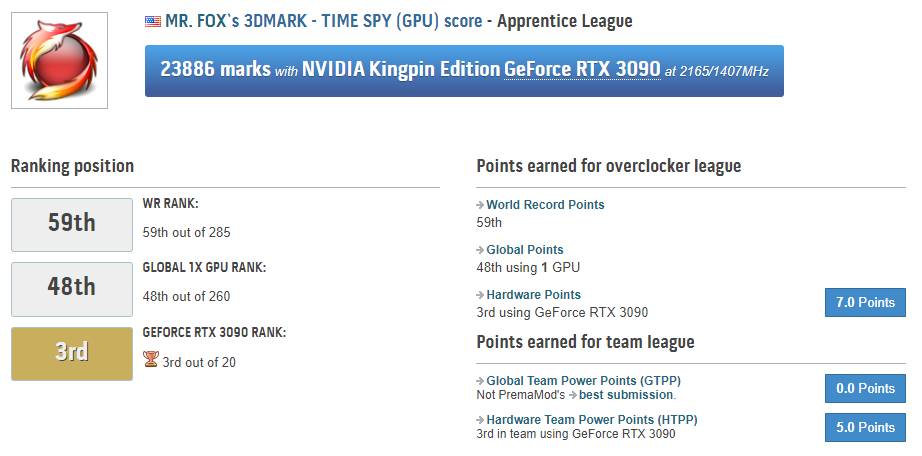
GPU Score: https://hwbot.org/submission/5187355 | https://www.3dmark.com/3dm/88212231 (same run as above)
-
Firestrike & Timespy Benchmarking Megathread
Mr. Fox replied to NavJack27's topic in Benchmarking General
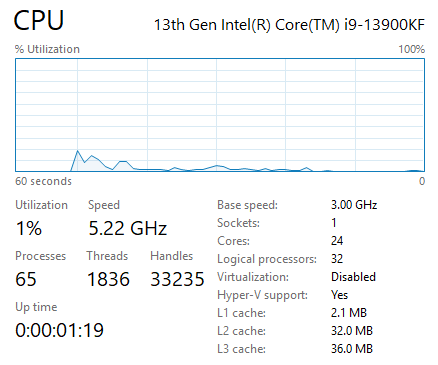
Looks like you need some serious Windows debloating. That is a butt-load of CPU overhead going on there.
-
Firestrike & Timespy Benchmarking Megathread
Mr. Fox replied to NavJack27's topic in Benchmarking General
https://hwbot.org/submission/5187340 | https://www.3dmark.com/3dm/88212231
-
Firestrike & Timespy Benchmarking Megathread
Mr. Fox replied to NavJack27's topic in Benchmarking General
https://hwbot.org/submission/5187322_ | https://www.3dmark.com/3dm/88182771 -
Firestrike & Timespy Benchmarking Megathread
Mr. Fox replied to NavJack27's topic in Benchmarking General
https://hwbot.org/submission/5187315_ | https://www.3dmark.com/3dm/88209742 -
Firestrike & Timespy Benchmarking Megathread
Mr. Fox replied to NavJack27's topic in Benchmarking General
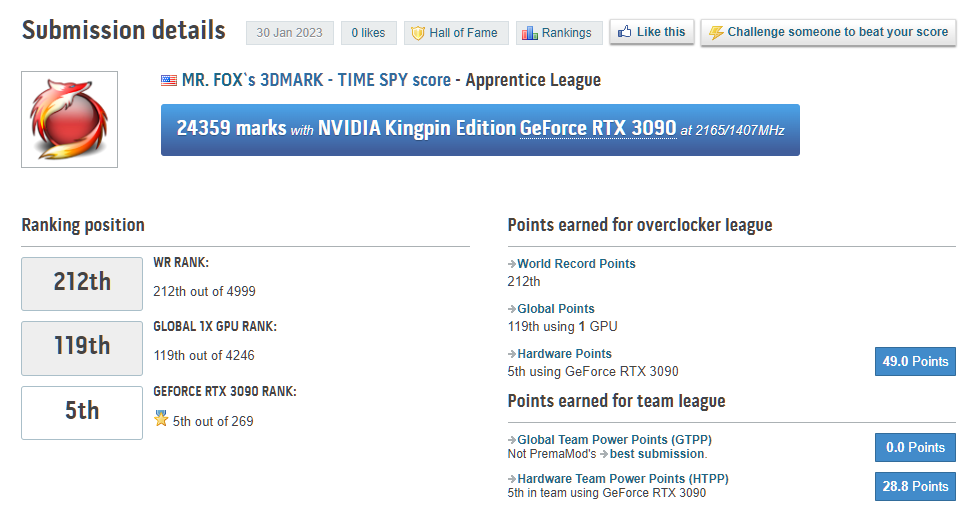
I hadn't done any benching for a while. Figured I probably should scratch that itch. https://hwbot.org/submission/5187310 | https://www.3dmark.com/3dm/88209265 -
They have what they have. I don't dislike the white, or this color. I avoid light-colored hats (and other clothing) because I can't avoid staining them with my grimy way of life, LOL. Hats and caps, especially, start looking rough quickly for me. I generally wear them out in the sun, so they end up with a sweat stain across the part covering my forehead. It only takes a day or two in the Arizona blast furnace to look kind of nasty. Even though they are machine washable, they never look the same again after washing. This should not affect everyone else though. Only sharing why black (or dark colors) are better suited to my needs. I really like that design though. It looks very good.
-
The Final Days of EVGA's GPU Division - Building the Last Video Card
Mr. Fox replied to Sir Beregond's topic in Hardware News
I watched that video right after Steve released it. It was an excellent video and I am very sad that we have lost EVGA in the graphics card space. With a couple of rare exceptions, every desktop graphics card that I have purchased since the time ATi was acquired by AMD has been made by EVGA. I feel lost without them as my go-to GPU provider. I have low confidence in the product quality and warranty with other brands. Whenever possible, I choose EVGA for my components because their warranty and customer service is unmatched. Their competitors almost universally have a lousy warranty / RMA process. Their chief competitor in the enthusiast space has an atrocious and painful warranty support program that takes weeks to run its course and sometimes with unacceptable outcomes. That has never been my experience with EVGA. -
Love the black shirt. Would go for a cap in black. The white looks nice, but it wouldn't after a day or two. White never stays nice and clean for me. I like the graphic on the cap a lot. Good stuff.
-
We don't know what we don't know right now. But, something is certainly not right. That is too many nearly simultaneous failures. The frequency seems too high to be coincidental regardless of what the underlying cause is determined to be. I don't think the exact cause has been determined. The only thing consistent between GPUs in an extremely strange frequency of identical failures was the driver version. That was actually brought out in the video. Nothing else could be identified (yet) and they are asking for info to help identify both cause and frequency. That said, I do not rule it out as a possibility. We have seen numerous examples of NVIDIA doing things with drivers, including making small adjustments to firmware without disclosing it in release notes. For example, overclock blocking and removing access to voltage controls. This actually just happened with Maxwell GPUs. If you are running the latest drivers on a 980 Ti, you will likely find you can no longer overvolt or undervolt the GPU. I can still remember severely throttling on Kepler SLI systems I owned that was 100% triggered by nasty GeFarts drivers. It never got fixed. NVIDIA did not care. They were selling Maxwell. The only solution was to use an outdated driver if you wanted SLI performance, or buy two new Maxwell GPUs. Those were deliberate acts on NVIDIA's part, but accidents and unintended consequences can also occur. The fractured die can result from extreme overheating or a freakishly high voltage spike, so it is possible (although maybe remote) that physical damage can result from a driver update, especially if it is carrying a special payload of "extras" in the package. Purely speculation now, but not outside the realm of possibility... AMD might have released something in the December driver that was designed to push 7900 XTX performance to make it more competitive against 4080 and 4090 that had unforseen consequences for their last generation GPUs.