Welcome to ExtremeHW
Welcome to ExtremeHW, register to take part in our community, don't worry this is a simple FREE process that requires minimal information for you to signup.
Registered users can:
- Start new topics and reply to others.
- Show off your PC using our Rig Creator feature.
- Subscribe to topics and forums to get updates.
- Get your own profile page to customize.
- Send personal messages to other members.
- Take advantage of site exclusive features.
- Upgrade to Premium to unlock additional sites features.
All Activity
- Yesterday
-
 Bratok joined the community
 - Last week
-
 neurotix changed their profile photo
 -
 sergey.energy joined the community
 - Earlier
-

CPUID hacked to deliver malware via CPU-Z, HWMonitor downloads
pio replied to Kaz's topic in Software News
Thank you for sharing it here. I was spreading it to the gaming groups I'm in on Discord, completely forgot about putting a link here. -
CPUID hacked to deliver malware via CPU-Z, HWMonitor downloads WWW.BLEEPINGCOMPUTER.COM Hackers gained access to an API for the CPUID project and changed the download links on the official website... Pretty small window, April 9th to April 10th for about 6 hours, the download link was compromised. VirusTotal appears to identify it when scanning.
-
 StevePab joined the community
 -
 (Dead Link for original article). I missed this when it was posted. We've known for over 10 years that quantum computers fundamentally break encryption. No nation state is willing to claim they have computers capable of that, but at this point it's hard to believe they don't exist. It's not about having a strong enough computer to break encryption, it's about connecting enough strong computers to break encryption. I'm curious why google started sounding the trumpet again. Are they seeing encryption breakdowns happen in the wild? Would they know? The counter to this is quantum pairs / tunneling. Breakthrough could connect quantum computers at 200 times longer distance NEWS.UCHICAGO.EDU A new nanofabrication approach could increase the range of quantum networks from a few kilometers to a potential 2,000 km, bringing... The entire banking system will need quantum tunneling to protect their transactions. These things cost resources and take time. I'm sure a couple wars could distract people for a while though. It's hard to study quantum entanglement when the more pressing matter is avoiding a bullet. P.S. This is why committing crimes on the internet is a bad idea. Might be fine with today's encryption, but tomorrow's encryption might reveal everything that was said today.
 -
 Spealer's map released today! HARDEST MAP EVER! You can check out Spealer's Maps by subscribing to his Patreon off his Youtube Channel: https://www.youtube.com/@Spealer PLEASE PLEASE PLEASE CLICK HERE FOR ECTOR'S DONATIONS: https://gofund.me/c5f924f1f Special Shoutout and Thanks to: LabRatKnatz, EctorPlays, JDQ Gaming, CappuccinoBeam, Phroogo, Butch13 Gaming, GSM_Gaming172, Notnico, Latte, and EVERYONE else involved with eXtremeGaming. Don't forget to checkout our discord channels too! Maybe you can be in one of our videos or livestreams! I've also got a Twitch channel, same streams but faster response. Don't forget to follow me over there too! I can also be found on X and Rumble as well now! Have any tech related troubles? Join us over at ExtremeHW for tech related forums and news! https://www.extremehw.net Links for more about me: https://linktr.ee/piodoesdonuts
 -
Camodo Gaming had issued a challenge for streamers, to attempt Spealer's latest Drive Up 2 map and record it and send it to him. So that's exactly what I did. Challenge accepted! I had a freaking BLAST playing this map the last 2 days, even though it was probably the worst 2 days of BeamNG I've ever done. The LIVE streams are fully uncut, raw, and all available here on my channel if you want to see my full suffering. I did very LITTLE cuts on this, only made it more "watchable" to retain the full run in its entirety. Stealthy eyes are welcome to double check the footage, its all there. This was a legit run and I freaking made it! Otherwise, enjoy my one SUCCESSFUL run of the HARDEST MAP EVER in BeamNG (to date). You can check out Spealer's Maps by subscribing to his Patreon off his Youtube Channel: https://www.youtube.com/@Spealer You should also checkout Camodo Gaming. He's an absolute riot most of the time! https://www.youtube.com/@CamodoGaming Timestamps: @00:00:00 - Intro @00:01:04 - Start of the run @00:15:55 - Epic JUMP! @00:19:27 - About halfway up? @00:25:48 - Save of my life! @00:49:19 - First fall of the run @01:01:02 - Caught back up from the fall @01:06:35 - Personal Best? @01:15:56 - Second fall of the run @01:22.12 - Caught back up from the fall @01:23:45 - EXCITEMENT! @01:34:25 - Finish Line! @01:37:02 - Celebratory Ice Snake / End Credits @01:40:53 - Hello???? PLEASE PLEASE PLEASE CLICK HERE FOR ECTOR'S DONATIONS: https://gofund.me/c5f924f1f Special Shoutout and Thanks to: LabRatKnatz, EctorPlays, JDQ Gaming, CappuccinoBeam, Phroogo, Butch13 Gaming, GSM_Gaming172, Notnico, Latte, and EVERYONE else involved with eXtremeGaming. Don't forget to checkout our discord channels too! Maybe you can be in one of our videos or livestreams! I've also got a Twitch channel, same streams but faster response. Don't forget to follow me over there too! I can also be found on X and Rumble as well now! Have any tech related troubles? Join us over at ExtremeHW for tech related forums and news! https://www.extremehw.net Links for more about me: https://linktr.ee/piodoesdonuts
-

ASRock DeskMini X300 Simple Windows SMB/NVR Build
ozlay replied to Snakecharmed's topic in Small Form Factor
Yes it uses the cutout. https://a.co/d/0aj0a14J -

ASRock DeskMini X300 Simple Windows SMB/NVR Build
Snakecharmed replied to Snakecharmed's topic in Small Form Factor
Nice. Does the M.2 to Oculink adapter you used also use the COM port cutout in the DeskMini case? What GPU do you plan to use with it? -
ASRock DeskMini X300 Simple Windows SMB/NVR Build
ozlay replied to Snakecharmed's topic in Small Form Factor
I installed an M.2 to Oculink in my desk mini. I am planning on getting an Oculink DAS to use with it. -
Blast from the past AND looking into the future! This video should explain why I've been so busy lately, and why I'm still going to be AFK for a while. Check out the Q/A section, the questions are absolutely amazing! Thank you to each and every one of you, seriously. Also - please nobody tell LA Beast I stole his outro for this one. I promise, only one. He's just too funny and it fit perfectly! PLEASE PLEASE PLEASE CLICK HERE FOR ECTOR'S DONATIONS: https://gofund.me/c5f924f1f Dudekahedron's CareerMP Mod Forum Post (Download link there): https://forum.beammp.com/t/careermp-beamng-drive-career-mode-for-beammp/ Timestamps: @00:00 - Intro @01:13 - CareerMP Mod Release - Intro to my career @05:25 - Announcement @06:48 - My new house! @12:42 - Live Q/A Session with chat about the changes @22:30 - Outro @22:50 - J's Red Rocket @23:15 - 3-4 Weeks later update - interior plans @26:51 - Outro #2 Special Shoutout and Thanks to: LabRatKnatz, EctorPlays, JDQ Gaming, CappuccinoBeam, Phroogo, Butch13 Gaming, GSM_Gaming172, Notnico, Latte, and EVERYONE else involved with eXtremeGaming. Don't forget to checkout our discord channels too! Maybe you can be in one of our videos or livestreams! I've also got a Twitch channel, same streams but faster response. Don't forget to follow me over there too! I can also be found on X and Rumble as well now! Have any tech related troubles? Join us over at ExtremeHW for tech related forums and news! https://www.extremehw.net Links for more about me: https://linktr.ee/piodoesdonuts
-
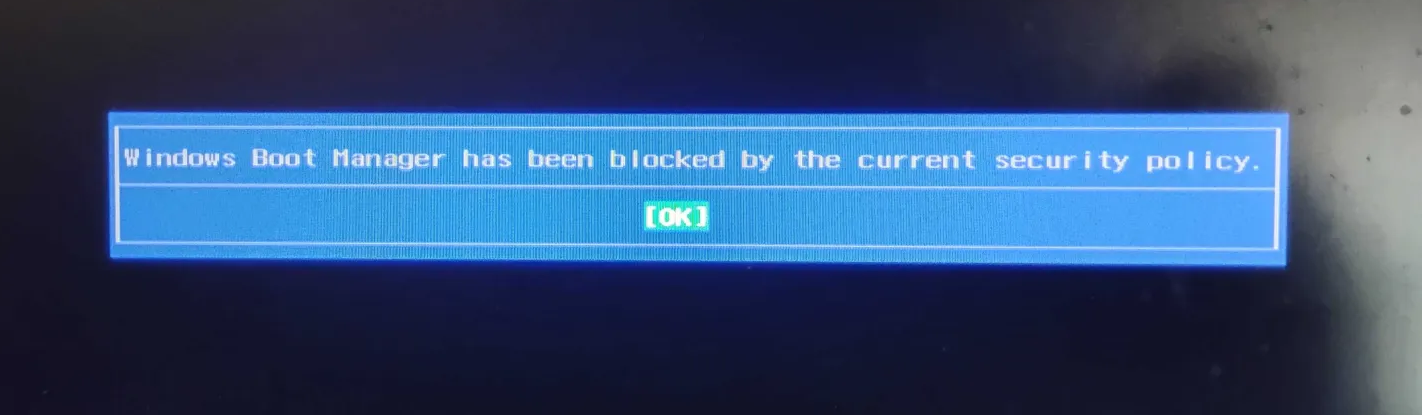
 How to fix bios rollback downgrade prevention: Windows Boot Manager has been blocked by the current security policy
-
ASRock DeskMini X300 Simple Windows SMB/NVR Build
Snakecharmed replied to Snakecharmed's topic in Small Form Factor
Some cheap upgrades in the face of everything else about this hobby becoming expensive: Back in October, I swapped out the Ryzen 5 5600G for a Ryzen 7 5700G. The used prices for the two CPUs were so close, so I just went ahead and did it because I could. The flip ultimately cost me just under $20 after reselling the 5600G. Tonight, I upgraded the NIC with a Realtek 2.5 GbE adapter that replaced the Wi-Fi card. The RJ-45 end fit neatly into the COM port cutout on the back of the case. This upgrade process wasn't without its pitfalls though. Before I could get to that, I upgraded the desktop switch that connects to both my desktop and NVR from the ubiquitous TP-Link TL-SG105 to a D-Link DMS-105. I got the D-Link for a steal at $34 direct from D-Link as a factory refurb. It was by far the best price I saw for a 2.5 GbE 5-port switch that doesn't feel like a cheap piece of junk, and the separate blue status LEDs to indicate a 2.5 Gbps connection won't leave anyone guessing or needing a legend. At first, I went with an M.2 2280 adapter with an Intel I226-V chipset that I put in the second PCIe x4 slot on the back of the ASRock motherboard. It flat out refused to acknowledge the Cat 6 Ethernet cable I previously had plugged in to the Realtek gigabit NIC on the motherboard, so I switched it with an old 15' Cat 5 cable from 2000 that I still keep around for testing purposes. That cable worked, but the I226-V did not want to negotiate a connection faster than 100 Mbps, which I can't complain too much about because it was only officially rated for Cat 5 10/100. Then I swapped to the Cat 6 cable that was plugged in my printer and while that worked, the I226-V still refused to connect faster than 100 Mbps. The onboard NIC on the other hand took any of those cables at 1 Gbps, slim or standard jacket, Cat 5 or 6. After reading about all the continued issues that people have had with the I225-V and I226-V (which is interesting because my desktop motherboard has the I225-V and it connected at 2.5 Gbps without a hitch), I decided I wasn't going to waste any more effort on this NIC that doesn't even think a Cat 6 cable is a cable. I went with an M.2 2230 adapter using the Realtek RTL8125 chipset in the Wi-Fi slot instead. I never used Wi-Fi on this anyway. On Amazon, there's a few sellers peddling M.2 2230 adapters with the Realtek RTL8111 chipset and claiming they're 2.5 GbE capable. Liars. Those are all gigabit-only, and thankfully Realtek's chipset naming makes that pretty obvious. This is the one I got with the Realtek RTL8125B chipset: Amazon.com WWW.AMAZON.COM So anyway, it worked. Other thoughts: How times change. I'm glad I got my SSD for this build back when I did. I got the 3.84 TB Samsung PM863a for $159 in February 2024. It now goes for $350 on eBay. This DeskMini started its role as an NVR in May 2024. I now have 7 cameras recording to the SSD, with 5 of 7 recording in 4K, and the other 2 recording in 2K, all at 15 FPS. I've set Blue Iris to record continuous video for 14 days, which occupies about 3.1 TB. CPU usage typically stays at 3-5% on the 5700G. It was slightly higher on the 5600G, maybe 6-7%. Relative to how I use it, this is the most overkill system I've ever built, and I still think it's an awesome little wonder. To me, there was never any other way I was going to run surveillance cameras, long before the general public woke up to how shitty Ring (and cloud storage video recording in general) is after that Super Bowl ad. -
Spending a lot of money on UPSes and UPS batteries is something that bothers me because the system isn't that sophisticated. The last four UPS units I bought including two rackmounts were used and I got them for cheap. I also never buy OEM UPS batteries because it's all AGM sealed lead-acid. They're not as complicated as lithium-ion. A 4-pack of replacement 7.5Ah batteries for my CyberPower OR1500LCDRT2U cost me $68 in 2024 and the same listing is $73 now. I bought the OR1500LCDRT2U unit used for $120 and it was in excellent condition aside from the batteries needing replacement. That's less than $200 total for hardware that performs just as good as new from the manufacturer (currently $546), and provides 3+ hours of network uptime in the event of a power outage either way.
-
Replacement "CyberPower battery Pack RB1290X4F" (it was $244 online sites for my 1500W rack UPS) - [retails / MSRP @ $352.00 on CyberPower site] Best price / cheapest @ Amazon after my 5% Prime CC discount & free shipping (26.5 lbs) The battery pack was received @ Amazon from CyberPower - only one month before I got package from Amazon (based on shipping information on the OEM box UPS Prices have also gotten way out of hand (I'm seeing 50% higher prices than just a couple of years ago) .... for just a UPS or replacement batteries? (no ram or drives in a UPS ...just price gouging & tariffs ?? )
-
Well, RAM prices are stupid and continue to get even more stupid, but I was going to need something within the next couple of years and there's no cheaper hardware on the horizon. I'm going ahead with (over)building an HTPC thanks to Micro Center combos being cheaper than buying everything used. All I'm really trying to do is stream Steam from my desktop PC which won't require much, but it still requires more than a ThinkPad W520 from 2011 that can't output 4K. I got 32GB G.Skill Trident Z5 RGB DDR5-6000 CL36 for $250 in open box condition on eBay, compared to when I paid $290 for 96GB Kingston Fury Renegade DDR5-6000 CL32 brand new from Newegg at the end of 2024. Anyway, that same 32GB G.Skill Trident Z5 kit is $480 retail right now. Meanwhile, Micro Center's combo comes with a single stick of 16GB G.Skill Flare X5 DDR5-6000 that has a resale value of about $160. $90 isn't nothing and really not even necessary for a system that will mostly stream from my main rig over Ethernet, but it's also not a budget breaker. Going up from 16 to 32GB could be a lot worse right now. This HTPC build will still total well under $1000 with a modest, used GPU like an RTX 3070. In the short term though, I'll just go iGPU because I'm still not making time for gaming this year.
-
 That was fun, thanks all!
 -
 Thank you to the organizers of the 96 Hr Sprint. I enjoyed the event, and it is always good to see everyone push their PPD!
 -
 That's @tictoc long-time folder I think
 -
 I just went past Q_Cruncher who is that? Am impressed by my work unit count did think stronger gpu did more unit.
 -
I tested in beam ng e core on and off with or without ht. And had increase in fps under large car traffic load with all of the enabled. Even ht helped alot. Not sure how good or bad e core are really since most arm cpu use big little.
-
I read Power Station are now the best ups. Since most new unit use lifepo4 less fire risk and ways more reliable. Also ways more power output over 2000w. Can probably fit a pc fan and cut the wire not sure about it. Ups battery may show good because of voltage but can be sulfated pretty bad and voltage drop to nothing on a low load.
-
Which BIOS chip do I flash on ASUS X570i Gaming Motherboard?
CoolGTX replied to HeyItsChris's topic in Desktop
I'm wondering if it is a "dead"/ does Not POST issue .... that is the only good reason I know to flash directly to the BIOS chip ............... because anyone else who needed to flash the chip for serious OC customization would not need to ask where the chip was. -
Good to see more members have joined the fun! I'm not "all in" for this event .... already posted over 2.5 Billion this month for the Team Three (3) UPS units are down, sigh - I'm sure the over a dozen power interruptions during the "Great Northeaster Storm of 2026" did not Help .......... eventually I shutdown all rigs & turned off all the breakers to any major appliance other than heating system - in hopes of preventing surge damage. Still, we made out so much better than many families who lost power for Hours - some even lost power for DAYs! It could just be the batteries are too old? Two (2) of my CyberPower 1350 Watt rack UPS units (PR1500LCDRT2U) failed to keep a PC running even for 1 seconds (while idle in Windows), though the batteries are indicated as "good / fully charged" in the display, aka "no battery error symbol". One of these 1350 W UPS units has a "bad fan" (only fan in unit) that is trying to intimate the sound of a blender .... pulled fan it has a failed bearing. ---> Does anyone know a good place (in US) to buy replacement fans for CyberPower UPS units? --->>>> (fan is) 80mm sq x 25mm thick two wire 0.34A 12VDC (T&T 8025HH12F ND1) I just replaced the batteries in my oldest CyberPower 1500 Watt rack UPS & that unit indicated the battery had failed. Voltage testing confirmed bad batteries; after I pulled the battery pack & tested individual batteries ...... 6+ years old? unit, so ........ The cherry on top: two (2) 900 Watt UPS units also have failed to keep an idling PC running for even 1 second. So, I pulled one of my Folding Rigs down; to keep the misses happy with her PC, as she worked from home post Nor'easter. Since "OEM CyberPower battery Packs" have gotten way out of hand $$$$ (it was $244 for the 1500W UPS) I am thinking of buying generic 12V batteries & rebuilding myself. --->>> Any suggestions for brand of batteries or where to get "fresh" sealed 12V batteries, would be helpful. Speaking of insane prices: the (2) 1500W brick UPS I bought a couple of years ago ($500.00 each) are now just over $700.00 .................... what is up with that, copper & lead prices are way down from a few years ago?
-
 At my age "late" means something totally different.
 -
We all late no worry