Welcome to ExtremeHW
Welcome to ExtremeHW, register to take part in our community, don't worry this is a simple FREE process that requires minimal information for you to signup.
Registered users can:
- Start new topics and reply to others.
- Show off your PC using our Rig Creator feature.
- Subscribe to topics and forums to get updates.
- Get your own profile page to customize.
- Send personal messages to other members.
- Take advantage of site exclusive features.
- Upgrade to Premium to unlock additional sites features.


Sir Beregond
-
Posts
2,052 -
Joined
-
Last visited
-
Days Won
58 -
Feedback
100%
Content Type
Forums
Store
Events
Gallery
Profiles
Videos
Marketplace
Tutorials
Everything posted by Sir Beregond
-
 Same. Such a huge backlog. I rarely buy AAA games these days and if I do, it's just cheap indie games.
 -
-
Keep in mind, boosts of 5GHz or more is just that...boosts of 1,2, maybe more cores at a time if they are good enough. It's not an all-core boosts, that would be impossible without sub-ambient cooling. Like I said before, max I can get all-core is 4.65GHz and that's at the threshold of voltage/thermals to get. Yeah, maybe you did have a 5900X that just didn't have the best silicon. Seems extremely strange to me that an undervolt gave you lower clocks. Just looking at your screenshots again...do you have Curve Optimizer just set to "Auto" or how is that being handled?
-
You don't want a positive offset. You'll want a negative one. Try 0.025v, maybe more, or less. How much were you undervolting? I really think you have some conflict between the Extreme Tweaker settings and AMD Overclock settings. What you describe just doesn't sound right at all in terms of how it's acting. Slight undervolt should absolutely be giving you higher boosts, not lower boosts. I have gone as high as 5150MHz boosts with PBO/undervolting. Just because cores are hitting 5100MHz, shouldn't in and of itself hard lock you, so something screwy is going on that's making this not stable. I'll doublecheck what my other voltage settings are when I get home again today. I'd say when you get the new chip, do a CMOS reset and start with a fresh BIOS. So probably save or write down whatever tweaks you've made for your RAM if your RAM has been stable. Though depending on what your new chip can do for fclk, might be reworking that anyway. Can't say I've ever bought a processor on Amazon. I'm one of those lucky people with a Micro Center within 40 minutes of me.
-
Happy Thanksgiving! Thankful you're still with us Jan.
-
-
-
Curve Optimer = CO, yes. CO is in the AMD Overclocking menu. I don't do a thing in the Extreme Tweaker menu aside from adjusting voltages, doing DOCP settings, etc. All PBO/CO stuff I touch is in AMD Overclocking. I really do not recommend Extreme Tweaker menu for PBO/CO. Seems off to me you had worse performance using that vs Extreme Tweaker. It's usually the opposite.
-
So my CO settings above I guess are not as stable as I thought. Had a crash last night while gaming so I just turned it back off and put my PBO settings back to +200 and CO on Auto. I will then need to just do a vcore undervolt I guess and see what that gets me as I am back to just boosting to 4950MHz, same as you.
-
Outa my budget too, we have other things we need and wife's turn for a new rig sometime soonish. I'd love to get a 3090 Ti from EVGA in the future just to say I got their last commercially available flagship they produced. But that would be more a collection thing then anything else right now. The reason I have the card I have now is because it fits in my case lol.
-
Wait, so this one tube of beef was $1.98? This is a little more fat then I'd like, but I am definitely a fan of using 80/20 for hamburgers. I don't mind 90/10 for others things, but definitely not for burgers. 85/15 works in a pinch too. I just like different styles for different uses I guess. I'm with The Pook. Arterial plaque is delicious. Though my wife is really good at making ground turkey taste like beef. I don't know how, but she does.
-
Oh so its more than a pound. OK, this is what I missed.
-
I was more amazed that it was $7.92. Can get a pound here for $5.99 still.
-
Where do you live where ground beef is $8? I hope that's more than a pound.
-
Good luck. From what I've seen, only golden samples really do 2000MHz fclk, most seem to hit either a hole or a wall at 1900. Some might be able to do 1900, but 2000 was never a guarantee with Zen 3. If it's any consolation mine won't go above 1866 either. Yeah there's a huge time investment in lewrning/testing for CO. Like Pio said, you can try a small vcore undervolt and that should help a little too.
-

[Official] EHW Retro - The EHW Retrogaming club
Sir Beregond replied to neurotix's topic in Gaming General
I still have a PS2. My favorites on there were the Jak and Dexter series, and the PS2 era James Bond games. -
-
The biggest offender to me has been the 7600X. I just can't imagine spending $300 for a 6-core in this day and age.
-
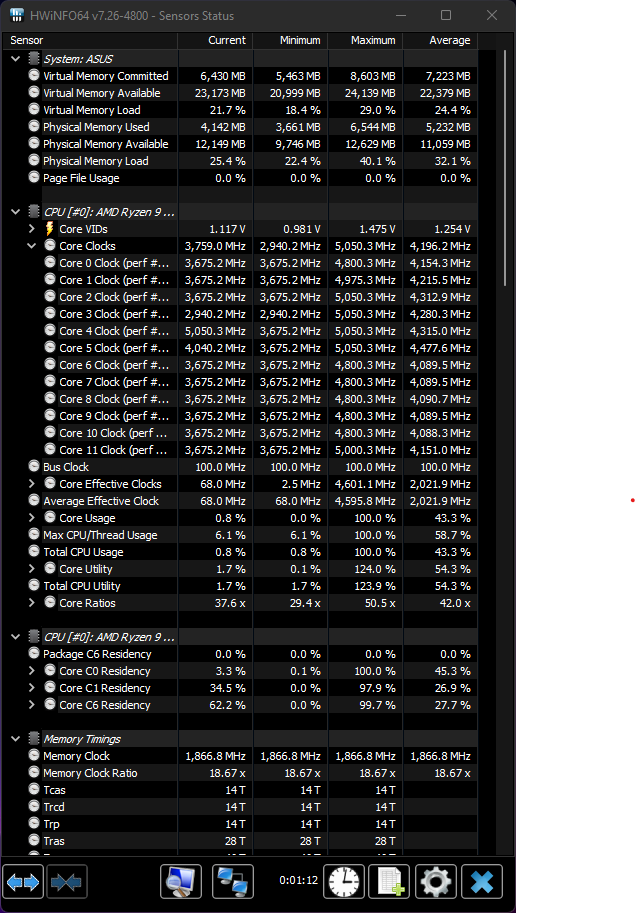
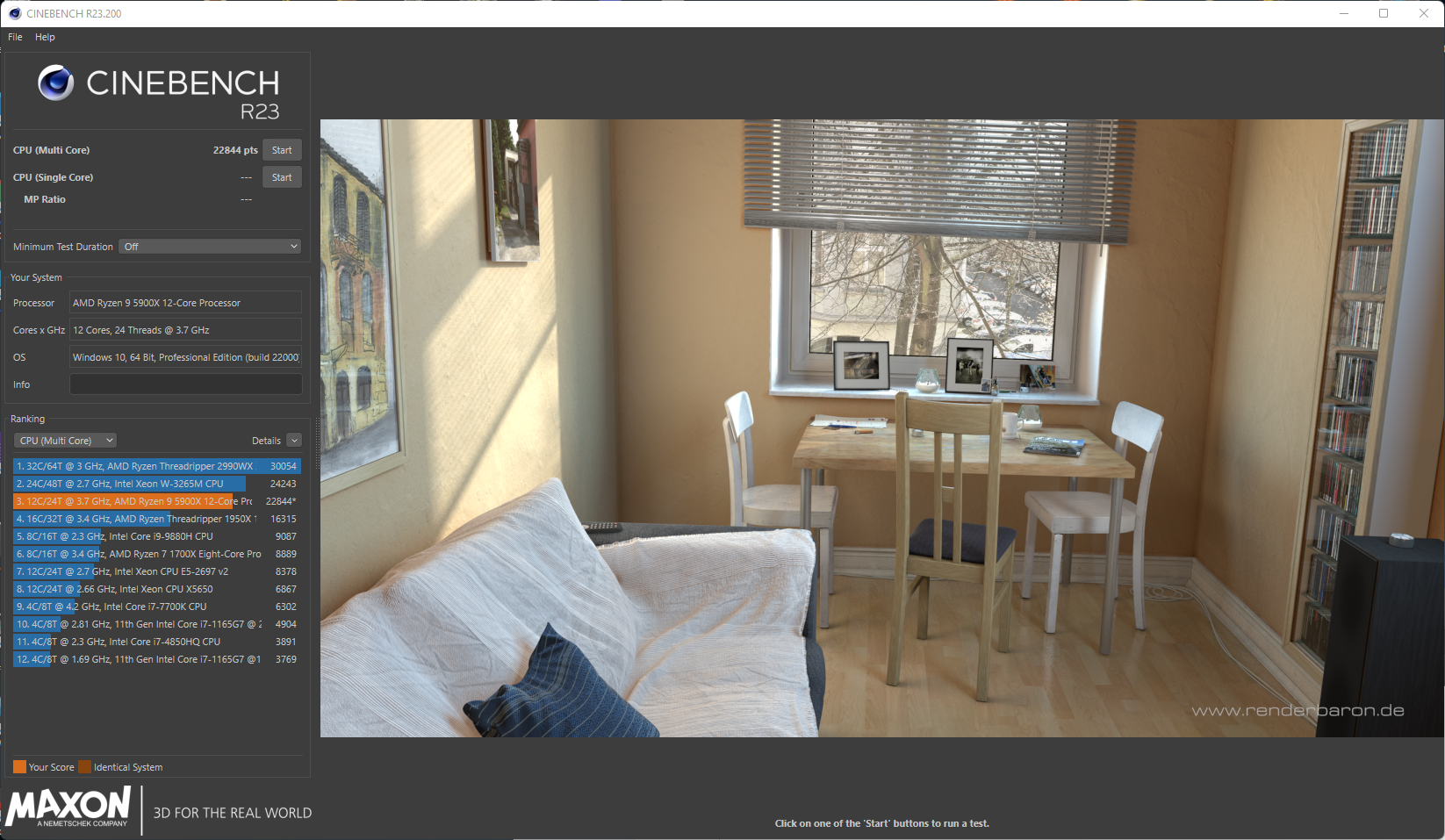
OK @neurotix, here's my settings: I run PBO power limits on "Motherboard", PBO Overdrive offset of +100MHz as any more is unstable with my curve optimizer settings. I then also set the Scaler to 10X. For Curve Optimizer, I do a negative offset per core on the following (please keep in mind, these work for my 5900X and you should NOT just plug these numbers in and expect the same results. It took hours of per core stability/error testing to reach these numbers and yours will most certainly be different). Core 0: -30 Core 1: -30 Core 2: -20 Core 3: -20 Core 4: -30 Core 5: -10 Core 6 -29 Core 7: -27 Core 8: -26 Core 9: -22 Core 10: -30 Core 11: -30 Here is my HWInfo64 shot from a CB R23 multi-core run. As you can see it easily boosts to %.05GHz due to the combo of PBO Overdrive offset and curve optimizer undervolting: Not my best score, I've gotten over 23.3k doing an all-core overclock, but you always get the best score for that doing an all-core OC, but my 5900X tops out at 4.65GHz all-core at not a voltage I would feel comfortable running 24/7. In my opinion, for daily use, and gaming, PBO and CO are definitely the way to go. If you really want maximum PBO Overdrive of +200, you can optimize for that too with probably a less aggressive curve optimizer. Anyway, this is what worked for me. One thing I forgot to add, you can download and use Ryzen Master to scan and determine what your best cores are on each CCD of the 5900X. Helps you when optimizing. I don't like trying to change anything setting wise via Ryzen Master though. I think it's still best to use the BIOS. Ryzen Master will also incorrectly tell you you can just set all cores to -30 CO and that's just not true unless you have some supremely divine golden sample.
-
Oh...definitely do not use the Extreme Tweaker tab. Set everything back to default settings on here and instead go to the Advanced Tab -> AMD Overclocking. Concur with others that if you have sufficient cooling, undervolting can and will result in better boosts. I have gotten as high as 5.15GHz boosts, but that particular undervolt wasn't the most stable. The part that really takes a ton of time is figuring out a per core undervolt via Core Optimizer. But if you don't want to do that, can definitely do what Pio suggested with just a vcore negative offset undervolt. Typically without working on a CO or undervolt, PBO caps out at 4950MHz. This is what I mean where I said I got better results with a +100 offset and a fully optimized per core curve optimizer, which was allowing me to hit closer to 5-5.05GHz boosts on best cores. I'll be headed home shortly, so will post back here with my settings as a data point, obviously your chip will be different, so definitely do NOT recommend just plugging in my same CO settings and expecting it to work.
-
Yeah if you just want a quick PBO, can just set the offset to +200 without really doing anything in Curve Optimizer (leaving it on Auto).
-
I ended up following this guide, but I am very intrigued about messing around with base clock.
-
I'll definitely let you know when I get home. I never really figured out how to manually tweak PPT, TDC, EDC so I have that on I think motherboard limit. As for the other settings, I can tell you I have optimized Core Optimizer per core (took a very long time to do) and with it only have +100 MHz offset so as to keep a balance of boost clocks and optimized undervolting. There is a bit of a balancing act here with those, though I hear there might be some newer settings in more recent BIOS/agesa, but I am on an older version.
-
It easily boosts to over 5GHz. I'll have to find my settings and I'll get back to you. I am at the office today.