Welcome to ExtremeHW
Welcome to ExtremeHW, register to take part in our community, don't worry this is a simple FREE process that requires minimal information for you to signup.
Registered users can:
- Start new topics and reply to others.
- Show off your PC using our Rig Creator feature.
- Subscribe to topics and forums to get updates.
- Get your own profile page to customize.
- Send personal messages to other members.
- Take advantage of site exclusive features.
- Upgrade to Premium to unlock additional sites features.


GanjaSMK
-
Posts
304 -
Joined
-
Last visited
-
Days Won
11 -
Feedback
0%
Content Type
Forums
Store
Events
Gallery
Profiles
Videos
Marketplace
Tutorials
Everything posted by GanjaSMK
-
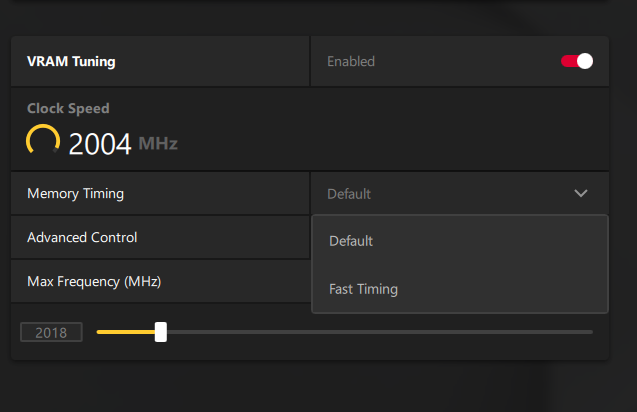
 Just tossing in for extra reference - I'm on MSI Gaming X Trio 6800XT, fully updated Win10 and I do not have secondary fast timing as an option with my setup (23.7.1 drivers).
-
Much appreciated @pioneerisloud! I should be good with what I have. May even get more stuff cause why not, what else do I have to do
-
I had one of those years ago, loved it. Could watch TV on one monitor and play CS on the other... man... missin dem days.
-
Well I bought an expensive (probably not originally) used JVC Hi-Fi DVD/VHS box but sadly it won't play SP VHS tapes. I was so bummed out. For capture I have a Honestech USB 2.0 VHS-to-DVD (BR even I guess) device with RCA/S-Video and works a charm. Even the outdated but handy software it came with works plenty fine. Then a few days after the JVC box I stopped by a local thrift store and found a Daewoo DVD/VHS box. It was also labeled as Hi-Fi and I thought, "Damn.. gonna be the same thing and might not work". Well, for a whopping $10 let me tell you GENTS.... the Daewoo WORKS. LOL! Got my 8-yr old easter egg hunt transferred, so many more to do now.
-
Eh, kids memory. Musta watched it a gazillion times as a child. Maybe someday it'll bring joy again on some kinda... spiritual edible ascent.
-
Yep I got some old stuff. The JVC player/recorder I just picked up is DVD+VHS; direct transfer possible, but sadly the VHS is only 'HiFi' so it won't properly display SP tapes, which is what most of the content is that I have. I've got old family recordings, xmas, birthdays, easter, accolades like first communion etc, and plenty more (like dad's PGA stuff from the 80's and 90's, tony awards, etc from mom). Plus I've got like original Peter Pan disney that I'd like to digitize for my personal library. What I bought YEARS ago was this VHS-to-DVD USB dongle from some rando company. Got the software on CD and have a good key for it (VHS to DVD 4.0 by Honestech). Simple to use software that can at least get VHS to a digital file that I can then use Handbrake/other encoders to format to what I want. Been fun sofar today ... but grinding my damn gears because many of the VHS tapes I have are recorded in SP (cause you get more time LOL).... anyway... gonna now build up my VCR/VHS devices so I can get everything I need digitized. I probably have... 100+ tapes? gonna be a project FOR SURE... lol
-
Casually trying to transfer VHS to DIGITAL... old VCR (oldschool... RCA {Thompson Electric actually} took a dump over the years I guess) and new JVC (dual dvd+vhs) seems to not like SP video (boooooo lol). So yeah, chat away....
-
Super Flower 1000W PSU - am I somehow rocking it too hard?
GanjaSMK replied to GanjaSMK's topic in Power Supplies
Right on I'm down I'll hit you up -
Super Flower 1000W PSU - am I somehow rocking it too hard?
GanjaSMK replied to GanjaSMK's topic in Power Supplies
Stoked the driver fixed it because... i do love wasting hours killing people in BF lol. -
Not a great showing on the 4060. Watch em do some weird thing and randomly release a 4065 that sits too close to a 4060ti and not close enough to a 4070....
-
Super Flower 1000W PSU - am I somehow rocking it too hard?
GanjaSMK replied to GanjaSMK's topic in Power Supplies
Well... there goes my old brain. Did the one thing I hadn't tried... reverting to older drivers. Went back two I think and seems to resolve the issue. *fingers crossed* Also disabling MPO did nothing for my case, result still same on most current driver 23.5.2. -
Super Flower 1000W PSU - am I somehow rocking it too hard?
GanjaSMK replied to GanjaSMK's topic in Power Supplies
BIOS is up to date (most current), RAM is all good. PSU good I think the issue could possibly be related to MPO (suggested to disable via registry) - I just found this via another thread. Seeing if it fixes/helps. Hoping it does! Downloading... -
Super Flower 1000W PSU - am I somehow rocking it too hard?
GanjaSMK replied to GanjaSMK's topic in Power Supplies
Pretty much everything.... Voltage, auto, GPU downclocks (along with stock/OC settings), pretty much the works so far. No dice. SA/IO voltages... all of it. Something wonky. Dunno what or how to figure out at this point. That's why uninstall. -
Super Flower 1000W PSU - am I somehow rocking it too hard?
GanjaSMK replied to GanjaSMK's topic in Power Supplies
At this moment, I could swap one from my laptop, or buy another; but I'm headed out of town for a few days and thinking about buying one after I'm back. Though, I should note I did install (reinstall, no copy/move) on different SSD's (3) to see if it was specific to one... but same results. -
Super Flower 1000W PSU - am I somehow rocking it too hard?
GanjaSMK replied to GanjaSMK's topic in Power Supplies
Yep, stays pegged no problems. I just don't get it... lmao. Oh well... no BF2042 for me. -
Super Flower 1000W PSU - am I somehow rocking it too hard?
GanjaSMK replied to GanjaSMK's topic in Power Supplies
Well, new RAM kit came and sadly the Micron chips don't have much wiggle room at all; stock CL18 @ 4600 wants my SA/IO voltage waaaay too high since DR dimms on this particular MOBO scale (DR, 16GBx2) top out at 4400. And since my B-DIE kit is capable at 4200/CL16 without error... I guess I'm now selling the new kit I got! LOL.. Lastly I ended up uninstalling BF2042. I tried so many things... limiting core/thread counts from 20/16 to 20/8, still crash hard. Tried overclocked, stock, stock RAM and even with the 10850K and 2933.... it. still. crashes. So.... bummer I can't play BF2042 as I do enjoy the game. Crashing no fun though. @UltraMega You mentioned a buddy had a similar instance with a different game and the SSD ended up being the culprit. Got any more info on what exactly the SSD was doing causing the issue or was it just *bad data*? -
Super Flower 1000W PSU - am I somehow rocking it too hard?
GanjaSMK replied to GanjaSMK's topic in Power Supplies
Yeah super annoying. I'm hoping RAM; that said could be mobo, GPU, etc. I actually have a new kit otw and gonna see if that proves a more robust/stable system. SSD sensors/reads all show no issues, no corruption via SFC/chkdsk/DISM; and temps are all in line. Bummer no less. Yup, happens at stock, XMP/no XMP, various voltage configs; no crazy temps above 90c max, I don't get it. After previous post I ran DDU and reinstalled drivers, kinda tempted to try BF2042 again but also... not super stoked to have it go awry if it wasn't some random driver thing and is hardware related. -
Super Flower 1000W PSU - am I somehow rocking it too hard?
GanjaSMK replied to GanjaSMK's topic in Power Supplies
Thing is there is no BSOD - it's like the graphics card just kills the system; monitors go black, audio persists, then stops, system halts and fans rev up and i have to hard reset. @UltraMega I'll do that and see what's happening. Also, I realize after doing a little reading on general electricity, if I was pulling 100Amps I'd be vaporized in explosions. So I'm wondering if the reading in HWiNFO64 isn't actually AMPS or maybe even is, but isn't reporting correctly, due to some random way the app/MB sends/processes signals. -
Super Flower 1000W PSU - am I somehow rocking it too hard?
GanjaSMK posted a topic in Power Supplies
Long story short I snagged a 1000w Super Flower 80+Gold PSU back in 2021. Packed up the PC went on the road. Set it back up and attempting to full throttle the badboy. I noticed via HWiNFO64 that my GPU's reported amps are exceeding 105+, mostly spiking. Seems to be also holding steady above 90A+ as in playing BF2042. Randomly - not looking at amps when it happens of course, PC screens blackout and fans full up and have to hard reset. Happening enough I'm really irritated and likely not going to play BF anymore. That said, isn't happening in any other games. So, paired with a 10850K at 1.3v, 6800XT and assuming the amperage readings are at least closely accurate - am I pushing the 83.5A rail too hard? -
Oh hell yes. GT7 on Windows? When is that happening?
-
That game does look pretty fun. I loved playing Torchlight... Having been on the road for nearly 1.8 years and just kinda getting settled into new place I have of course installed all the games I didn't play... big big big game play backlog. Like... I am play COD/BF2042/CS:GO, just registered for XDefiant and... in the middle of these games currently: Far Cry 5 Cypberpunk 2077 Dishonored DE AOE II RM Dungeons 3 Death Stranding RDR2 I... I don't.... Uh... I don't uh..... I don't think I'm gonna finish 'em all LOL
-
No worries, appreciated! I'm hoping I randomly stumble across it sooner or later.
-
Ahhhh appreciate the the suggestion but that's not it. Man I wish I could remember the damn name. LOL. I'm gettin' old.
-
Man... I saw an article (can't remember when but at least a few months back or more..), with an upcoming game that was supposed to be released Nov this year. Started with an R. Looked like a cross between Diablo, Torchlight, and Warcraft 3... If anyone has any ideas I'd be STOKED to find it and follow it... Name is kinda like Returnal, but obviously not.. LOL. Anyone got any ideas?
-
I can't recommend the monitors (as already suggested) or a receiver/+floor pounders for PC audio, ENOUGH. That said... You'll be quite content at the $100~150 level with a 2.1 Klipsch Pro Media THX set. I use one with my rig and it's... delightful. FWIW~!