Welcome to ExtremeHW
Welcome to ExtremeHW, register to take part in our community, don't worry this is a simple FREE process that requires minimal information for you to signup.
Registered users can:
- Start new topics and reply to others.
- Show off your PC using our Rig Creator feature.
- Subscribe to topics and forums to get updates.
- Get your own profile page to customize.
- Send personal messages to other members.
- Take advantage of site exclusive features.
- Upgrade to Premium to unlock additional sites features.


ENTERPRISE
-
Posts
6,058 -
Joined
-
Last visited
-
Days Won
385 -
Feedback
0%
Content Type
Forums
Store
Events
Gallery
Profiles
Videos
Marketplace
Tutorials
Everything posted by ENTERPRISE
-

Driver Crash Every Time I Press Ctrl+Shift+E To Record In Game, Why?
ENTERPRISE replied to HeyItsChris's topic in AMD
If all was fine, the only factors are your driver change and Windows updates (without knowing anything more about the system). So you may be able to restore performance with a DDU and installation of older drivers. Fingers crossed. As you say, correlate the date of your video to the drivers of the time and you are on a good course. -
Contentment - is it what the PC industry hates ?
ENTERPRISE replied to J7SC_Orion's topic in Water Coolers
Im content with my system. Back in the day, I used to get the upgrade bug...BAD. But these days I much prefer to get a decent system that matures and I tweak it to the best I can get and that will usually do me nicely for a good while. Gone are the days living on the bleeding edge. It's too expensive, has a tonne of teething issues and usually a side-grade to what I already have. -
Driver Crash Every Time I Press Ctrl+Shift+E To Record In Game, Why?
ENTERPRISE replied to HeyItsChris's topic in AMD
You could be looking at symptom of later drivers that are not overly optimized for that GPU. See it all the time. Latest or newer drivers are not always the best. Sometimes sticking to an older driver set is a better option. Generally speaking a driver set that was released when your card was the current gen. Newer drivers released for newer architectures have been known to regress in performance for older architectures. If you have already tried that, then you may be looking at Windows 11 being a factor. -
Informative Articles for our users and SEO.
ENTERPRISE replied to ENTERPRISE's topic in Announcements
No problems bud. Taking inspiration from other work can certainly be a good way to go, has certainly helped remove my own brain blocks in the past. -
Job interview question that made no sense
ENTERPRISE replied to UltraMega's topic in Operating Systems
Good luck with the job hunting bud -
Job interview question that made no sense
ENTERPRISE replied to UltraMega's topic in Operating Systems
Its talking about the boot manager I think. Say for instance you have two operating systems on your PC, everytime you boot you get an OS selection screen. This screen you can dictate how long it stays up before it makes an automatic selection. Either way, the question is ambiguous. Should be written differently. -
That makes a whole lot of sense! Thanks for sharing the resolution with the community.
-
Informative Articles for our users and SEO.
ENTERPRISE replied to ENTERPRISE's topic in Announcements
Hey @pioneerisloud @Sir Beregond @PCSarge I hope all your creative juices are flowing. Let me know if you need anything from me to help you progress -
What ones were you looking at ? That sounds far too much. For instance: https://www.ebay.co.uk/itm/354003430226?mkcid=16&mkevt=1&mkrid=711-127632-2357-0&ssspo=k9kzovtxtr-&sssrc=2349624&ssuid=YS_rOPUuRPe&var=&widget_ver=artemis&media=COPY
-
Driver Crash Every Time I Press Ctrl+Shift+E To Record In Game, Why?
ENTERPRISE replied to HeyItsChris's topic in AMD
Only thing I can suggest is to keep the higher res but lower the game quality and see if you can record. If not then it could be an inherent driver issue or some form of overlay in the background causing issues and conflicting with the driver. I have seen that sort of issue before with screen recording software and remote desktop software. -
techradar Intel Raptor Lake CPUs 5.8GHz boost rumored
ENTERPRISE replied to UltraMega's topic in Rumour Mill
Nice, good to keep the competition going. Life is expensive enough without unchallenged CPU manufacturers hiking up prices lol. -
I would highly recommend searching for "4G Draytek". You can pick these routers up within your budget and you can certainly disable wifi and have 4G internet via ethernet only. Also a big welcome to the community
-
How to Take Ownership of a Folder in Windows 10 Using File Explorer | Laptop Mag WWW.LAPTOPMAG.COM If you're unable to edit a file or folder in Windows 10, here's how to take ownership and full permissions. You may need to take ownership of the file first in order to change the read only properties and have the change stick.
-
Sometimes you just gotta have that bling!
-
Nice bud!
-
How To Fix Tom Clancy's Rainbow Six Vegas PC Xbox One Controller?
ENTERPRISE replied to HeyItsChris's topic in PC Gaming
Ok so the game does not have native support for the XBOX One controller on PC by the looks of things. I am guessing this is what you have already tried ? Xbox One Controller Support :: Tom Clancy's Rainbow Six: Vegas 2 General Discussions STEAMCOMMUNITY.COM Doesn't work with an Xbox One controller, even with the Xbox 360 controller option turned on. Having not really used the XBOX controllers on PC, I have no real insight into how to go about fixing this, less knowing that the game does not officially support it. Not sure if you tried this for a Wired controller : To Get Your Wired Controller Working :: Tom Clancy's Rainbow Six: Vegas 2 General Discussions STEAMCOMMUNITY.COM I'm posting this after two hours of browzing threads and trying to find my outdated controller's IDs. This should work for any wired gamepad. Open the file Steam>SteamApps>common>Rainbow Six Vegas... I am sure some/all of these you have found already. I would also be inclined on focusing on getting the wired one working first, just to remove the additional factor of wireless. -
Hello all, So after some recent feedback, we decided to add in the ability to hide page elements that you find in Topics, a little like our existing feature that allows you to remove elements from the homepage. The aim is to allow those who like a "minimal" look to be able to achieve this by hiding unnecessary page elements. This is a premium only feature. You can configure the Topic page blocks via your Premium Options section. You will be able to toggle on/off the following page elements as per the below image. As an example of a before and after (This assumes you want the maximum minimal look) BEFORE AFTER I hope this comes as a welcomed feature All the best, E

-
How To Fix Tom Clancy's Rainbow Six Vegas PC Xbox One Controller?
ENTERPRISE replied to HeyItsChris's topic in PC Gaming
Does the controller work on other games in general and its only Rainbow Six you are having issues with ? -
Driver Crash Every Time I Press Ctrl+Shift+E To Record In Game, Why?
ENTERPRISE replied to HeyItsChris's topic in AMD
Excellent, glad it was easily solved -
Driver Crash Every Time I Press Ctrl+Shift+E To Record In Game, Why?
ENTERPRISE replied to HeyItsChris's topic in AMD
Good luck! -
There are going to be benefits, so anyone on the market for a new CPU should consider this an option/the next gen with the same 3D cache. However for those already on a current gen CPU. The performance uplift wouldn't justify the sidegrade.
-
Driver Crash Every Time I Press Ctrl+Shift+E To Record In Game, Why?
ENTERPRISE replied to HeyItsChris's topic in AMD
I am wondering if Windows 11 is the issue here. Any chance you can test the GPU and driver set in Windows 10 to see if you have the same issue ? -
Driver Crash Every Time I Press Ctrl+Shift+E To Record In Game, Why?
ENTERPRISE replied to HeyItsChris's topic in AMD
Are you using Windows 11 ? -
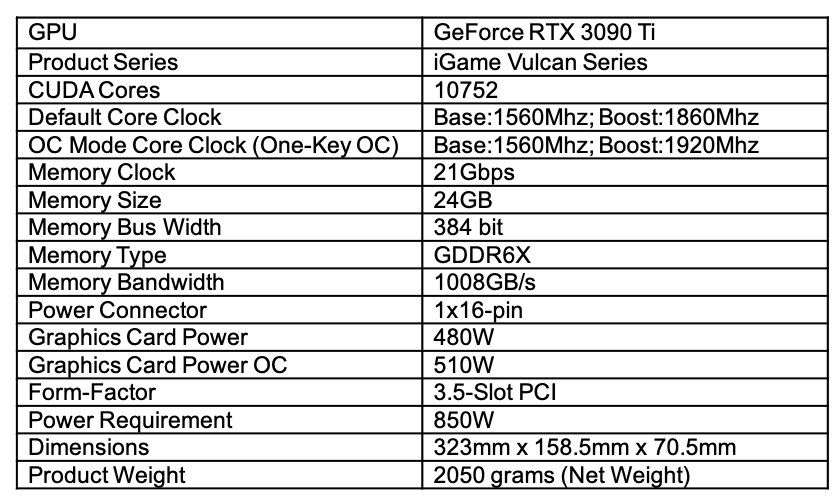
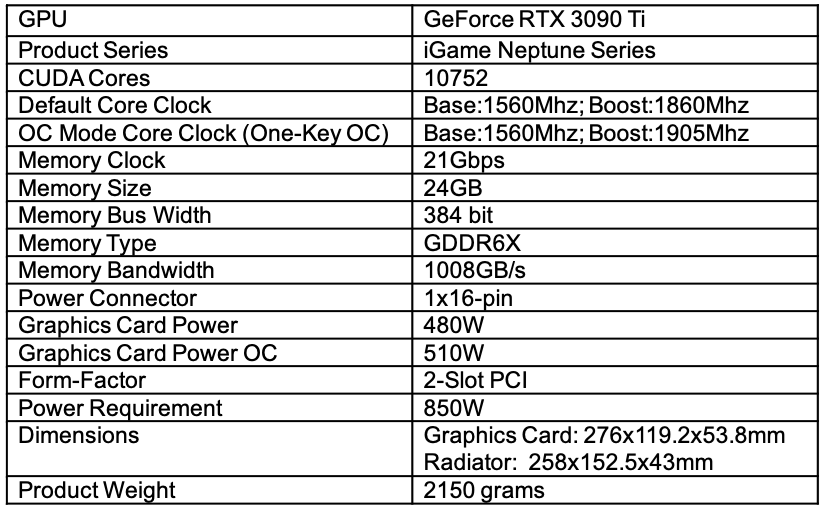
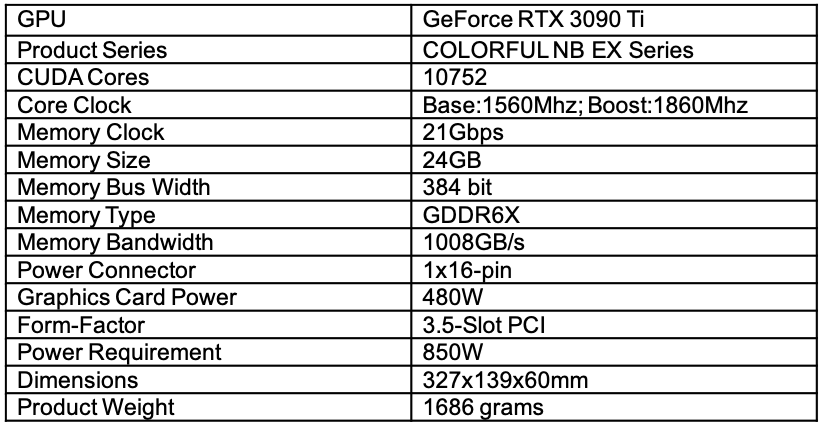
COLORFUL Launches GeForce RTX 3090 Ti Series Graphics Cards March 29th, 2021 Shenzhen, China – Colorful Technology Company Limited, a professional manufacturer of graphics cards, motherboards, all-in-one gaming and multimedia solutions, and high-performance storage, presents its lineup of GeForce RTX 3090 Ti graphics cards – NVIDIA’s latest and fastest gaming graphics cards to date. COLORFUL will initially launch a trio of models under the Vulcan, Neptune, and NB EX Series. The COLORFUL iGame GeForce RTX 3090 Ti Vulcan features a triple-fan design with a hollow back panel for pass-through airflow. The Vulcan model also sports a display for monitoring and customization. On the other hand, the COLORFUL iGame GeForce RTX 3090 Ti Neptune uses liquid cooling technology to deliver extreme cooling for extreme performance. Lastly, the COLORFUL GeForce RTX 3090Ti NB EX is fitted with a black and red themed triple-fan cooler design. NVIDIA GeForce RTX 3090 Ti Designed for the most demanding gamers, content creators and data scientists, the GeForce RTX 3090 Ti features a record-breaking 10,752 CUDA cores, and boasts 78 RT-TFLOPs, 40 Shader-TFLOPs and 320 Tensor-TFLOPs of power. And It's packed with 24GB of the fastest 21Gbps GDDR6X memory, providing 1TB/s of memory bandwidth. COLORFUL iGame GeForce™ RTX 3090Ti Vulcan The iGame GeForce RTX 3090 Ti Vulcan adopts the new 16-pin power supply interface introduced with the new GeForce RTX 3090 Ti Series graphics cards. The iGame Display on the side can be flipped 90° to stay visible even in vertical GPU mounting orientation. Being a massive and heavy graphics card, COLORFUL fitted the RTX 3090 Ti Vulcan with the Vulcan Support Frame. The graphics card also sports addressable RGB lighting that can be customized and synchronized with the rest of the system via iGame Center app. Key Features ● iGame Display: The iGame GeForce RTX 3090 Ti Vulcan sports a LCD display on the side with a 480x128 pixel resolution. Using the iGame Center app, users can personalize the display to show real-time system monitoring or custom GIFs or images. Use the 2-in-1 cable to connect the display to the card’s interface and to upload a customized display. ● Vulcan Support Frame: The Vulcan Support Frame enhances the stability and structural rigidity of the entire graphics card. This eliminates the risk of bending and warping as it supports the weight of the card. ● Hollow Back Panel: The iGame GeForce RTX 3090 Ti Vulcan adopts a hollow back panel design that allows airflow to freely pass-through the heatsink. This design greatly improves heat dissipation compared to conventional GPU air cooling designs. ● Dynamic RGB Lighting: The graphics card features dynamic RGB lighting on the Vulcan triangle logo, cooling fans, and metallic shroud. All RGB elements are customizable and support synchronization using the iGame Center app. Specifications COLORFUL iGame GeForce™ RTX 3090Ti Neptune The iGame GeForce™ RTX 3090Ti Neptune features advanced liquid cooling technology with its all-in-one liquid cooler. The Neptune’s liquid cooling component comprises a 240mm radiator and a newly designed water block making it more compact than the iGame GeForce RTX 3090 Neptune. The Neptune model also adopts the new 16-pin power interface. The graphics card sports dynamic RGB lighting on the Marine Eye that comes with an infinity mirror effect for sophisticated RGB illumination. The two 120mm cooling fans also provide RGB lighting. Neptune’s tubes are 500mm in length and use 360° rotatable fittings to allow easy installation and to support all mounting orientations. Key Features ● Compact: iGame GeForce™ RTX 3090 Ti Neptune uses an improved water block making it shorter than the RTX 3090 Neptune. At 258mm in length, the RTX 3090 Ti Neptune is a compact powerhouse with superb cooling to deliver extreme performance. ● Liquid Cooling: The iGame GeForce™ RTX 3090 Ti Neptune is fitted in a full-cover water block that provides cooling to the GPU, VRAM, and Mosfets as the coolant passes through these critical components. The cooler uses a 240mm radiator with high-performance 120mm cooling fans for fast heat dissipation. ● 360° Rotatable Fittings: The Neptune is fitted with 360° rotatable fittings for easy installation and to support all graphics card mounting orientations. ● Dynamic RGB Lighting: The graphics card features dynamic RGB lighting on the Marine Eye, side iGame logo, and 120mm RGB cooling fans. All RGB elements are customizable and support synchronization using the iGame Center app. Specifications COLORFUL GeForce™ RTX 3090 Ti NB EX The COLORFUL GeForce™ RTX 3090 Ti NB EX features a triple-fan cooler with an eye-catching Black and Red design. The cooler uses a combination of two 100mm and a 90mm central fan – all of which feature an upgraded thicker fan blade design. The GeForce RTX 3090 Ti NB EX also adopts the a 16-pin power interface. Specifications