

Welcome to ExtremeHW
Welcome to ExtremeHW, register to take part in our community, don't worry this is a simple FREE process that requires minimal information for you to signup.
Registered users can:
- Start new topics and reply to others.
- Show off your PC using our Rig Creator feature.
- Subscribe to topics and forums to get updates.
- Get your own profile page to customize.
- Send personal messages to other members.
- Take advantage of site exclusive features.
- Upgrade to Premium to unlock additional sites features.

pio
-
Posts
1,780 -
Joined
-
Last visited
-
Days Won
109 -
Feedback
0%
Content Type
Forums
Store
Events
Gallery
Profiles
Videos
Marketplace
Tutorials
Everything posted by pio
-
I haven't fully started trying to search yet for fixes but thank you, I'll check it out. Very well could be since its a first gen Phenom. I got a 6970, 5870, 3870, and HD2900XT all in over the last few days. Some 939 gear arrived. Been busy testing stuff, making sure its all functioning. I've got a 3GHz Toledo again though, and the same (but better clocking) board I had in 2005. This is gonna be good. Still waiting for all the parts to finish arriving, but I should have enough stuff on hand to test Windows 10 and "modern" type stuff on a 939 rig and the Phenom both. I also have RX 580's on standby to try out too (and my Ryzen 3600 rig as a whole for comparison). Of course, the goal was for having different OS's too, so that'll eventually be what they retire to. But I'm curious if 939, Phenom, Phenom II, Thuban, and FX are still relevant today. Kinda curious if old cards are still relevant too. So far, I've been impressed though even with the Phenom and 5870.
-
Well Cyberpunk didn't want to even load, probably nowhere near enough VRAM. Also I lack system RAM too, apparently that game requires 12GB RAM and I only have 8. The couple racing games I've tried work fine (GRiD 2, DiRT 4, Project Cars 1 / 2). Mafia - Definitive Edition was a no go. So seems like absolutely cutting edge / modern games will not run on it. But most everything else does. Does it max out the games at 5120x1440 at 120Hz? No. Does it play the games at acceptable enough settings to have a good time? Oh absolutely! I was rocking out Killing Floor 2 last night on it lol. I only ever had one FX setup so far (and now I regret selling it lol). From what I recall of it, it was a matter of CPU core speed, CPU-NB speed, and RAM speed combined all kind of mattered on FX.
-
Well, while waiting for my other junk to show up, some old junk arrived today. The HD5870 I ordered. I just finished dinking with it and getting it figured out with my new monitor. Phenom + HD5870 isn't bad. Plays GTA V at 3840x1080, Killing Floor 2 as well (both DX11 titles). For shiggles, gonna try out Cyberpunk 2077 on it, after the hour and a half it'll probably take to install it. It's odd since I have to use Eyefinity, but it does work. The 4890 I was stuck using split screen on a single monitor.
-
Sapphire ATI Radeon HD2900XT 1GB. Scored this one for $37 I think it was in a bid war. No thank you to the people above (although an Athlon XP rig is something on my list) on the GPU's. I'm now only missing the X1950, HD7970, and R9 290x for PCIe GPU's, with the exception missing a 5700XT (I think we all are wanting a high end card lol). This is getting to be fun hunting down all this tech history.
-
Yessir I did. Just pulled the trigger on a HD3870 too. I want, on hand, a rig from each generation from AMD / ATI. Down to K6, and up to Ryzen. I'm slowly getting there, Thuban and FX are going to be expensive still right now, and the K6 gear is expensive. The rest is actually pretty cheap. I'd go Intel / Nvidia too but then things get too crazy.
-
Socket 939 Opteron 165, CCBBE stepping. Socket 939 Opteron 180, LCBBE stepping, Socket 939 Opteron 175, CCBWE stepping A8N32-SLI Deluxe Pair of BFG Tech GTS 250 1GB's and SLI bridges eVGA GQ700w 5 sticks of Corsair XMS DDR400 CAS2 Probably some other junk I'm forgetting. -_- Even retro parts are expensive....... All is on the way currently, no pictures yet.
-
Also, updated my sig rigs. Little hint as to what's coming in the mail.
-
I don't think this is 110% accurate as I'm still under kinda heavy-ish (50%) load installing games on Steam and Epic still at the moment. But.....here's what I got so far. Memory / IMC performance isn't bad. About what you'd expect. For reference, my Ryzen setup I want to say was around 18,000MB/s read speeds out of the box untuned. It hits just over 30,000 tuned up. This Phenom rig is approximately "half" the performance in memory. DDR2 vs DDR4. Guess it makes sense. So far, I see no reason I can't use this rig daily still. It's just as usable as my Ryzen. I dunno about gaming on it yet, but GTA V does play at low / 900p. I only play old games as of lately anyway. This....plus the other old crap in the mail coming my way, ought to keep me busy over the summer. CPUz Benchmark Link: https://valid.x86.fr/jh5js9 AIDA64 Memory Bench:
-
That'd be Tropics I think you're thinking of. The Phenom rig runs Heaven fine though too. It runs at settings of "low" / 1080p, but runs smoothly enough (over 30 FPS). And...... Stable! Here's proof:
-
Well, slight update (no pictures yet, sorry)....... Ordered everything to build my next old new to me rig. I coulda bought a brand new laptop for the cost of this 15+ year old rig, but whatever. Parts are on their way now. Ordered a new monitor too, I badly needed one. And some Jeep stuff. And lots and lots of SSD's. That stimmy money didn't last too long in my hands, but whatever. Bills are paid, got money in savings. So......time to build? ________________________________________ On topic a little further: I was able to achieve somewhere in the realm of 3-3.1GHz out of the Phenom 9850. The 4x2GB DDR2 I was able to get as high as 480MHz CAS 5 seemingly stable anyway on the Phenom. I've never played with a regular old AM2 Phenom before, this is a whole different setup than Phenom II's were, wow. NB and HT Link both want to stay around that 1.8-2.0GHz mark. I'm getting it all figured out. SSD died in it already, so ordered a BX500 240 that just arrived today since I already have 9 BX500's around the house already, they seem like good drives. So bought 6 more. -_- Still looking for potential benchmarks / games that I could get running on all these "old" rigs. GTA V plays on the Phenom.
-
Yeah just finished a little stability testing on the x3 last night. Best I can get the board to run at is 260 FSB. Highest CPU-NB clocks I can achieve are around 2.6-2.65GHz or so. Any higher and it breaks things from BSOD'ing. Needs CPU-NB voltage adjustment, and it doesn't have that. Same as my old DFI DK 790FX I had years ago. That's why I was saying this 790GX board I have just isn't good enough for a Phenom II. 2.6GHz NB isn't enough.
-
Already checked my trike, it won't unlock a core. You got really good results out of that B55 though, wow. This 790GX board I have currently has ZERO CPU-NB voltage adjustments, so a Phenom II is a no go on this board to PROPERLY tune it. I can get about 2.5GHz NB clocks and that's about it. Phenom II's love 2.8-3GHz+ NB clocks.
-
That'd be a negative. I don't see a market here? I do need to find me some really good DDR though, probably not OCZ sticks though, as those won't work on the board in question that I just bought. I forgot about the 9950. Oops, that woulda been a little better at stock, oh well. I have a Phenom II x3 already its in there for testing. This board wasn't good enough for a Phenom II though (my 790GX), and a HD4890 is too weak of a card to pair with a Phenom II too. That's why I chose a Phenom for this build.
-
Okay well I just did a thing today. Not going to say what just yet. "Phenomenon" is up and functioning fully with all 8GB RAM, SSD, etc. I'm still missing a Phenom 9850 since the one I bought arrived damaged.....grrrr. But its got Windows 10 on there with the x3 720 I have for now. Ordered another 9850 for it, it should arrive this week sometime. Got some stuff on there to play with too, it runs DX11 with the 4890. Never thought I'd see that. I won't give away any secrets......but anybody that knows me from OCN will know what I bought today. I'll give you a hint, I'm now in the market for DDR-400 sticks or better. I still hold the #11 spot on hwbot too. This is gonna be GOOD!
-

The "Show Me Yours And I'll Show You Mine" Thread
pio replied to PCSarge's topic in Office/Gaming Spaces
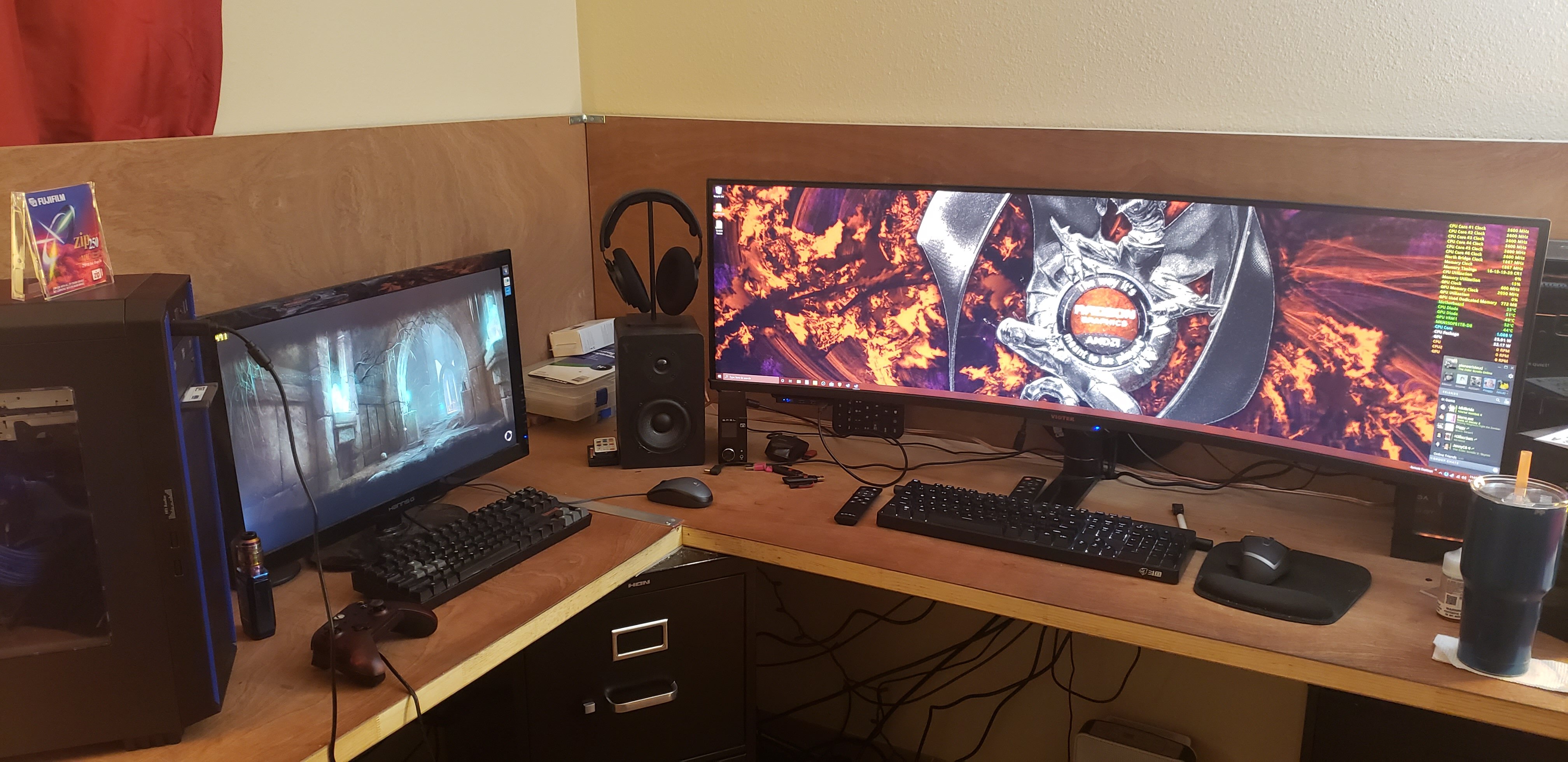
It's only 2 walls. :p Once I stabilize the desk some with some tube steel later this year, I'll be mounting my monitor to a giant arm in the corner so it can swing, speakers attached to it too. The idea was giving me not only a desk for my computer, but also a workbench. :) -
Just finished Doom and Doom 2. Working on Doom 3 coop now. Mechwarrior 3 and Quake are on my list next.
-
The "Show Me Yours And I'll Show You Mine" Thread
pio replied to PCSarge's topic in Office/Gaming Spaces
This would require cleaning up my mess. I'll sub, but I won't post a picture till I feel like cleaning. Might be a while lol. I've got tools, coolers, GPU's, paper towels, syringes (TIM), toolboxes, random parts in boxes that need installed........ and of course, random toys (I have a 6 year old) strewn all over my desk. Oh screw it....... (Rig is in my sig, "AMDerp"). "Screen", for now, is an old 1080p Insignia 40" LED TV (has the famed LG panel in it). Running at 1440p VSR. -
To answer the question at hand (sorry for double post, its intentional but so I can separate joke from actual help)....... If the TV is light enough in weight, honestly drywall anchors aren't so bad if you get good ones. I've successfully had up to 50" TV's just fine on drywall anchors. I personally wouldn't mount a big one again obviously with anchors, but anything under a 50" should be fine with anchors really. Assuming its a smaller TV (under 50"), just get a monoprice bracket and use the included drywall anchors. They're quite heavy duty (for drywall anchors). If you're looking for some sort of an adapter to actually utilize the power box....don't. You'd be better off using 2x4's on nearby studs to make a platform.
-
Oh absolutely! I can help! Here's a tech tip....... DO NOT EVER USE DRYWALL ANCHORS! ALWAYS FIND A STUD. IF NO STUD, USE 2X4'S ON THE STUDS TO MAKE A PLATFORM. Yes, I had to yell that. This was a very VERY sad and expensive loss. I never even got to watch a 4k movie on that. 75" TCL 6 series that I had owned less than a month. It took it literally 5 hours to fall off the wall. Was late at night, so I had absolutely no assistance to pull it down safely before it fell.
-
If its on my NAS, I've ran it lol. I don't RECALL using it, no. I only ever used Crysis as a benchmark and, "look at all the purdies!".
-
Just.......well, the song speaks for itself on my mood at the moment. ?
-
I still have that mod saved on my NAS actually, as well as that graphical enhancement pack another other forum member had posted. Real Lifesys I think it was called. Good times, good times. And you really should feel good about that chain of events, and thank you for sharing it with us all here. Not very many people can say that they've personally made content and its been shared and used worldwide. That's absolutely an accomplishment.
-
VDDP, no. Well, yes and no? That's the one that I believe the guides said to set to 1.05v. I had tried upwards of 1.10-1.15v yes. Pretty sure its still sitting at 1.05v right now though, maybe 1.10v. I noticed zero difference with this setting. SoC, I have 2 settings for it and I could be using the wrong one maybe? I'd have to reboot and double check for sure, but I'm about 99% sure I have it set "correctly", and yes I've raised it as high as 1.295v trying to get things tuned. I believe I have it sitting at like 1.125v right now for 1866 IF clock. Again, I have noticed absolutely zero difference changing this setting either. I can get to 1866 IF using all auto settings and just adjusting IF and memory dividers and nothing else.
-
Oh by all means I agree completely with that. I wasn't expecting even SB level overclocks, or even Nehalem level overclocks. Hell, I wasn't expecting Core 2 Duo overclocks, or even FX level overclocks. I just wanted to see PBO speeds as advertised on the box on all 6 cores instead of just 1. I figured it could do at LEAST that much since it does at stock with one core at a time. Guess not lol. But I'll try BWG's advice next tweaking session, probably over this weekend while I'm building my Phenom build up (again).
-
Thanks. I mean really PBO @ 4.275 mostly all the time on all cores (so gaming) is fine. Folding I sit around 4.05-4.15GHz depending on the core (more at 4.15). Overall it performs amazingly well and I'm super pleased with out of the box performance. It's just....dang, there's NOTHING to tweaking these things at all. Buy the right parts, plug in the stock / tuned numbers, and bam, you're good to go. There's no fun in that. Dude, I got in at 4.5 and primed till I saw 105*C. Really wasn't very long, like 5 seconds, but still. Didn't even think about it since voltages were all "safe" (I think that was 1.375v). That's why I know this is a good chip, if I can figure out how to get over 1.275v to run without overheating lol. I don't have any proof on that, and since I now KNOW I have a cooling problem somehow I'm not trying it again anytime soon lol. So for now, we'll assume I get 4.275 off PBO lol. Nothing else I've ran seems to work quite right just yet. Isn't 1.275v kind of a really low voltage wall to be overheating at? I mean really it should be closer to 1.25v if I want to keep under 90*C. Everything I've been reading seems to say 1.35v is normal, even stock. Hell, PBO gets to 1.45v at times. I have messed with my PBO settings as best I can per the Ryzen guides floating around other forums. Never thought to check p95 like that and set the PBO accordingly. I'll have to write that down and see if my BIOS has those options, or pull up my manual or something lol. Does that temperature drop result in higher PBO clocks or something? I'm boosting decently enough as is, and full load temps using PBO aren't horribad since it downclocks. I'd just like to see all 6 cores a little higher under full loads since I know all 6 cores can clock higher and do. I mean I could probably pull off a 4.25 all core no problem and keep temps under 90C SmallFFT's (folding about 75C). I dunno, I'm still learning these things and so far not all that pleased with tweakability at all. -_-
