Welcome to ExtremeHW
Welcome to ExtremeHW, register to take part in our community, don't worry this is a simple FREE process that requires minimal information for you to signup.
Registered users can:
- Start new topics and reply to others.
- Show off your PC using our Rig Creator feature.
- Subscribe to topics and forums to get updates.
- Get your own profile page to customize.
- Send personal messages to other members.
- Take advantage of site exclusive features.
- Upgrade to Premium to unlock additional sites features.
J7SC_Orion
-
Posts
2,211 -
Joined
-
Last visited
-
Days Won
96 -
Feedback
0%
Content Type
Forums
Store
Events
Gallery
Profiles
Videos
Marketplace
Tutorials
Everything posted by J7SC_Orion
-
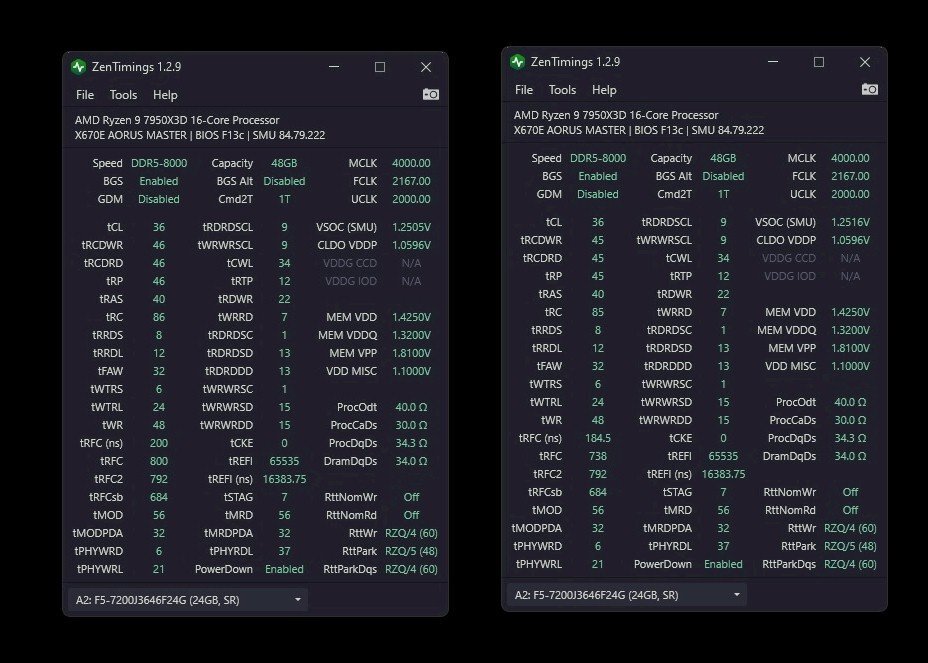
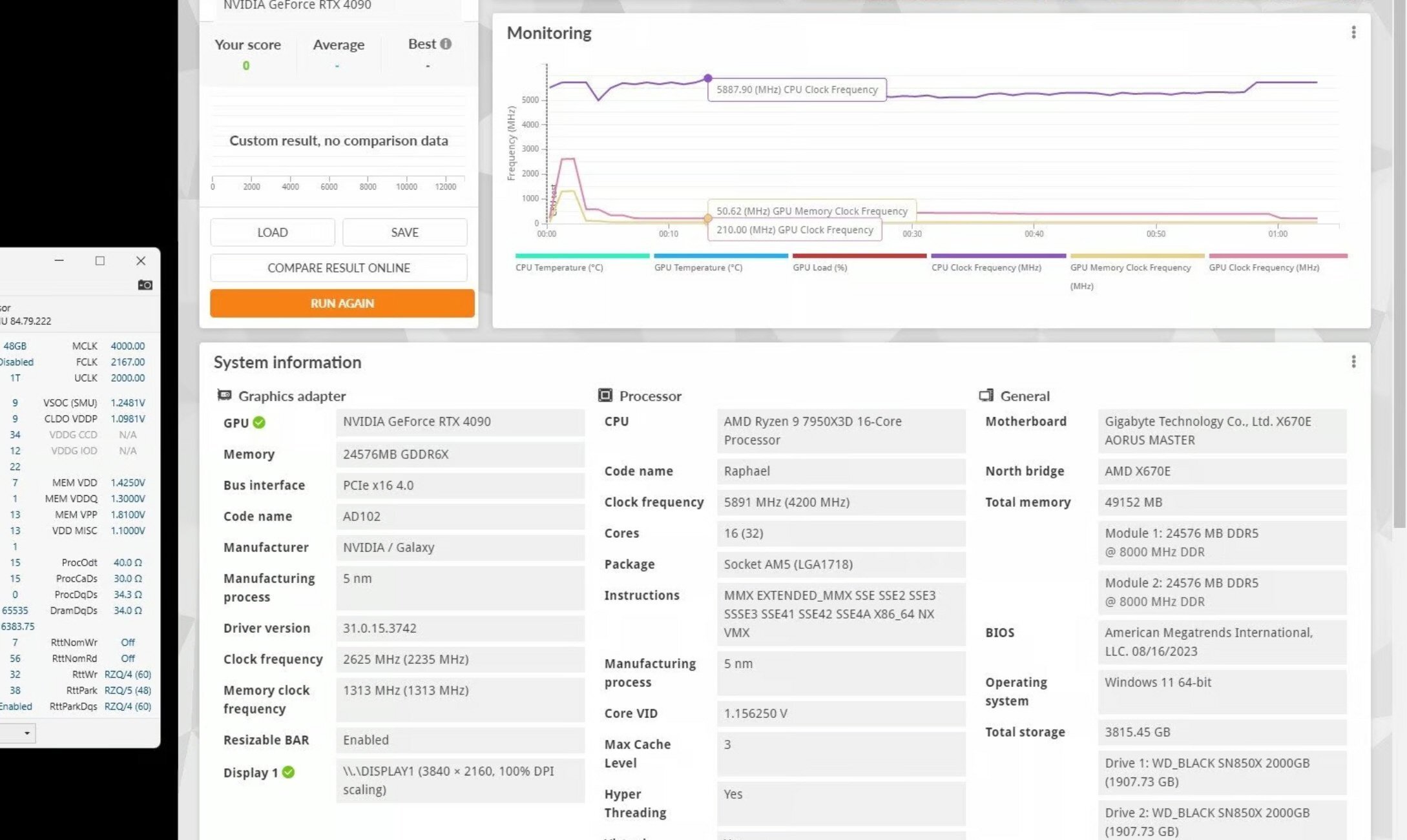
...just for the record, while both DDR5 8000 settings pass long RAM stress-tests, the one on the left is my 'normal' every day one. The differences to the 'tighter' one on the right are minute in for example games, and it never hurts leaving a few steps of space between the abyss and every-day fun. Per-core CO on the other hand has some real and obvious pay-offs. I have got the per-core done for the 'standard' bclk 100 / 8000 but am still working on per-core CO for eclk 104 / 8000 though I have a decent working-set locked in...final steps in CO require a lot of repeated testing across the board.

-
...RGB works great both via Aorus mobo setting and also Open RGB
-
...chocolates and flowers !
-
...decided to go for the slightly tighter of the two tested profiles for now (36-45-45 instead of 36-46-46, and tRFC to 738 from 800). When I have more time, I will try to lower tRAS and later on, also lower and re-test tCL as long as MEM VDD does not exceed 1.45 V. I know tCL 34 at DDR5 8000 won't work at 1.4V
-
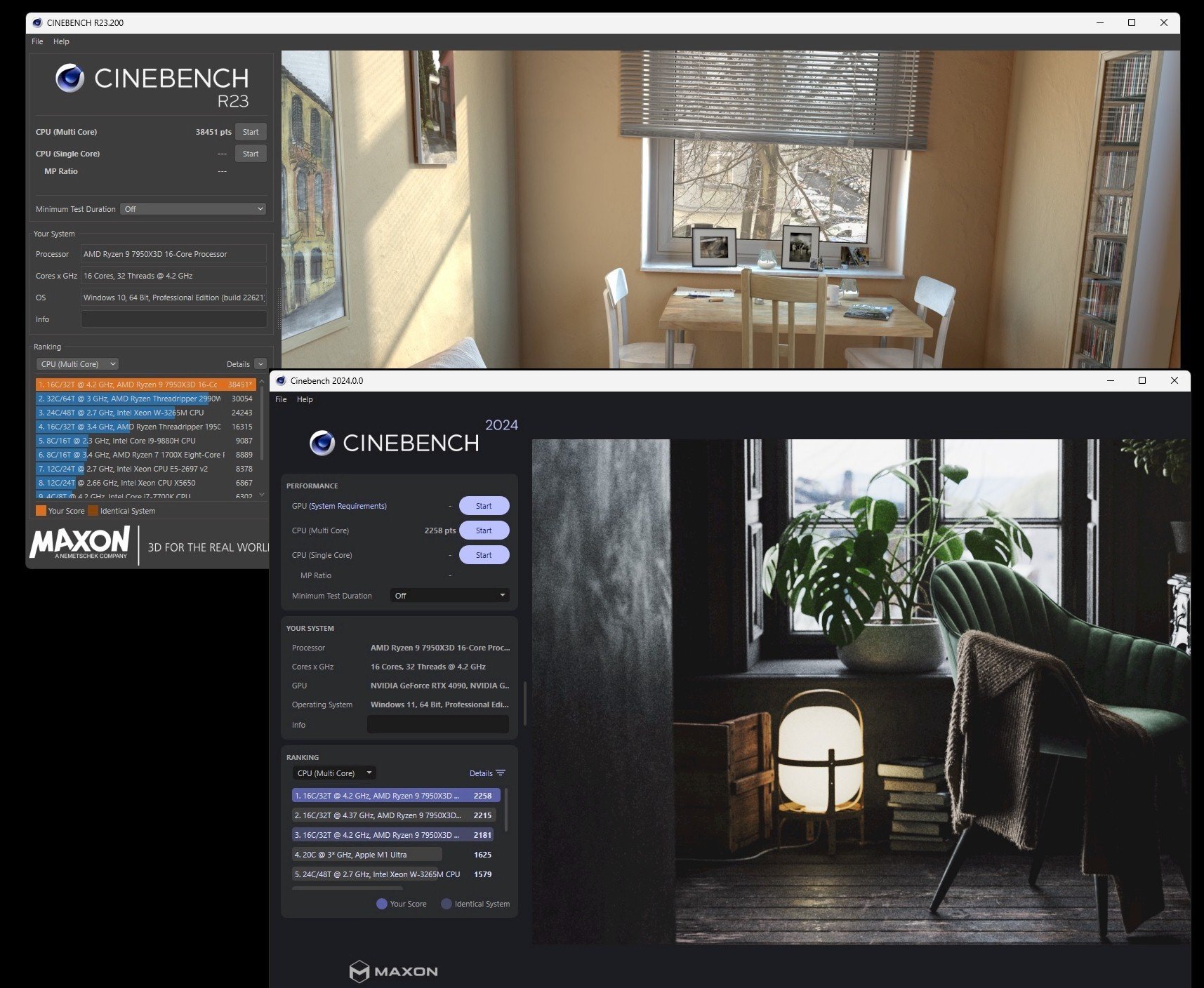
Now looking ahead to CPU tuning after your RAM is all locked in, you might want to use corecycler and Hydra 1.3x Pro (or higher) to get to your specific per-core CO if you haven't already done so. FYI, I did my own all-core and best-guess-per core CO, then used those two tools to confirm / deny. My 7950X3D is a bit of a weirdo, but I ended up setting '-6' from 'per core max' across all per-cores, noting a.) that I was running a base of 90L5 (a secondary but cumulative CO settings with my Aorus 670E mobo) and b.) -6 off the recommended max CO level for each core (from as much as -48) works just great. Superb single and all-core results in CineR23/24 (see above) and no crashing anywhere, anytime, and 'zero' WHEA. I like it...I like it a lot ! After RAM tuning, per-core CO awaits you, @ENTERPRISE
-
Not much to add, @kaliz already got it covered better than I could. FYI, I keep V_SOC at below 1.26 V and VDDQ in the 1.3s and yeah, as already mentioned, either go to 1:1 for 6400 and below, or 1:2 for 7800 and higher
-
...all in the name of science: Running through some of my fav games with the modded 7950X3D / 4090 combo while generating detailed numbers in HWInfo for 4K Ultra play
-
...now that my C1 OLED pixels are clean and scrubbed, it's back to eye-candy...
-
...reminds of an older system (an Intel 8C/16t 5960X ROG Rampage LGA 2011) that sort of drove me crazy. It had a name: Nemesis. Time and time again, the relatively sane oc setting on Nemesis would pass every single short, medium and long stress test but once every 5 weeks or so, it would just throw (always different) errors and reboot int he middle of something. After resetting and testing everything, it would be fine again, until the next time...eventually, I gave that whole system away (set to stock speeds) since I still had a 5960X ES left over from another project. More specific to your current sinuation, I would browse Buildzoid's channel for settings of other RAM types (rather than the specific 24 GB / stick new M-die I had linked). I know he did some earlier ones for A-die, and also the initial-release 'M-die'
-
...Pixel cleaning won't fix really 'dead' pixels but they can get stuck on a specific colour, including black - have to figure out which one is which. Using an all-black background (desktop setting will do) and then an all-white and an all navy blue one usually helps to identify which pixels need attention cleaning. The one pixel that needed attention on my C1 was dead center both horizontally and vertically...as mentioned, I did two rounds of pixel cleaning. The pixel had clearly improved by more than 50% after the first round (recalling that it was stuck white-green). Second round seems to have fixed it.
-
...I had one pixel on my C1 that was stuck on white-greenish, so not 'dead dead'. If you go into the LG menu, look for support > OLED Care > OLED Panel Care > Pixel Cleaning... takes a bit more of an hour (per onscreen instructions, can't use the monitor/tv then), but it will turn itself back on when done. I had to do two rounds and then it was back to normal.
-
...after close to 2.5 years, I finally had a 'stuck pixel'...two rounds of the Pixel Cleaner option and that was that, for now at least. Also: OLED 48 + 4090 + 7950X3D + DLSS 3.5 w/ ray reconstruction =
-
 DLSS3.5 coming for FS2020 ...some Vancouver fly-bys ...and some Miami / Miami Beach
-
V_SOC is a bit of a two-headed monster which fights with itself; high RAM clocks want it one way, but high InFin speeds the other way. It took me a while to find the common ground between the at 1.255 V_SOC for InFin at 2167 MHz and DDR5 at 8000. I don't know much about your specific CPU and mobo/bios, but if you have the latest bios and thus AGESA loaded, I would start with V_SOC at 1.25 V and the same for DDR_VDDQ and CPU_VDDIO_MEM. BTW, you likely will have to do two separate profiles - one for 1:1 (ie 6400) and one for 1:2 (ie. 8000). Best to lock one of the two in first (I settled on 1:2 8000 quite early on due to the specific type of new M-die 2x 24 GB). Once you get to 1:2 dividers and around 8000 MHz DDR5, you can test out V_SOC again at 1.25 V_SOC to 1.26 V_SOC but raise DDR_VDDQ and CPU_VDDIO_MEM to 1.3 V. Folks usually start out having these two the same but each mobo / chip combo can be different. Apart from TPU's Memtest64, I also use y-cruncher by itself, and the latest version of OCCT. I have not used Hydra Pro 1.x (1usmus) for RAM yet but I think it has a RAM stress / stability section for it as well . FYI, I had someone suggest the other day to run Karhu at (3x 30,000=) 90,000 % . You run these things long enough and error will creep up which is why servers have the full-meal EEC deal onboard.
-
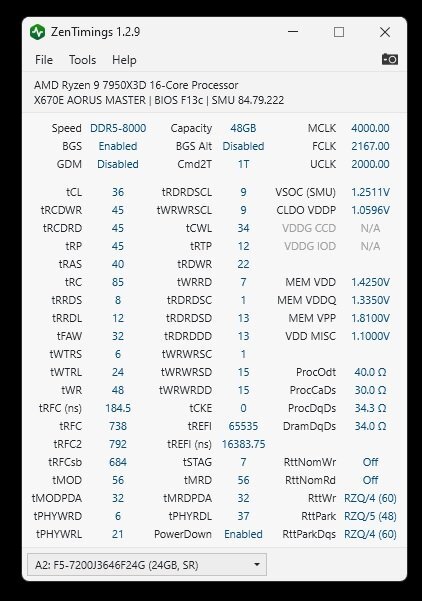
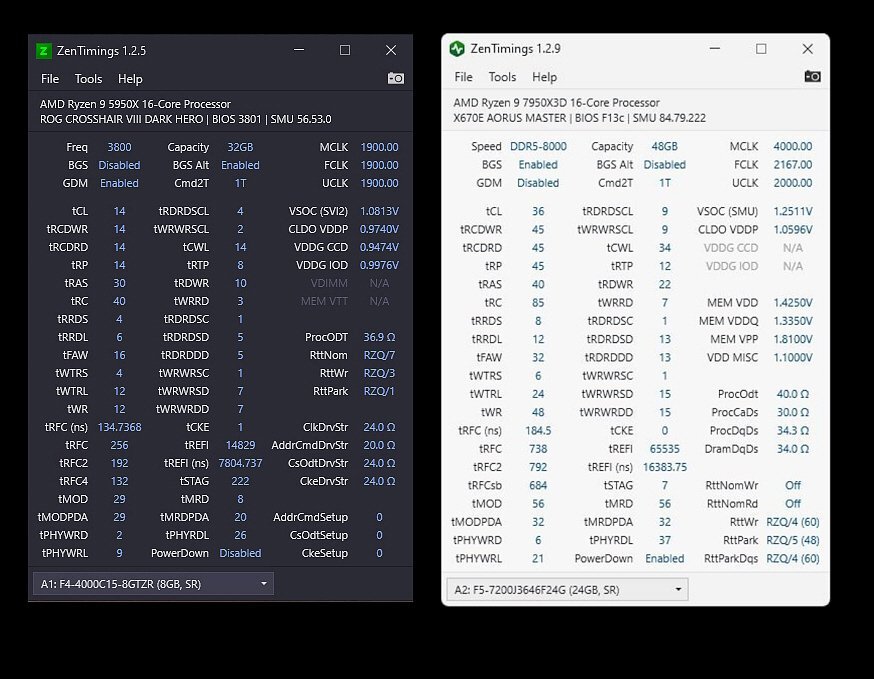
...this seems to be geared towards Zen3...below on the left are Zen timings for my 5950X and on the right is the 7950X3D. They are different animals to some extent. For V_SOC on the 7950X3D, 1.3 V is supposed to be the safe max but I stay well below that, even at the speeds I am running. Some earlier bios would automatically push that to 1.4 V and above when enabling EXPO (or XMP) and that led to several such CPUs frying themselves. The MEM VDD is the main DDR5 voltage and I have seen folks push 1.7+ V with extra RAM coolers. My M-die comes in the 1.35 V, 1.4 V (and possibly 1.45 V) as nominal values from the factory so the 1.425 V I set it at is not a worry. FYI, I have lowered MEM VDDQ below a bit to 1.325 V since that screenie was taken.
-
I finished with all the memory tuning and finally got around to do per-core CO. That said, the Aorus board also has a 90L5 'all-core' setting on top which I did leave in place when doing the per-core CO tests. Below is for stock 100 bclk / DDR5 8000 and using the balanced Power Plan in Win 11 Pro . Translating that into my fav eclk 104 setting is going to be tricky since I am running a negative boost cap on that to compensate for the 4% increase in CPU speed - the 7950X3D (fortunately) does not allow me to set a positive v-core offset on CCD 0 at least. All this means that I probably have to run positive CO values for eclk 104, rather than the negative CO for the stock bclk. FYI, I among other tools used Hydra Pro to validate my CO for bclk though for now, I am staying below the 'max CO' by -4 or each core.
-
...I do use Aida but get Buildzoid's point(s). For general memory testing, I use OOCT / RAM and also highly recommend "memtest64" from TechPowerUp. It doesn't show you the actual latency but is a good test to run for final stability (ie. 10 loops min). I believe Hydra 1.3Pro also has some RAM test w/ latency but I'm just using it now to get per-core CO values. So far (ie below), I've just been using all-core trial+error...below is a fully stable eclk 104 screenie with all-core - these things can clock !
-
...re. tFAW, here is a time-stamped segment by Buildzoid running DDR5 8000. He explains the relationship between tFAW and other parameters (ie. tRRD_S). At lower RAM clocks both can be reduced but their relationship has to stay intact
-
...DDR5 setups are a bit trickier than DDR4 IMO - DDR5 has 'some' error correction code (re. single bit memory errors) though it is not the full ECC with an additional chip on the DIMM (per Corsair's web site). Because of this 'ECC Light', finding the edge of the canyon takes more testing. On my DDR4 systems I have GSkill GTZR Samsung-B for years and years, ezee-peezee to set up. DDR5 will take some more time to master. Apart from lower primary timings and maxed InFin, tRFC in secondaries also help with higher bandwidth and lower latencies, but it looks like you are already doing well on tRFC. I do wonder about your tFAW '15' in your Zen Timings screenie above, btw. It might be that your systems is just ignoring it - 15 is super low for DDR5 ...btw, Unigine's Superposition 8K does give your system memory a bit of a workout as well once you have run the usual RAM stress tests which can be a bit boring. At least Superposition 8K is s.th. to look at and listen to while waiting for it to do its thing.
-
...in addition to what @kaliz mentioned, a higher speed on the InFin fabric will also cut latencies though 2100 FCLK you showed in your post is nothing to sneeze at. I can run 2200 but typically have it at 2175 (2167 + Aorus 'bonus boost')
-
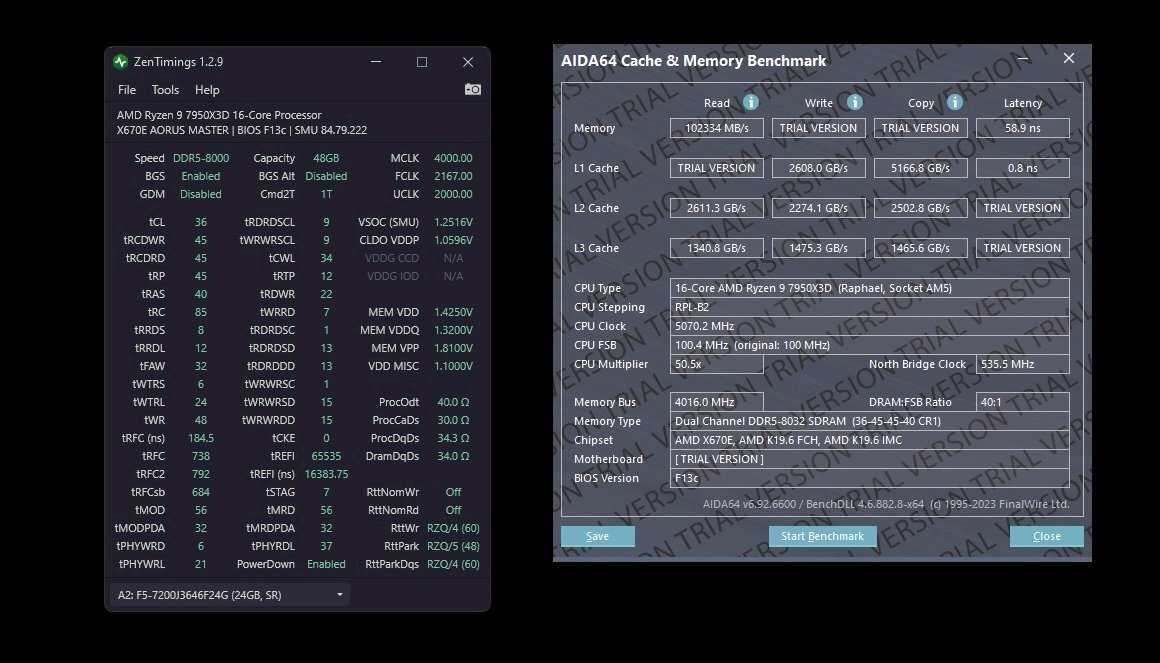
...yeah, I run mem DIV/2 at DDR5 8000. According to Buildzoid and a few others, DDR5 7600 speed is were DIV/2 becomes more or less worth it over DIV/1, at least in many more modern apps (think also resizable_BAR). As to latencies, I have now arrived at / dropped to the high 50 ns range in Aida bench, after much additional tuning. Things such as disabling PowerDown Mode and GearDown Mode give you an extra push in at least Aida cache and memory benchmark. That said, while I have disabled GearDown because I dropped a few primaries to 45, I re-enabled PowerDown again - sometimes, disabling it can lead to intermittent and hard-to-track oddities. Given the most recent AGESA updates which opened up a whole new world for Ryzen RAM clocking, a bone-stock 7200 kit at DIV/2 starts in the low to mid-70s ns latency - but the stock XMP and/or EXPO settings are soooo generous for the vendor as to not throwing any surprises (and RMAs). A well-tuned but 24/7 '''sane''' multi-purpose work-play setup should get to 59 ns - 64 ns range, depending on various factors such as your mobo's topology, your specific RAM kit and such...and I have seen low 50ies (51.x) ns on the 7950X/3D some folks showed w/ their Aida, but only with very high voltages. I have three rules for my 7950X3D build re. voltages (and related temps): 1.) V_SOC has to stay in the 1.25X V range (up to 1.30 V is considered mostly 'safe' even after the bubble-burns on the socket / CPU underside earlier in the year), and 2.) VDD DDR has to stay in the 1.42X V range. My RAM's stock voltage is 1.35 V, with many newer DDR5 high speed kits even at 1.4 V or 1.45 V 3.) Cool DDR5 is happy DDR5 - I have some extra Arctic P12 fans right above the DDR5 RAM - this kind of RAM gets hot (including PMIC) and you want keep it in the low 40s at most when under stress. Many folks resort to water-cooling as DDR5 has some fundamental differences (and heat sensitivity) compared to DDR4 Samsung-B, for example Final advice: Open your favourite beverage before diving into the RAM-tuning-and-stress testing rabbit holes (there are many of them)...it's going to take a while and a lot of testing...
-
...new patch today (DLSS update ?). After downloading a new driver for Cyberpunk 2077 w/ DLSS 3.5 ray reconstruction and path tracing, still found the time for a quick local flight...below is a parking lot of a nice pub.
-
Rejoice ! DLSS 3.5 for CP2077 with ray reconstruction is here
J7SC_Orion replied to J7SC_Orion's topic in Nvidia
...on the surface, just a frosted window in a back alley in the screenie below, but what's wild is that can look inside and the perspective changes as you move around....also, game-play seems much edgier and violent, even when 'just roaming'
- 1 reply
-
- 1
-

-
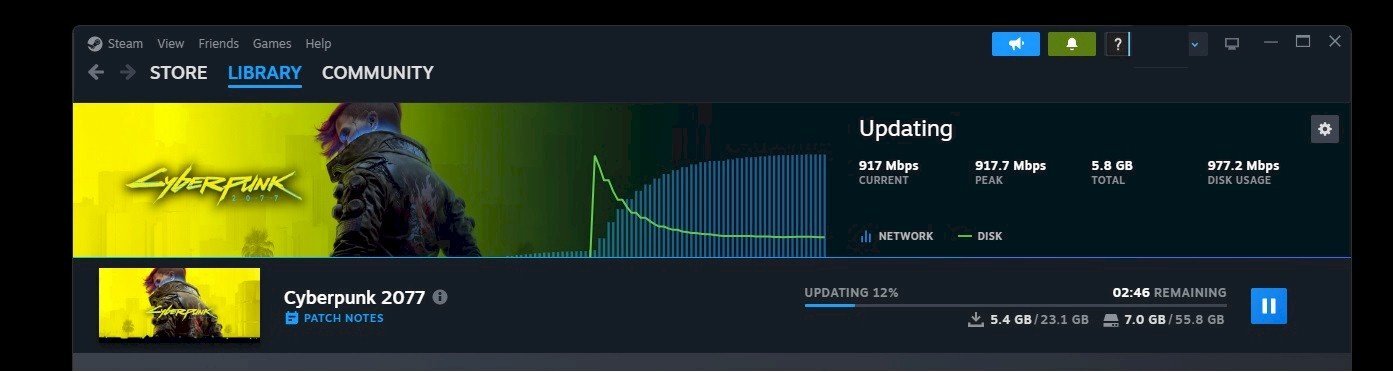
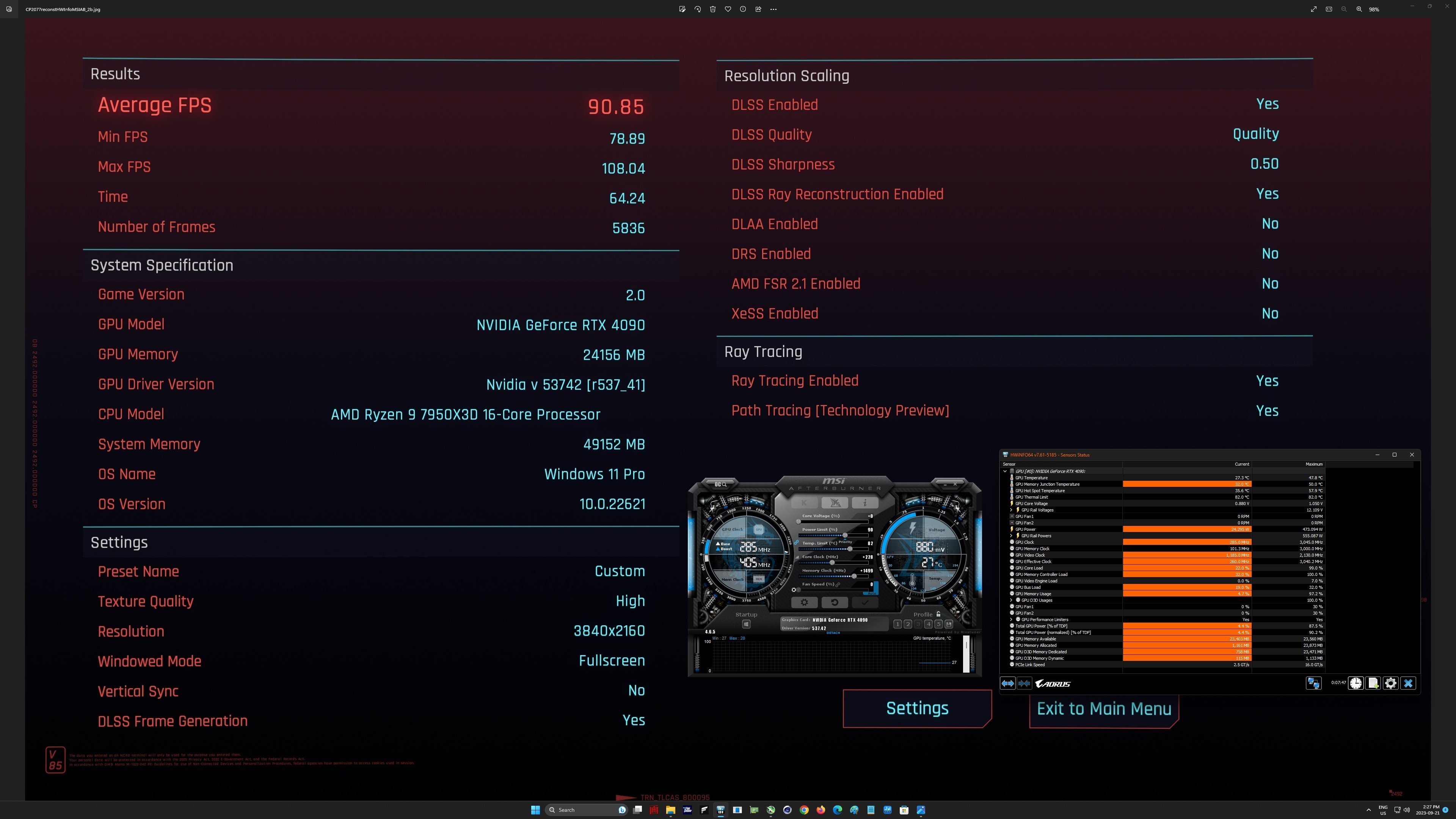
...had a few rounds roaming in-game and a quick benchmark in Cyberpunk 2077, after downloading the latest NVidia driver and a huge patch from Steam...it is worth it ! DLSS 3.5 with Ray reconstruction and Path tracing is faster than DLSS3 with (just) path tracing before. I had only a very mild 'oc' on the 4090, but it was still way beyond expectations (7950X3D doesn't hurt) ... looking forward to clock this up fully and also add some screenshots, suffice it to say it is gorgeous. As an aside, I like and play the new Starfield, but in certain scenes such as those with water or open fire, it can't measure up to CP 2077, never mind ray reconstruction which is not only faster as before but also unloads a bit from the CPU. Then again, Starfield has also announced 'official' support for DLSS 3.X (?), though unofficial mods for that are already out there
-
...here you > go ...and the latest Zen timings I use for DDR5 8000

.png.5ebcb2c4b8d3150c9335588a53617370.png)
.png.0af826b58ad24878330c2e60ead0735c.png)
.png.9b3aaef767302616c6de6b07a58cca61.png)
.png.bc91b96efb88f761e1d98924ea437227.png)
.png.be086a49e295a60c30b2e0c7c8757b4c.png)
.png.43f0cb06d8a348d2293f90070252028b.png)
.png.6d8c0996cc684c640fd381f5bbb1a185.png)
.png.56e09433de8c8089831a12f674724bc3.png)
.png.e4d18f995c4fbd3418b4b81ef06a635c.png)
.png.668cc5b3ac2c4e63960b39074c199770.png)
.png.03c651c2d8dbf331565685425c0af65d.png)