Welcome to ExtremeHW
Welcome to ExtremeHW, register to take part in our community, don't worry this is a simple FREE process that requires minimal information for you to signup.
Registered users can:
- Start new topics and reply to others.
- Show off your PC using our Rig Creator feature.
- Subscribe to topics and forums to get updates.
- Get your own profile page to customize.
- Send personal messages to other members.
- Take advantage of site exclusive features.
- Upgrade to Premium to unlock additional sites features.
J7SC_Orion
-
Posts
2,211 -
Joined
-
Last visited
-
Days Won
96 -
Feedback
0%
Content Type
Forums
Store
Events
Gallery
Profiles
Videos
Marketplace
Tutorials
Everything posted by J7SC_Orion
-
...yeah, path tracing is pretty resource-intensive which is why DLSS3 + FrameGen + NVReflex are so important...I believe that all RTX4xxx can employ those techniques, not just a 4090, but it is probably better to use a 4089 or 4090 for path tracing on 4K settings. On another note, I mentioned the Unreal 5.x engine above - the demos I have seen are fantastic (as one would expect for demos), but perhaps it can also get to a form of path tracing in a more resource-efficient way; we'll see. Somewhat related, I would love to see non-DX drivers such as Vulkan to adopt similar tech and features - perhaps I am 'dreaming in technicolor', but a nice Linux-based system able to run major titles natively with the same eye candy as DX would be, well, a dream...
-
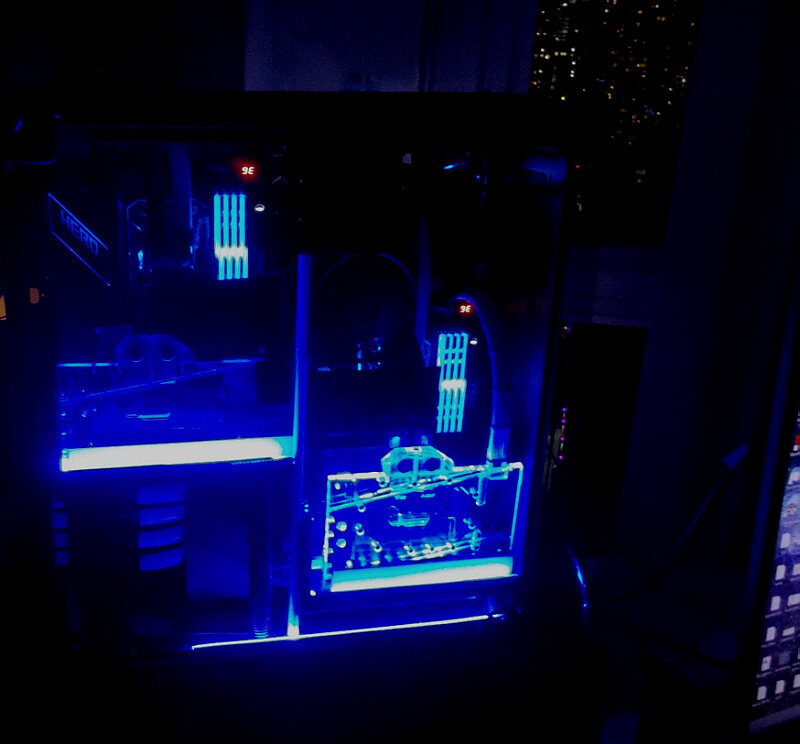
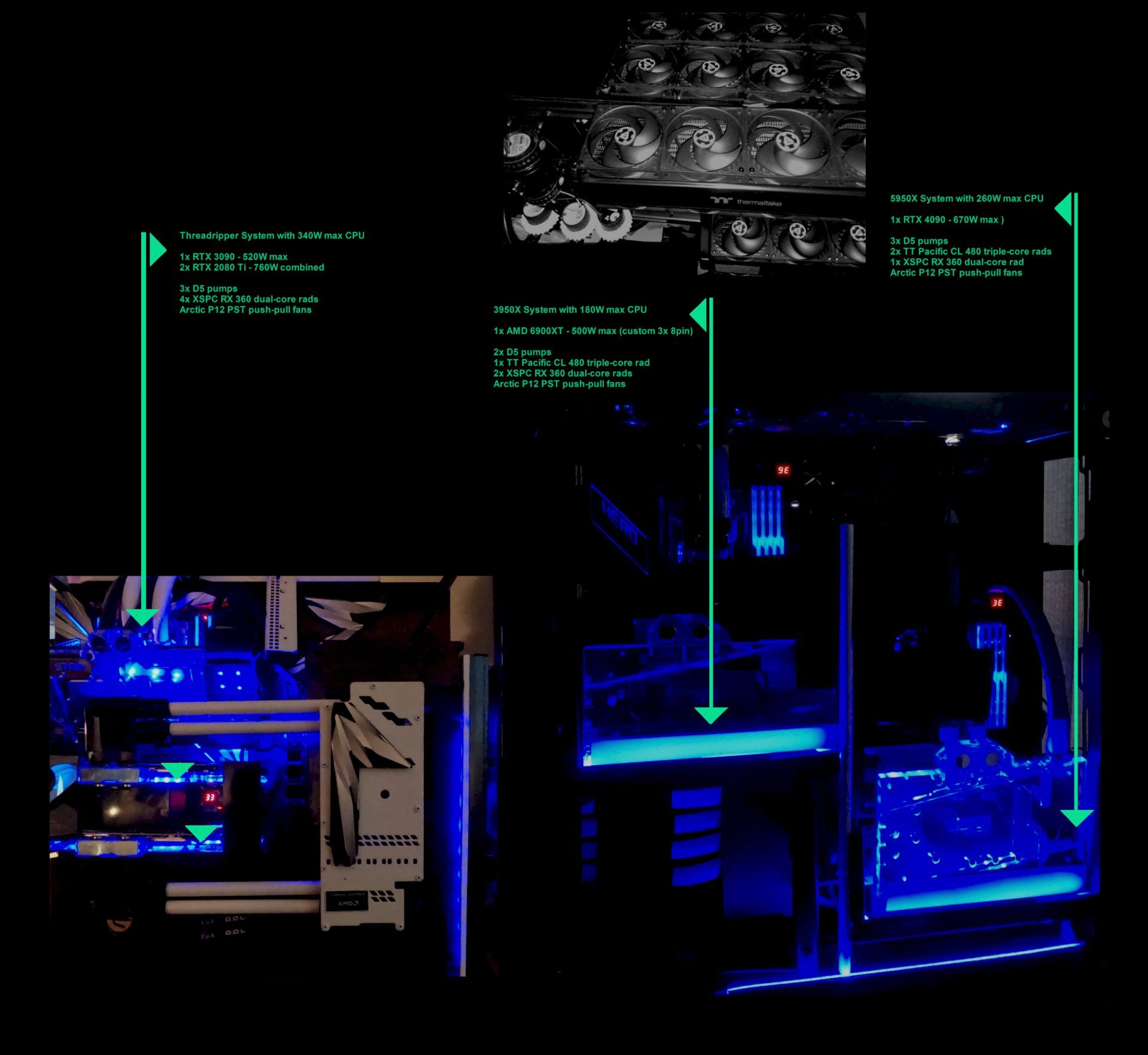
Custom cooling summary: All tubing is 1/2 x 3/4 and the quick-disconnects are all Koolance QD4s

-
 ...obviously, I like the upper screenshot of GT7 better. As to FS2020, it has been steadily improving - and I am surprised at the detail when photogrammetry kicks in. Using the Volocopter in a place like New York City and landing in the streets is a good way to get much closer to the buildings, and only then can you see that it is 'not real'. On another note, I using the new path-tracing in Cyberpunk 2077 > very nice, but at a huge resource costs (Watts, fps). I wonder if we ever get path tracing in FS 2020; for now I think that few if any GPUs could run full path tracing in FS 2020 given all the light reflections and fast-changing angles.
 -
ahem ? That first segment pilot of the A380 flies like I do
-
Here are some of my fav screenshots with the new path traced tech. These are the original size (4K) and .png to try to get some visual fidelity across...later on, I will use smaller .jpg conversions. --- It would be foolish to judge path tracing on the basis of just one game, but it clearly does show tremendous promise, albeit at a very high resource cost...if you have a system you use for 4K and can get decent fps and frame times at DLSS 2, 3 Quality or FSR 2, you are not missing out that much yet compared to the full-on path tracing, but if you can run path tracing with your RTX 4xxx (and later gens), you're in for a treat, with more to come...
-
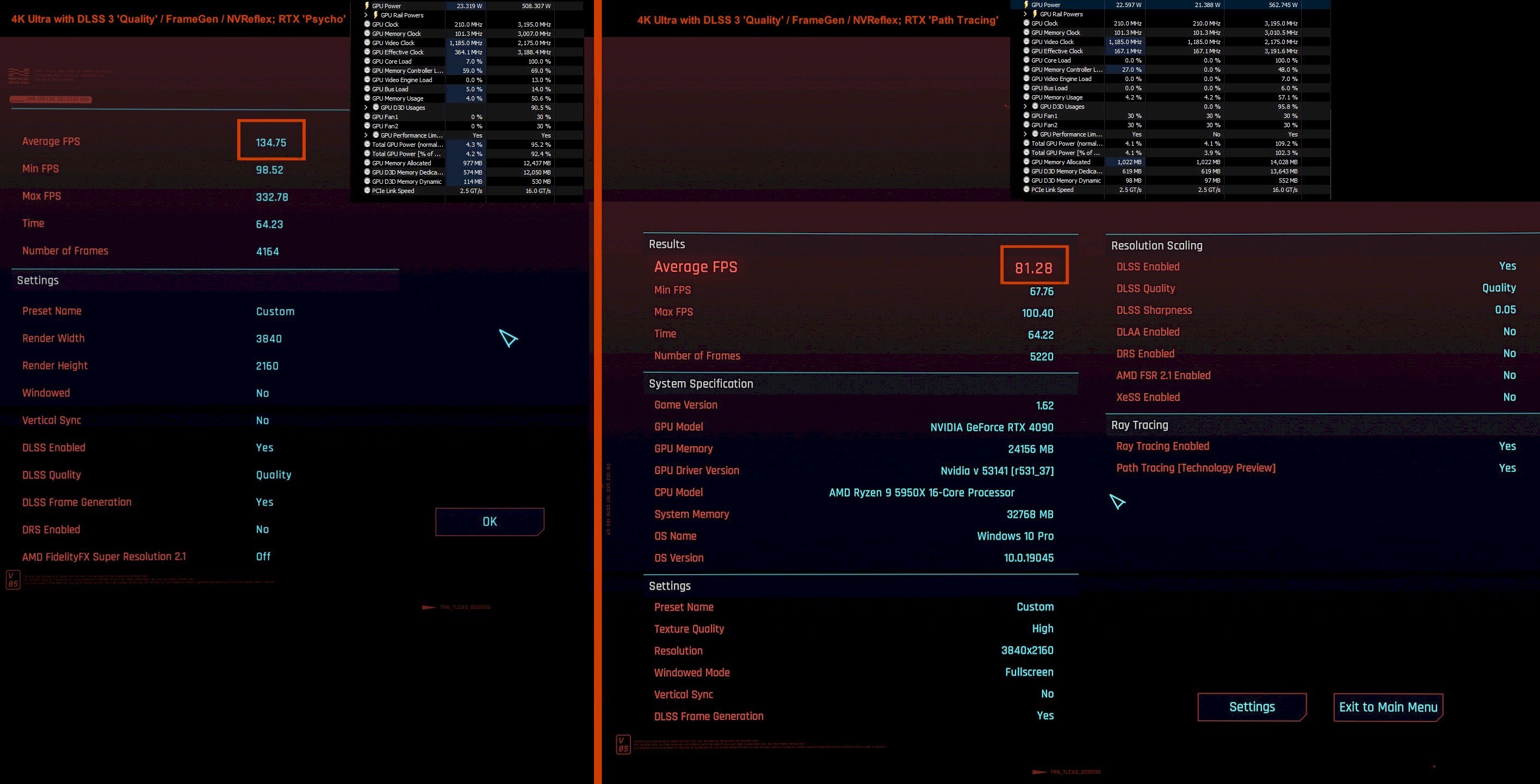
Cyberpunk 2077 has one of the best implementations of ray tracing in video games, and it has now added path tracing as well (currently only for NVidia RTX 4xxx). Below is a comparison for 4K ultra / DLSS 3 'Quality'/ FrameGen / NVReflex on my RTX 4090, clocked fairly high. On the left is the RTX Psycho' setting (RTX Ultra and 'Psycho' are fairly close in visual fidelity and fps), on the right is RTX 'Overdrive' that incorporates path tracing...all other settings and oc-profiles are the same. Normally, I restrict game play to the low-to-mid 400 W range and use a less aggressive oc profile, but I also wanted to see how the power consumption differed with the new path tracing using the same build-in benchmark... Path tracing does add some extra quality in many scenes, but it is not quite dramatic enough (yet) IMO, to account for or a loss of ~50 fps when compared to the RTX Ultra or Psycho. In fairness, 1.) it is still a 'Technology Preview', and... ...2.) in some scenes, it becomes quite magical and outright jaw dropping, especially when viewed on a big OLED ...that tech being discussed with @Sir Beregond @bonami2 and many other graphics aficionados > here
-
Path tracing certainly seems to be an exciting technology on the way to more 'real' imaging of how we see the world. Not all that long ago, 'video games' looked something like this... ...many eons and new graphics technologies later, we finally arrived at more wide-spread use of 'ray tracing' around 2018/19. For example, all my fav games have some sort of ray tracing now, though there are still a lot of other nice games out there that do not make any or much use of ray tracing. Still, path tracing could shape up to be a fairly big thing, if one is to believe NVidia which certainly does have 'influence' in the graphics market (side bar: I own both AMD and NVidia GPUs...). Then there is the upcoming Unreal 5.x, with some sample vids in > this thread Whether path tracing will get a bigger foothold in the future also depends in part on AI upscaling such as DLSS 2/3/X and also AMD's and Intel's similar technologies - AMD's FSR 2.1 for example is also quite impressive already...in any case, running 4K 'native' with full ray tracing (never mind path tracing) but without any sort of decent upscaling tech is not a fun experience, IMO.
-
I am starting this thread to dive deeper into path tracing. I will add some of my own results (quantitative and qualitative) in subsequent posts, but here is a very good video by Gamers Nexus to introduce path tracing and its 'costs' in Cyberpunk 2077 / patch 1.62
-
...minimum for me now is 16 GB VRAM, and I also use two 24 GB VRAM cards for work + play
-
...some Cyberpunk 2077 path-tracing... RTX 'Overdrive' 4K / DLSS3 'Quality' / FG / NVR ...first screenshot is shrunk down and converted to jpg, the second pic is full size .png
-
2 1/2 feet is perfect for 48 OLED - especially with new eye candy below Path Tracing CP 2077 update (Originals are 4K DLSS 3 'Quality' / RTX Overdrive / FG / NVR) This last one is full size .png, revisiting an older 'save', but with RTX Overdrive / Path tracing, DLSS3 Quality / FG / NVR
-
FrozenCPU closing, everything's on sale for half off
J7SC_Orion replied to Fluxmaven's topic in Chit Chat General
...sad to see FrozenCPU go - was always happy with them (before, and after their 'sabbatical') -
I am also not particularly fond of curved setups. In addition, I find that sitting close to the C1 48, my whole field of vision is filled...has kept me from investing in VR so far.
-
instead of eyefinity, how about a bendable OLED (once the economy / budget priorities allow for it) ?
-
...I'm going back and forth between 4K and Ultrawide - that's the beauty of the 48 inch OLEDs...have your cake and eat it, too As a fellow Canadian, you'll know where Ellesmere Island is (brrr, cold); you'll see bits out of the right-side cockpit below (4K this time, unlike Ultrawide above). It looks all a lot better on live-OLED than in a screenie, but still...love the cockpit detail ...and this YouTube vid recently came out - looks simply stunning ! ...as @Snakecharmed and @Sir Beregond pointed out, C2s should be on sale very soon given the C3 update (not much changed)...but no matter what version you get, OLED is very much worth it, IMO.
-
...easy-to-locate documentation is not a strong suit of Microsoft/Asobo....glad that you figured it out and thanks for posting the steps. Below, somewhere over Ellesmere Island in the TBM turbo-prop
-
...some 3840 x1620 Ultrawide-mode screens (120hz, 10b, y444) on the C1 48 OLED
-
...some (original size) 3840 x 1620 UltraWide (10bit, y444, 120Hz) screenies for FS2020 and CP2077. HDR doesn't always work with this on the RTX but it is still gorgeous and interesting in certain scenes / apps.
-
...yup - that also works on my 6900XT > C1 OLED
-
...the beauty of the 48 inch LG OLED is that you can turn it into an Ultrawide screen setup, at least with recent-gen NVidia GPUs. I tried this, works flawlessly - and the sheer size of the 48 makes it 'affordable' in terms of screen real estate source
-
@Andrew ...saw this posted on another FS 2020 thread...looks like some nice April fools extras...
-
Like other enthusiasts, I can get carried away by nice GPUs and a fast, healthy-oc main system, but at the end of the day, the monitor is the visual interface between 'man and machine' - no sense having a hi-po setup but a so-so screen, IMO. And yes, glossy + OLED makes things pop even more. Then there is the very decent sound the C1 48 puts out on its own (at least if you sit close enough)...never mind connecting a sound-bar that takes advantage of the signal processing. Below are a vids from channels I often watch and use to calibrate things (best to watch directly on YT rather than windowed)...
-
On the 'glossy' bit, I prefer those 10:1 over the matte finish as long as you can control other lighting sources that could reflect --- in a large-scale open office with a ceiling full of those ugly neon lights, it might be a different story... On size, I saw the 42 inch and 48 inch C2s side-by-side in a store display recently....given my particular home office setup and multi-use case, I still prefer the 48 inch as an 'allrounder'. As posted earlier, I plan to keep the C1 48 OLED until they come out with a 240Hz+ version. The 5+ year old 55 IPS HDR on the other setup (primary GPU for display is the 3090) would be upgraded first, but not until it goes 'kaput'. It has been solid for all these years, even when running for much of any given day.
-
...water block basically has GPU and VRAM temp very close to each other - not least as on this gen, VRAM is also physically much closer to the core. Add a wallop of thermal putty on the VRAM... Below was at 26 C ambient but w/o water block, VRAM temps would have been warmer ('better') but hotspot would be too high. First pic = water-block, second pic = first boot after card install w/stock air cooler (obviously, different oc settings and vbios as well as lower ambient of 22 C to factor in)
-
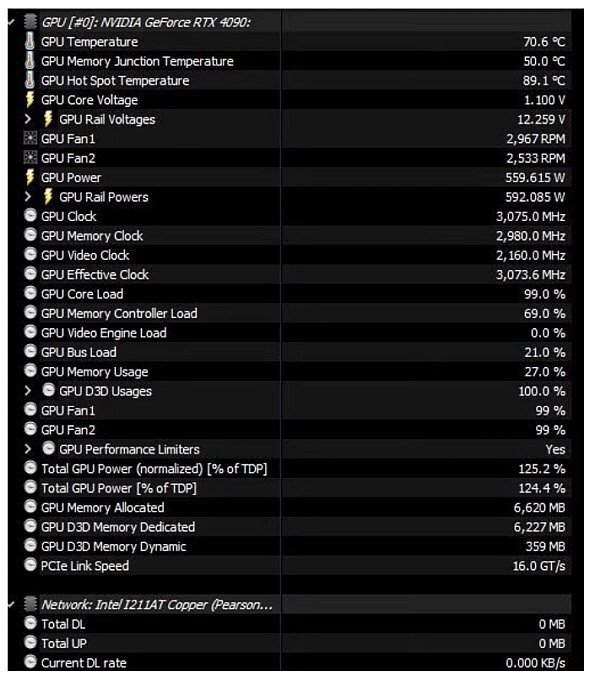
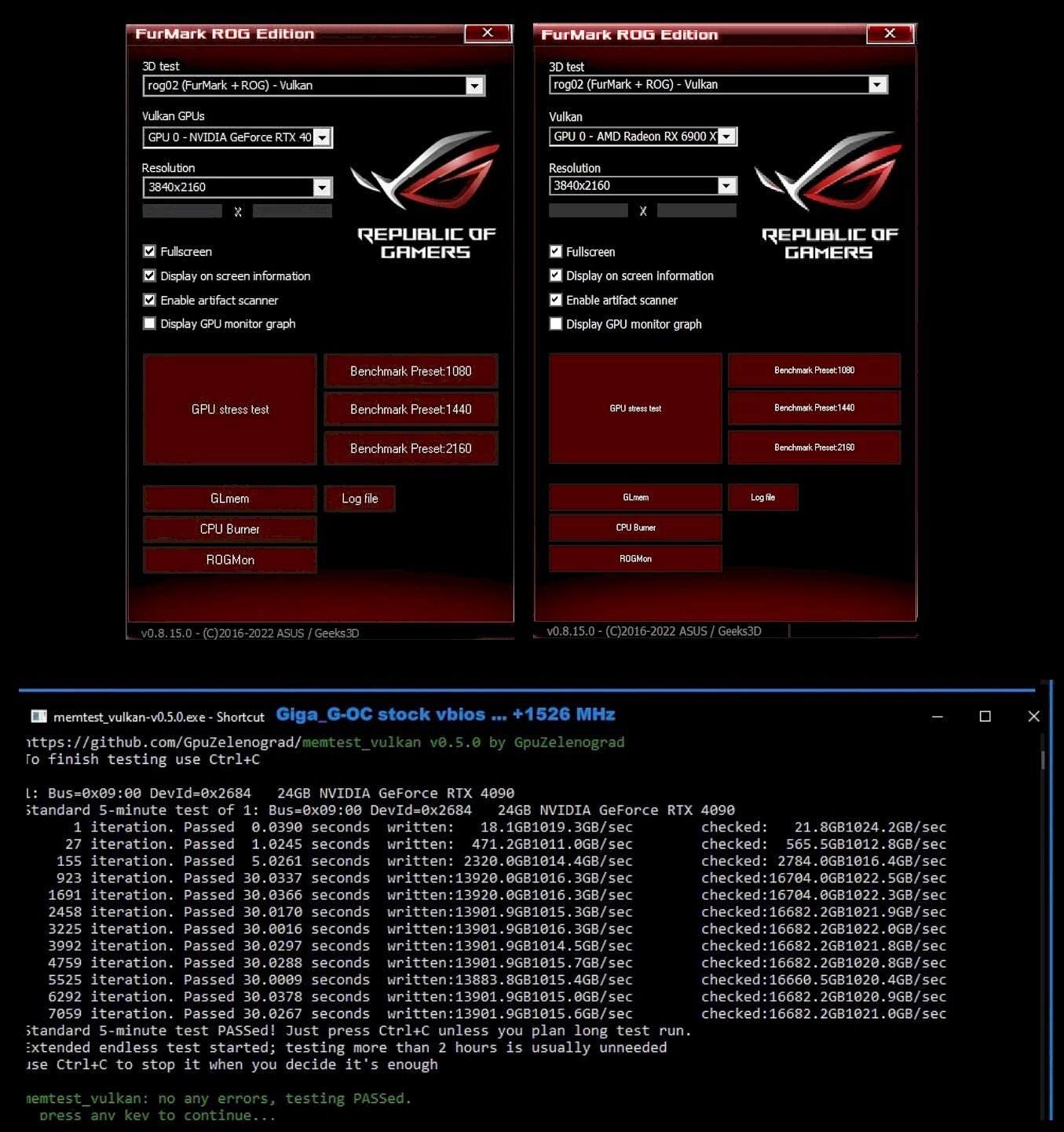
3DM's TimeSpy / Extreme, Port Royal and Speedway are very good tests for VRAM, though memtest_vulkan is a bit more sensitive in picking out VRAM OC that doesn't quite measure up, IMO. Below / bottom screen is the Giga vbios for the 4090 in memtest_vulkan, the Galax HoF vbios is similar. Another interesting test is the ROG Furmark version (I usually set that to Vulkan instead of Open CL). The ROG Furmark also has a built-in artifact scanner ! Note of caution: ROG Furmark can REALLY test the outer limits of your card's power and temperature handling - so best to keep PL at or below 100% - at full bore, I have seen > 670 W on the GPU . Finally, OCCT's VRAM tests is also pretty sensitive. FYI, for the OP's RTX 4090, it is worth remembering that VRAM on that card is a bit unusual - it likes to be warm...around 55 C for best oc performance...so there will be a best 'cold' OC result and a best 'hot' result for VRAM and those can diverge by as much as 100 MHz.



.png.e0fe979b1f9c0daf2102e0e7b97b868a.png)
.png.362310dfc6b42e5a2dd5a03c382102f8.png)
.png.cc1175ebcb0d93a87e40e192476549aa.png)
.png.0e56da8d06330bd41c4430b5644f675a.png)
.png.35fa2a42e42a8845bc20102f24ce73bd.png)
.jpg.95a2f0aadaa283c3c5fe1004e52989a7.jpg)
.png.00f237f7364d32dcd832df0dc68ef48c.png)
.jpg.a329deaaaaa00768cb786263d104d321.jpg)
.jpg.3ec31c80f284728242998762fbb004ba.jpg)
.jpg.4e096f7902224160b7e2db71cf466cf0.jpg)
.png.59725d8678131de4d32ddf22bd5eb773.png)
.png.a1eb1c967f7adfcaf4bf51c48e167f5a.png)
.png.9a05c5898777414a082c6a03677b28cd.png)
.png.15b643635dcd7c1e149003dfc7142c23.png)
.png.d45a1f47c505576a26776ef2ab0f9739.png)
.png.c57215c705af5f8e73dfd4048bb2e940.png)
.png.14ced094bab9dc2ee36eb1fccd74a798.png)
.png.35c54e4e97fa0cd75046c8e56a0287c6.png)
.png.8b865b529a77ac65eeed5799d0ce06f8.png)