Welcome to ExtremeHW
Welcome to ExtremeHW, register to take part in our community, don't worry this is a simple FREE process that requires minimal information for you to signup.
Registered users can:
- Start new topics and reply to others.
- Show off your PC using our Rig Creator feature.
- Subscribe to topics and forums to get updates.
- Get your own profile page to customize.
- Send personal messages to other members.
- Take advantage of site exclusive features.
- Upgrade to Premium to unlock additional sites features.


ENTERPRISE
-
Posts
6,058 -
Joined
-
Last visited
-
Days Won
385 -
Feedback
0%
Content Type
Forums
Store
Events
Gallery
Profiles
Videos
Marketplace
Tutorials
Everything posted by ENTERPRISE
-
I cannot recall all of them. If I stumble on the others I will let you know as I know I have done more messing around than below, but alas, it was a while since I did my initial setup. I know I definitely moved my Temporary Transcoding directory off of my main drive and onto another SSD to avoid stressing the main drive. : Transcoder | Plex Support SUPPORT.PLEX.TV Transcoder settings related to your Plex Media Server. You can access these under Settings > Server > Transcoder in Plex... Some also will create RAMDISKS for this as well as they see a large improvement in performance (Obviously) and another takeaway is that if on a RAMDISK, then any transcoding you are doing will not be wearing the SSD.
-
I have a couple of optimizations I believe. I will try to look them up and let you know.
-

Notification not mapping browser to said post
ENTERPRISE replied to Storm-Chaser's topic in Resolved Bugs
I am speaking with the IPS devs. It is a known issue that topics with images can sometimes throw off where a notification takes you, further to this it could be related to some of the customizations we have installed on the site. If that is the case, it would be a VERY long process to try and identify and it would also mean certain site features being turned off during this time. If it turns out it could be a site feature causing the issue, I will be honest and say that it will be a case of "we find it when we find it" as I wont be able to commit the time and testing. It is a fairly minor issue overall, I understand it is a nuisance but even after we "Fix" the issue, browsers like to behave differently from one another and I highly doubt there would be a long lasting "FIX" for this type of issue. I will see what I can find out and what can be done, I will keep this in the open bug section, but consider this matter closed unless there is an update. Thanks, E -
This issue should now be fixed and you can once again use the long browser URL as well.
-
Just as an FYI, development has begun for this feature
-
At this rate, considering time and money spent on this drive conversation, might be worth buying a drive fit for purpose.
-
Im confused, is this drive being used as an external drive now or internal ? I assume it's external as your last post mentions USB.
-
Huge thanks for getting all that sorted bud!
-
All well and good....but can it play Crysis? Sorry, couldn't help myself. However that is a mouth watering piece of technology. We can all have one when I win the lottery.
-
Darn straight they should be fined. The truth will always out!
-
After speaking with the developer of the application, it seems that YT have changed some criteria. I have been told they will update the app, not sure on an ETA. However for now we will have to use the video share links as detailed in this post : Thanks, E
-
Subbed for sure, I would love to see how this turns out, certainly a great experiment.
-
I will take a look at that sometime
-
Then I think we found the issue, not related to permissions but how the software seems to handle the links these days. I will speak to the Dev of this particular software out of curiosity.
-
Thanks, do you get a permission error when creating a video in the Member Submissions area using this link: https://youtu.be/G5HvWN6d42g
-
Yeah it is definitely the case that it only works with the YT Video URL, which to be honest makes sense as that URL is never going to change. The browser URL may do, which I think has been the problem in the past. I will still follow up with the dev to see what is what, but this may just be intended behaviour. @UltraMega Regarding your permission issues. To help me narrow things down, do you get a permission issue with viewing this video :
-
Notification not mapping browser to said post
ENTERPRISE replied to Storm-Chaser's topic in Resolved Bugs
I use Chrome and the notifications work as intended for me. It is highly likely that browser is a factor. -
That was helpful thank you. I can replicate that video not loading. I managed to fix it. I edited the video to grab the URL that was used. I used the URL to get to the video via browser to check if the video still exists, it did. I then right clicked on the video and selected "Copy Video URL". I came back to the forums and swapped out the original link in the External URL field with the new one I got from copying the video URL. Voila, now works fine. So It is possible that YT have altered something. To be honest, using the Copy Video URL is better as it is the ACTUAL video link. Not everyone knows that of course so I will see if it can be altered. If it is a YT think and it cannot be changes then I will pop up a short notice on how to get the video URLS. @bonami2 To test the situation @UltraMega is facing, could you please add a new YouTube video to the Video section, I would like to see if you get a permissions error of sorts. Please could you try using both the standard URL you get in the browser and URL you get in "Copy Video URL". I would be intrigued if there is a difference.
-
Notification not mapping browser to said post
ENTERPRISE replied to Storm-Chaser's topic in Resolved Bugs
That is what I have enabled indeed. Thanks for the feedback. I am not sure if this is something we can fix locally, or if this is a platform related qwerk. I am not sure if perhaps the anchor points need adjusting etc. I will speak with our Dev and see if there is anything obvious. If we cannot sort it locally I will see what IPS (Platform provider) have to say. -
It would be great if other users can test as I am struggling to replicate the issue my end.
-
Hello all, With a view to keeping user Rig information clear, concise and with a continuity of layout on the site. We have decided that we will no longer allow user rigs to be input manually into the user signature areas. Moving forward, all those who wish to display their rig specifications in the signature area must do so via Rig Creator. For those not 100% clear on how this feature functions, please see our Site Guide All the best, E
-
Sleuth software developer wants to use AI to measure productivity
ENTERPRISE replied to bonami2's topic in Software News
I have never believed that productivity = Someone working constantly balls to the wall. Productivity should not be measured solely by time spent. -
Indeed!
-
Hello all, To aid in the recognition of users who have won/partaken in EHW based competitions or who have gone beyond the call of duty, we will be bringing to the platform, User Awards. In short these will be badges that will show in the users signature. Due to space concerns we will only show the latest 6-8 awards won within the signature area. However you will be able to go to a users profile to view all the awards won. As part of the Premium Upgrade packages, we will also be including a setting that allows Premium users to hide user awards from the user signature area because we know that everyone loves choice! When in place, you will find the option HERE, under "Topic Page Blocks" For anyone wondering, when the system is in place, I will be retroactively creating and assigning awards to users with respects to EHW competitions held in the past, a good way to kick start the system and it only seems fair we do not leave anyone out:) This is in its early stages and I have sent my project plan to our developer. More to come on this soon. Regards, E
-
Notification not mapping browser to said post
ENTERPRISE replied to Storm-Chaser's topic in Resolved Bugs
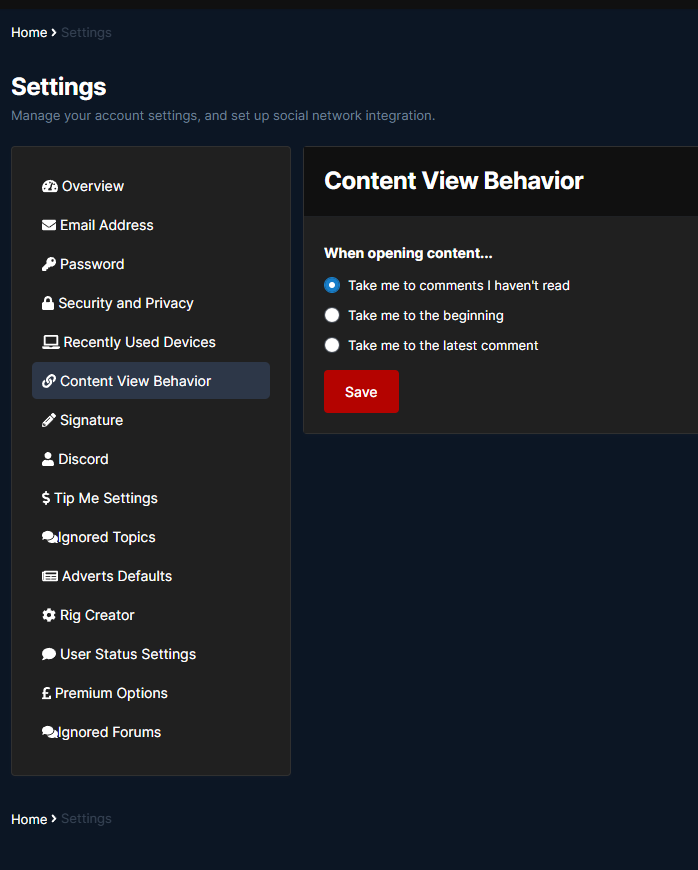
Just a thought can people check what they have set here : https://forums.extremehw.net/settings/links/