Welcome to ExtremeHW
Welcome to ExtremeHW, register to take part in our community, don't worry this is a simple FREE process that requires minimal information for you to signup.
Registered users can:
- Start new topics and reply to others.
- Show off your PC using our Rig Creator feature.
- Subscribe to topics and forums to get updates.
- Get your own profile page to customize.
- Send personal messages to other members.
- Take advantage of site exclusive features.
- Upgrade to Premium to unlock additional sites features.
J7SC_Orion
-
Posts
2,211 -
Joined
-
Last visited
-
Days Won
96 -
Feedback
0%
Content Type
Forums
Store
Events
Gallery
Profiles
Videos
Marketplace
Tutorials
Everything posted by J7SC_Orion
-
...how about this kind of crazy (thread needed update pics of the Frankenstein Raven_B build anyway; finished it yesterday)

-
great entertainment but...nope, not looking for the 7900XTX smoke edition . I actually had that happen a few years back (HDMI to DP connector cable had gotten wet some days before), but when my card 'went to the digital beyond', it also had lit-up star-nebula like effects with lightning inside in addition to a bigger bang...s.th. I do not want to experience ever again (though warranty came through).
-
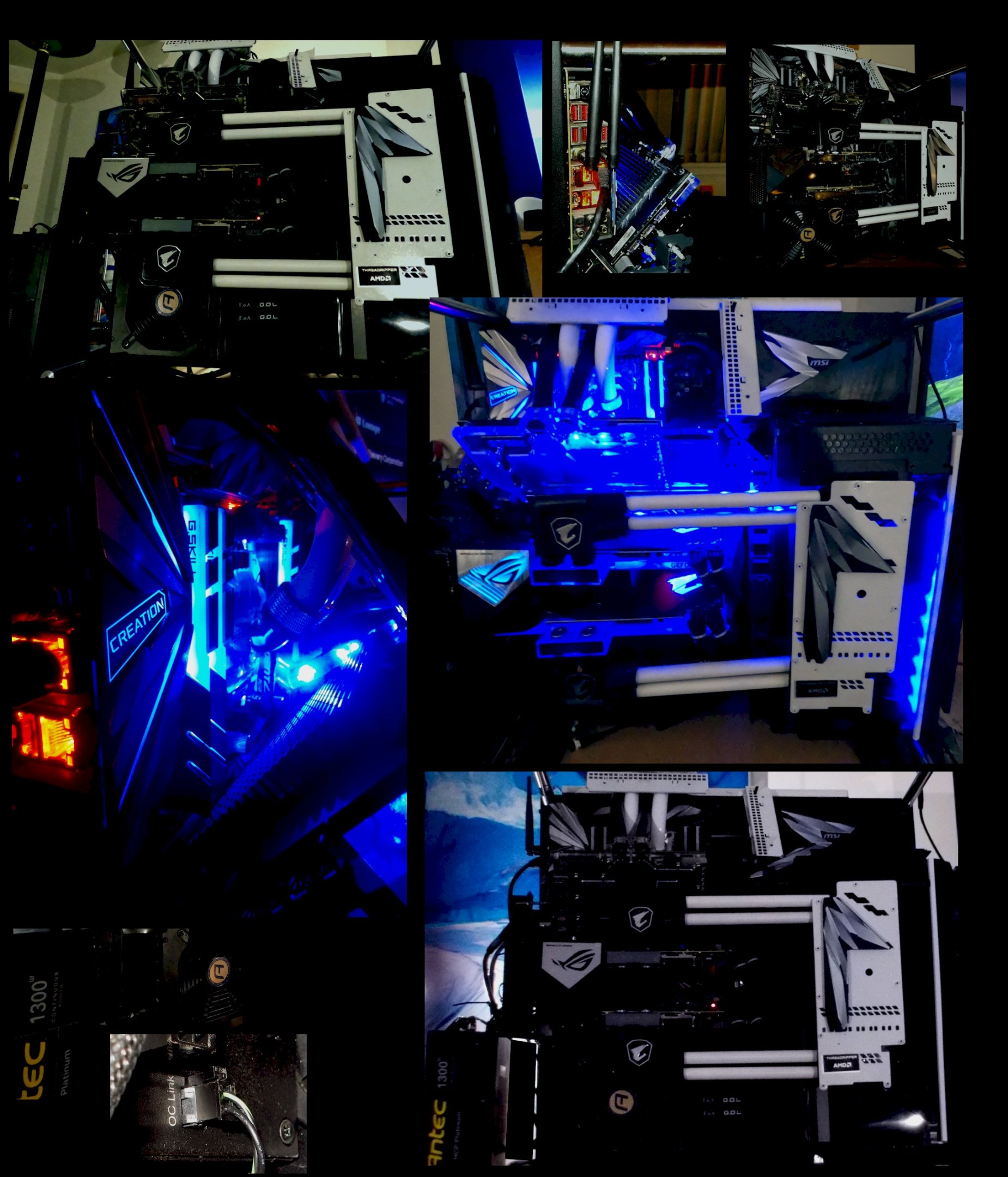
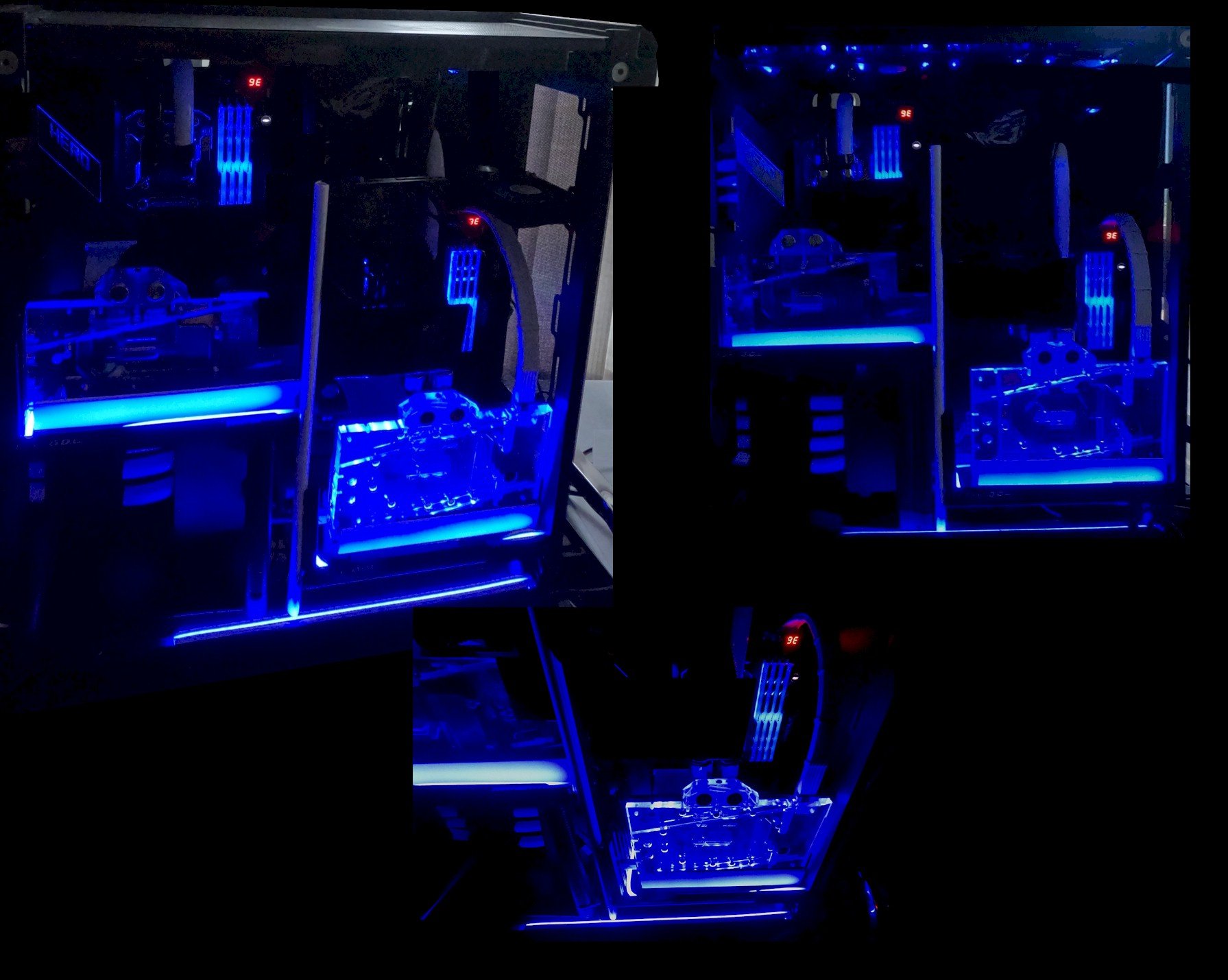
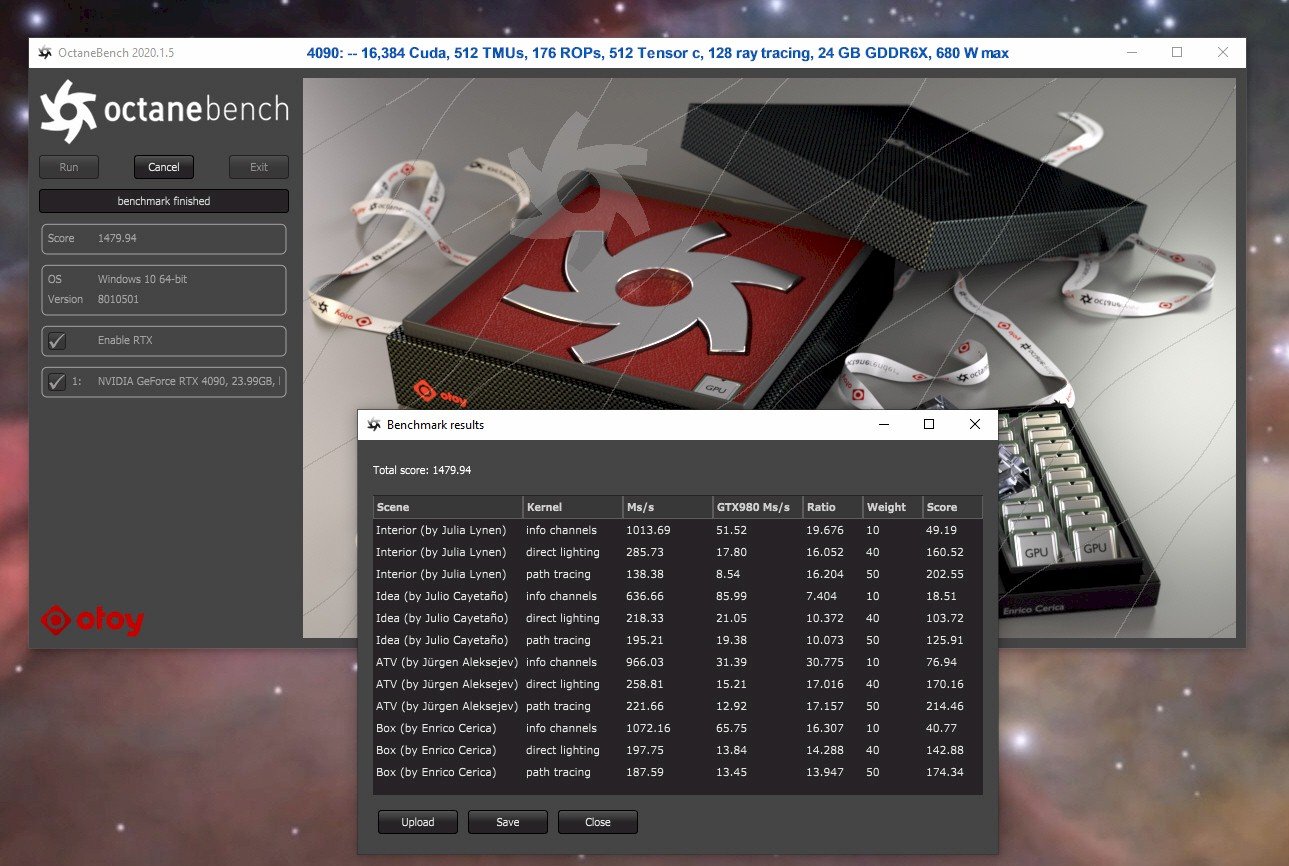
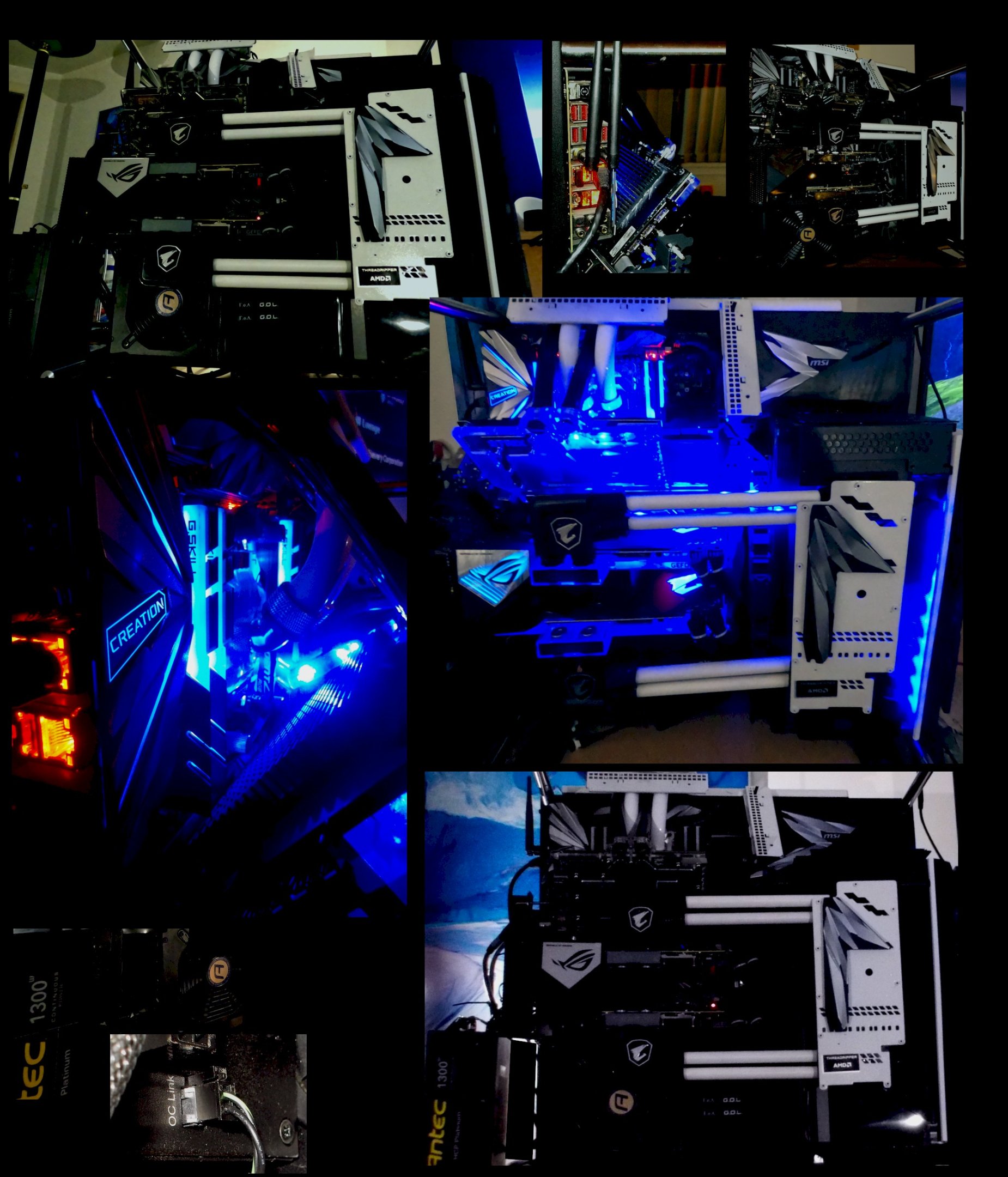
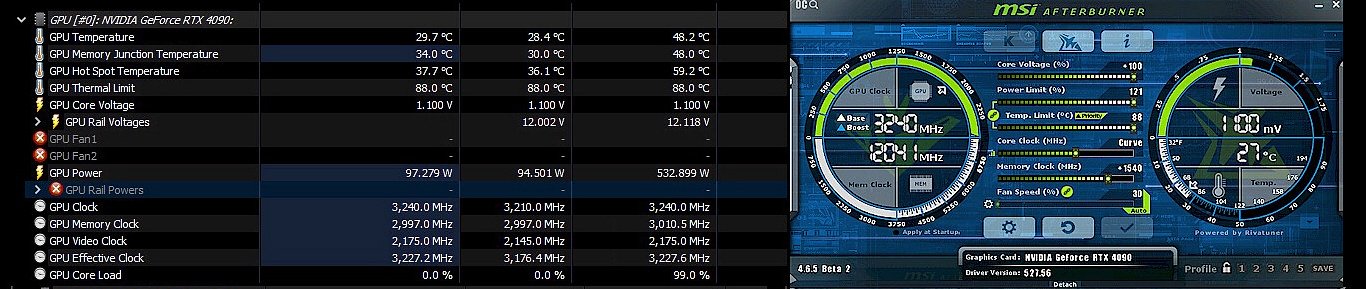
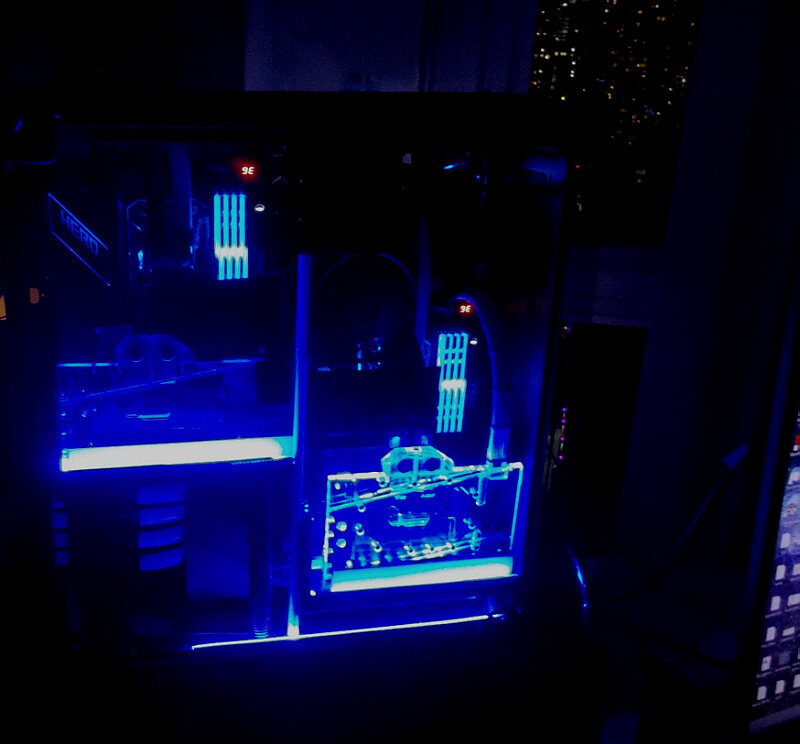
Just when there are new CPUs on the horizon (looking at you 7950X3d , 13900KS ). I finally got around to finish some long-planned for updates on both my current work & play combo, and an older work & play setup started in late 2018. The latter one is now tagged for some machine learning and rendering tasks in addition to some secondary-station gaming so I might actually have a few months when I am not doing any new builds or modding anything... To recap: My current main system in the primary home office is below (3950x w/6900XT; 5950X and RTX 4090) and had some minor visual updates recently... The 4090 in particular rocks...Port Royal at > 29,700, Superposition 8K > 17,200 etc. Add in DLSS3, Frame Insertion, NVidia Reflex and all those goodies - it is just a sheer joy to play with, especially on a 48 inch 4K120 OLED. However, it is not all fun-and-games. In OctaneBenchmark this sample is among the top results for a single GPU (4090 or otherwise), but... ...with growing emphasis on machine learning for edge AI and visuals such as rendering, even a single and very powerful card has to take a bit of a back seat to multi-setups. OctaneBench has some listings with various over-the-top multi-GPU setups (20x plus). Since the RTX 4090 'displaced' a 3090 Strix that was now available, it was time to integrate the 3090 into the older Threadripper build with its 2x 2080 Ti in NVLink, not that they ever were slow.... The 2x 2080 Ti score > 21,200 in Port Royal (3090: ~ 16,100) and > 12,600 in Unigine's Superpostion 8K (3030: ~ 8800). However, when the 3090 is added to the 2x 2080 Ti, it becomes a genuine workhorse for rendering and ML: 19,200 CUDAs, 872 TMUs, 288 ROPs, 1416 tensor c, 218 ray tracing, 46 GB VRAM GDDR6/+X. This is where even a very fast 4090 meets its match with its 16,384 CUDAs, 512 TMUs, 176 ROPs, 512 Tensor c, 128 ray tracing, 24 GB VRAM GDDR6X - though to be fair, some of these are not directly comparable between generations. But using the same benchmark, the older 3x RTX GPUs still manage... Of course, the other side of the coin is just how fast the single 4090 is, especially when taking power efficiency into account. In any case, what absolutely amazed me (as I was expecting otherwise) is the lack of any issues in Windows 10 --- both the NVL/SLI 2080 Tis and the 3090 Strix have their own HDMI monitor inputs for a single 55 inch IPS HDR I have connected, and it is just a matter of setting the Windows display options re. which set should be the primary...so I can game with either the 2x 2080 Ti in NVL/SLI or just with the 3090, all smoothly. And for work tasks, all three easily combine in either setting. The toughest part really was the 'Frankenstein' operation without making it look hideous (IMO, anyway) and also to make sure that the cooling system could handle 1,700 W + without a problem. 3x D5 pumps and a total of 1080 x 62 mm rad space is enough even when everything is max-co'ed, though down the line, I might add a bit more rad space. It takes 2x 1300 W Platinum PSUs (Antec HPC) which are connected via their proprietary 'OC Link'. I had those PSUs since 2013/14 - good quality, obviously. Also, it gets pretty crowded on the mobo as you can tell as both the TR CPU and the 3x GPUs are water-cooled, never mind 9x PCIe 8 pin power cables (no wonder I've grown to like that 12VHPWR cable setup the 4090 uses in the first pic). I had to drop the 2x 2080 Ti in NVLink two slots lower than before, meaning one of them floats in its own cage and is connected via a PCIe riser cable (quality counts there w/ Lian Li PCIe 4.0, running 3.0). The 3090 Strix has its own PCIe riser via the top PCIe slot to allow for a roughly 45 degree angle for mounting - it too has its own cage it sits in. So there you have it - some rendering and edge AI tools that cost nothing extra (and good for reasonably-sized proprietary data sets we have) which can run on one machine unsupervised once tasked ,while the newer setup is used for other tasks in another room...
- 1 reply
-
- 2
-

-

Updated Windows now external Hard drive are saying access denied.
J7SC_Orion replied to bonami2's topic in Storage
"Ubuntu" -
...the 2x 2080 Tis are in SLI/NVlink, but the 3090 Strix (top PCIe slot) is doing its own thing. @Bastiaan_NL ...and you think I am crazy...
-
...that's shocking - and a bit reminiscent of Michael Schumacher's skiing accident...top drivers survived all kinds of motorsport accidents but then get into 'trouble' while playing in the snow. I watched most of Ken Block's vids - he was an absolutely brilliant talent in 'car control', rallying etc and still seemed like a down-to-earth chap in spite of his success.
-
...the crazy idea actually works
-
...what to do at a 'slightly foggy' morning on New Year's day ? I have an idea
-
Wishing you all a Happy 2023 !
-
...delayed-fuse FYI ...just ran across > this --- you might want to try Process Lasso
-
...some serious mountains and twisties around here as well -fun for winter-driving . I first learned winter-driving in Europe, then in Ontario's snowbelt, with a torquey V8 rear-wheel drive...but the temps were well below -5 C (actually better for traction) and the car had full positraction rear-diff. I am not a great friend of fwd as I loath understeer (while oversteer can be fun...). ...some pics I posted before, the first two involved a more recent, twisty uphill jaunt in the winter, and the older pic (bottom-right) is when I returned from a cross-Canada drive in the winter and stopped at the Crowsnest Pass in the Rockies. FYI, I always carry chains for the tires...
-
[Official] EHW Retro - The EHW Retrogaming club
J7SC_Orion replied to neurotix's topic in Gaming General
...I always loved MDK, then MDK2. In fact, MDK2 is active on one of my older machines even now....just played a round w/2x GTX 980 Classies
-
...yeah, awd w/hybrid would be my choice also. As you may know, before winter really set in back East, we had about ten days of super-cold (for us here at sea level out West, -11 C might as well be - 50 C in the arctic). Roads were a mess with deep snow, then lots of black ice - awd came in handy with my SUV.
-
Very nice indeed, but I like to see you take that camper in the first pic up to Northern Quebec in the winter Nice to see that it has independent suspension and decent wheels (well, not the cop car). Hopefully, they'll add a hybrid option down the line.
-
[Official] EHW Retro - The EHW Retrogaming club
J7SC_Orion replied to neurotix's topic in Gaming General
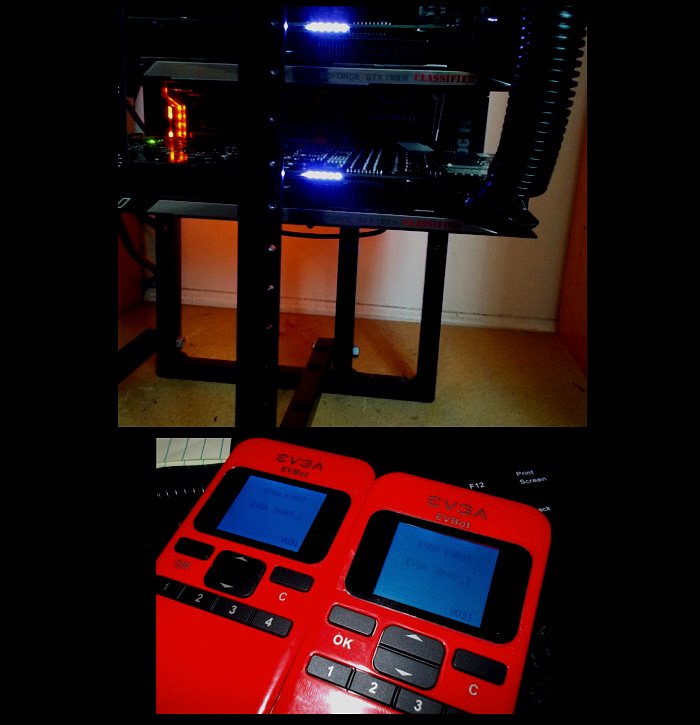
...I got 8x GPUs over different gens that have EVBot capability, sooooo............; besides, you have other and cheaper options, per below
-
...rumour has it that the 7900X3D and 7950X3D are clocked very similar to the non-X3D parts, but whether they can be overclocked is another matter. I usually only build HEDT-type systems because after some gaming and oc benching fun, they will get put to use for business purposes. That said, my last two builds (3950X and 5950X) were desktop builds but still useful for business given the 4x RAM and the built-in dual network chips. AMD HEDT got expensive after the 2k series (and also shorter-lived chipsets) and Intel HEDT was MIA. However, there are some new interesting Threadrippers coming based on the Zen4 core, and Intel for its part is readying some new workstation-HEDTs (below)...so for a full-on folding machine, you might want to wait a few months to see what is available at what price...
-
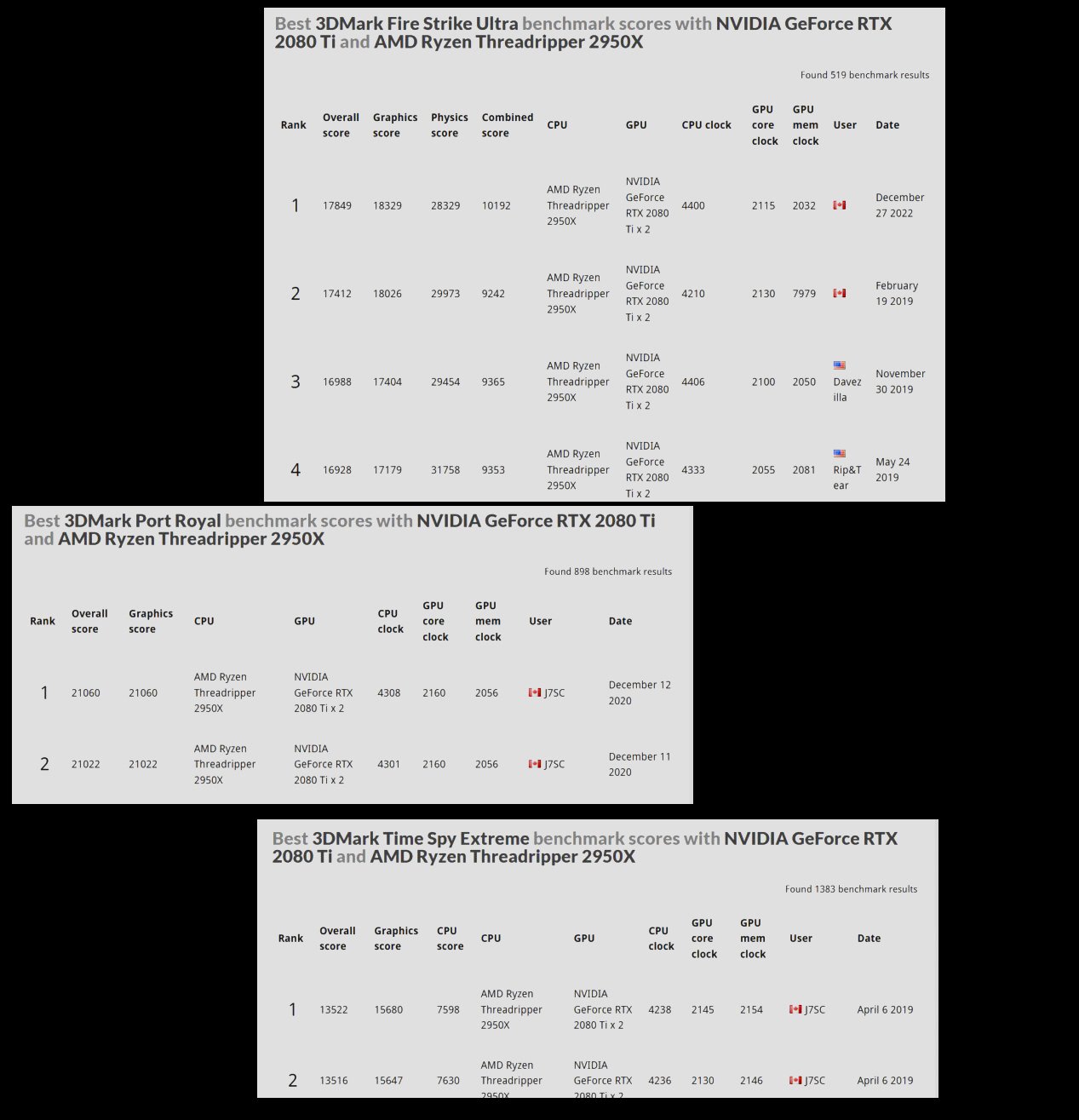
...re. older GPUs, they're like many of my horse friends (Percherons) here; they are enjoying pasture... ...some of them, like 2x 780 Ti Classifieds, come in every once in a while for some retro-gaming --- @Bastiaan_NL As to the GPU-Z screenie, yes that was my Threadripper system w/ the two 2080 Ti Aorus Xtreme WF WB (factory water-block) - the one which is about to house the 3090 Strix as well. The 2080 Tis can clock a bit higher, but I tried a different setting in the new mobo-bios I flashed, and voila ~340 W just for the TR CPU...add in the ~750 W (before transient spikies) for the GPUs and another ~150 W or so for peripherals (3x D5s, lots of fans etc) and before you know it, the 1300W Platinum PSU starts to wheeze a bit. Speaking of which, yes, it likes to juice 12 V up first so that I can droop down a lot - like a kid on a slide. With the 3090 in there, I'll add a second PSU for that triumvirate. FYI, I added FSUltra best 3DM score yesterday; was going for some of the other 3DM benchies but then noticed I had those anyway from a few years back...
-
...you don't really need that extra kidney, do you ?
-
I see, and yeah, those P + E cores seem, well, not symmetrical and potentially troublesome ...what you need is an AMD Epyc 96C/192T w/4x RTX 6000 Ada 48 GB VRAM GPUs. And remember, this advice is worth as much as you paid for it.
-
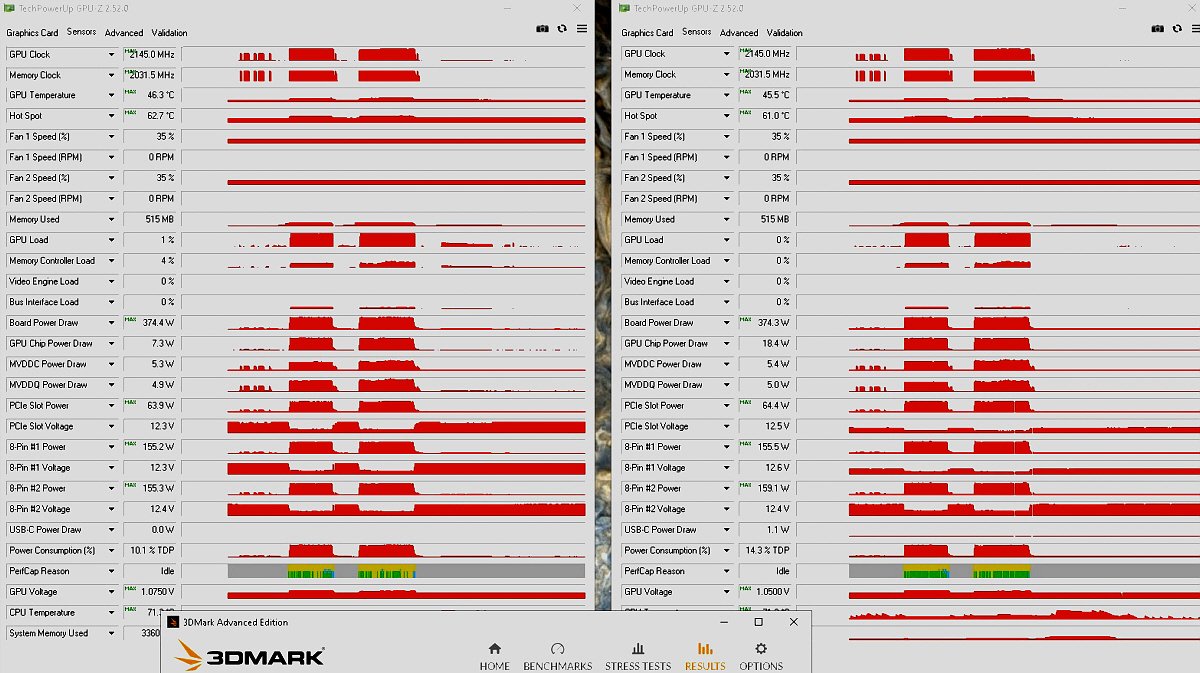
...Banzai ! @Bastiaan_NL check out those edgy PerCap reasons after a 3DM run...
-
What's wrong with the 13900K (general, or specific to yours) ? Since I skipped that gen, I'm no expert, but I hope you're using Win 11 Pro with that...
-
Excusez-moi ? Moved to rumour mill ? But I read it on the internet, so it must be true Also, I avoided buying a 13900K or 7950X so far as I wanted to first see if the rumours of a 7950X3D would come true. I guess time will tell and we'll find out next week.
-
...better get ready for that 7950X3D...
-
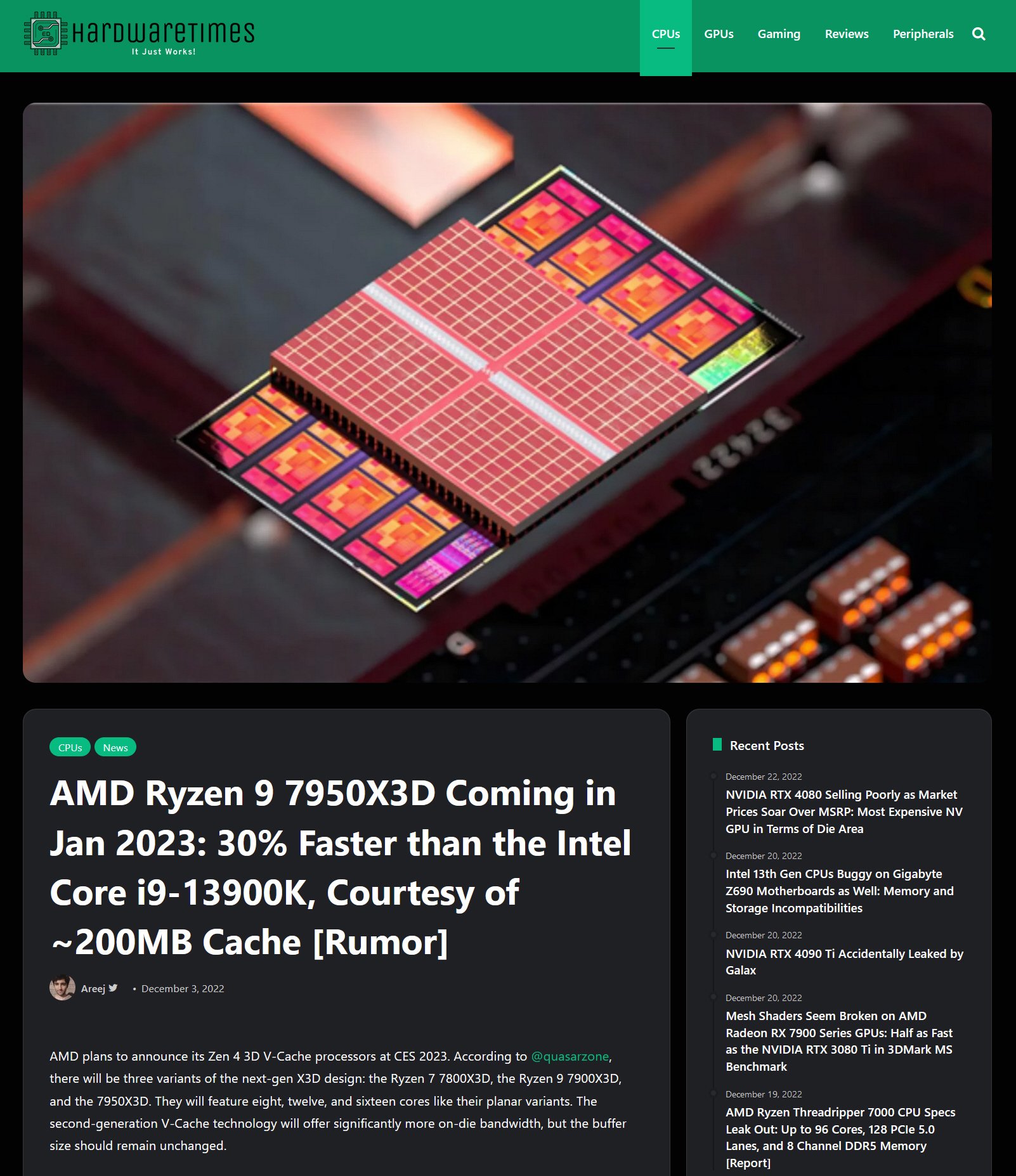
"AMD plans to announce its Zen 4 3D V-Cache processors at CES 2023. According to @quasarzone, there will be three variants of the next-gen X3D design: the Ryzen 7 7800X3D, the Ryzen 9 7900X3D, and the 7950X3D. They will feature eight, twelve, and sixteen cores like their planar variants. The second-generation V-Cache technology will offer significantly more on-die bandwidth, but the buffer size should remain unchanged." The Ryzen 7 7800X3D will likely pack a 3D stacked cache die with 64MB of SRAM for a total of 100MB cache memory. The Ryzen 9 7900X3D could either feature two 64MB cache dies or a single denser cache die with 128MB of SRAM. Furthermore, the clock speeds of the Zen 4 X3D chips will be the same or close to their vanilla variants." source Juicy update on an earlier thread here' CES '23 starts next Thursday. Also, picture a dog with its tongue hanging out and dripping while looking at 200MB of bacon...
-
[Official] EHW Retro - The EHW Retrogaming club
J7SC_Orion replied to neurotix's topic in Gaming General
...from way, way back - ran across this when looking through the storage room. Probably belonged to one of my siblings and I 'borrowed it' long-term ...my current definition of retro-gaming --my setup from back in ~ February 2014. Those 780 Ti Classified cards could get close to 1700 MHz w/EVBot boost and chilled water. I still have them...these days, they're out on pasture, doing the odd retro-gaming session.