Welcome to ExtremeHW
Welcome to ExtremeHW, register to take part in our community, don't worry this is a simple FREE process that requires minimal information for you to signup.
Registered users can:
- Start new topics and reply to others.
- Show off your PC using our Rig Creator feature.
- Subscribe to topics and forums to get updates.
- Get your own profile page to customize.
- Send personal messages to other members.
- Take advantage of site exclusive features.
- Upgrade to Premium to unlock additional sites features.

pio
-
Posts
1,780 -
Joined
-
Last visited
-
Days Won
109 -
Feedback
0%
Content Type
Forums
Store
Events
Gallery
Profiles
Videos
Marketplace
Tutorials
Everything posted by pio
-
 Huge thank you and congratulations to everyone who participated. Hopefully we did some good for the cause this year!
-
I've added signature badges for everyone that participated this year. Still trying to figure out what we're going to do about prizes (event ends in 10 minutes). I was unable to find the following members on site to apply the badges though (perhaps user names are different on site): Q_Cruncher MicheleEHW CptAsian hertz9753 Please DM me (I just need user names on site), and I'll get those badges sorted out for you 4.
-
No worries bro. We're just happy to be able to bring these events back again, and hopefully bigger and better each time. I know YOU might not want prizes, but what do you think we should do about them? We're trying to listen to everyone's opinion on this one, as I think this was the biggest prize pot the site's had to date, but also the lowest participation rate.
-
Alright guys, event ends in 2 hours. It's the home stretch!!!!! Question. We didn't come anywhere NEAR the numbers I was hoping to see, of 50 participants. I even lowered that down to half and said 25 people join up and we'll still give out these prizes. Unfortunately, we ended up with 17 participants. So we want to hear from YOU. All of you. Mine and Labrat's position is maybe we shouldn't send out these prizes as we didn't hit even half of the participants we wanted. Or perhaps maybe just offer up the RAM kit as a random draw since the RAM kit wasn't too expensive. What do you guys think? I was sincerely hoping we'd hit those metrics. Let's get your guys' opinions on the prizes and what we should do with them as the event winds down today.
-
Just a couple more days, and since we're still wanting to do the prizes, let's shoot for 25 people involved in the foldathon instead of 50. We need 8 more people to fold, just get your names on the board!
-
9070 XT seems to be settling in around 6-6.7m PPD or so (mine and Labrat's both). 7900 XTX is settling in around 7.7m PPD.
-
Yup, mine seems to be settling in about the same there too.
-
Seems to be slightly less. I had to reboot and haven't fired it back up, but its reporting around 6m PPD so far. I can probably give better numbers in a day or so.
-
Sweet! I'll keep an eye on the stats to make sure your name pops up since you're new.
-
No worries at all. You've got 96 hours to get some units in, you can do it! If we get enough people in, I'm thinking we're probably just going to do a random draw for the prizes to keep it fair for everyone.
-
Just fired up my 9070XT. Let's go!
-
Just a few more hours till event starts guys. I want to see 50 people competing this year for the prizes. Let's see if we can at least get close to last year's numbers (45 people). I'd like to send these prizes out! My own stats will be lagged, as I need my rig tonight for youtube stuff. I'll start my folding up tonight though afterwards. Good luck everyone!
-
Igor's Lab uncovers 'hotspot issue' affecting all RTX 50-series GPUs — says it could compromise graphics card longevity Igor's Lab uncovers 'hotspot issue' affecting all RTX 50-series GPUs — says it could compromise graphics card longevity | Tom's Hardware WWW.TOMSHARDWARE.COM Power delivery hotspots can run hotter than the GPU core itself. Definitely not a good trend to be starting. This entire 50 series launch seems like its been a complete disaster. I honestly don't think there's a single 50 series card I'd even recommend to somebody at this point; unless you're an enthusiast and are willing to take apart your card to fix it before you install it.
-
5 more days till event starts guys. Don't make me keep these parts!
-
Just to show you guys that I'm not bluffing......... (again will ship anywhere but shipping will be paid for by winner and arranged with @LabRat). Prizes we have on offer if we can get 50 people folding for the cause for this 96 hours: (1st-3rd place prizes, first person gets first choice, etc) (*also - up to you guys if we do a "random draw" for those 1-3 prizes or award to highest contributers) 32GB (2x16GB) G.Skill Flare X DDR5-6000 kit: Lapped AMD Ryzen 9 7900x (lapped by @Fluxmaven) ASRock Challenger Intel Arc B570 10GB OC Edition:
-
Bump, about 10 days left. I stand by my offer, if we can get 50 people on board....I'll give away those prizes. Do we want to see pictures? I can dig the stuff out and snap some pictures. Also, huge thanks to @rUNbYrATZfor the image. Looks great!
-
Small but heavy .... Livingroom Gem build.....
pio replied to Memmento Mori's topic in Small Form Factor
I believe the usual answer is send the signal to the AVR first, and then out from the AVR to the TV. Coax / optical is capable of 5.1 channel. HDMI is capable of 7.1 / THX / Atmos if I remember correctly from when I was diving into this on my TV setup. I think @Fluxmaven might know a better answer though? He's been way more into home theater type stuff than I have been lately. If you're only doing 5.1 channels though, I think the easiest solution is likely just using the HDMI ARC capabilities. If you're after more than 5.1, I'd probably want to research a little more carefully before recommending something. -
Donations are now active at the links above again (after the site owner transfer), and now payments are going directly to the new owner @LabRat. One time donations are of course always welcome in any amount, as are recurring monthly or yearly donations. Any amount helps keep the lights on! Thank you
- 1 reply
-
- 2
-

-
Neat results. Expected, but neat. It's amazing how quick and snappy those FX chips can still feel today honestly (and how SURPRISINGLY capable they are). They really do surprise you, even if the benchmark numbers show "bad" numbers.
-
Don't worry bro, Management approves of discussing modding old tech as well as new. Glad Chris was able to help get your card up and running even better than before! Awesome job guys!
-
This sounds like an interesting test! Let us know what you find please.
-
Depends on what equipment you run it on. "How much electricity" depends on how many 4090's or 5090's you throw at it. Last year I ran it on my 7900XTX, 6900XT, 5700XT, and my Vega64 for the 96 hour event. My apartment was getting VERY hot and my AC was running nearly 24/7 during those 96 hours. I couldn't tell you how much electricity I was using. My bill went up probably 30-40 bucks or so that month I'd guess (at around $0.1099 / kwh) from where I'm normally at (in the $200 ish range, for scale). But my two bigger cards were drawing around 350w each, and the two non "bigger" cards were around 180w each (5700xt and vega). Nvidia cards do it probably a million times better and more efficiently though. I do it for fun on my AMD cards, because its what I have. You do NOT have to go crazy with multiple cards or systems. One CPU or GPU is all that's required (Nvidia preferred, AMD "works" / CPU's don't really help much these days anymore). What is the benefit? You're giving your resources to Stanford University while its running on your system, to help "fold proteins" to help find cures for incurable diseases such as Alzheimer's and others. Best way I can describe it "simply", you're providing your system to be used for AI purposes at Stanford for researching cures for diseases. You get free internet points on a made up scoreboard that doesn't count for anything. Except maybe a prize here at EHW.
-
If we can get 50 INDIVIDUAL people on board for this fold-athon, top prize can have their pick between an Intel Arc B570 graphics card (used / open box), my personal old lapped 7900x that @Fluxmavenlapped during Computer Camp Week (was his prior), or a 32GB kit of GSkill DDR5 that I used for about 6 months before I decided 32 wasn't enough. 3 prizes total for the top 3 places. Shipping will have to be paid by the winner and can be arranged with the site owner @LabRat. I've also updated the postbit awards to be relevant this year, and they're ready to be handed out!
-
Small but heavy .... Livingroom Gem build.....
pio replied to Memmento Mori's topic in Small Form Factor
Sounds like a solid build! I went with the Patriot Viper Venom 64GB DDR5-6400 CAS32 kit myself (which tightens up no problem to CAS 30 at 6400). CL @ 30 at 6400 speeds SEEMS to be a pretty good sweet spot, at least when I was looking about 2 months ago for RAM. If you think 32GB is enough for your needs, a lot of people like those Neo sticks. If you're after tweaking performance, I cannot speak as DDR5 is like greek to me still. If you're looking for EXPO and go settings, those are probably a solid bet for ease of installation and performance. -
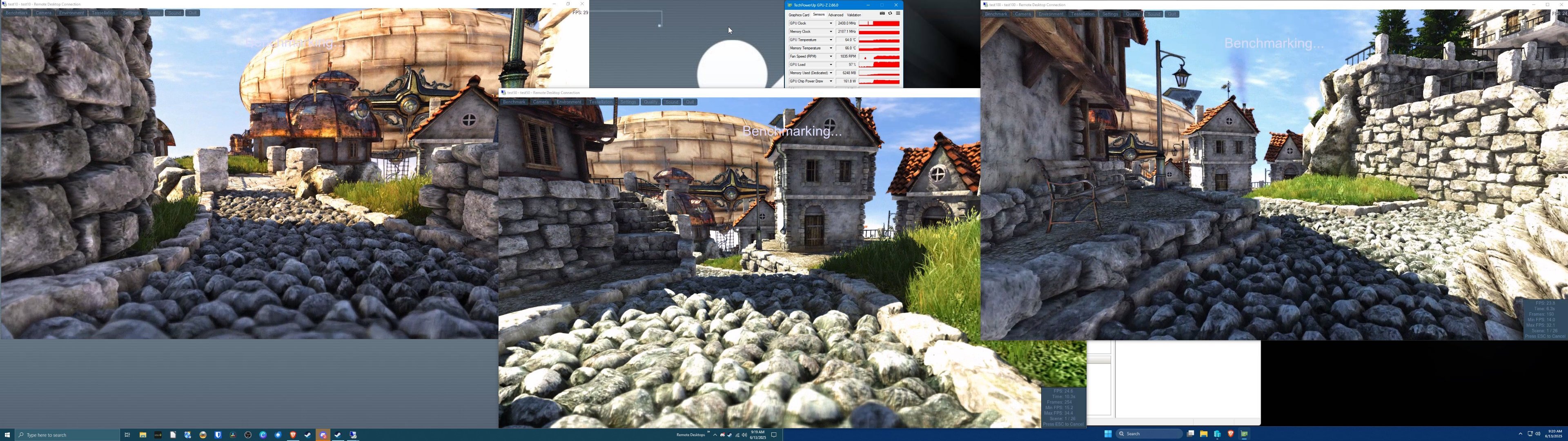
Easy VM GPU Sharing! Ever ran a homelab server, or just been messing around with Hyper-V and wanted your GPU to work in your VM's? Well this tool "should" work out for you (in Windows 11)! --------------------------------------------------------------------- Minimum System Requirements: --------------------------------------------------------------------- Hyper-V Capable System Generic Hyper-V CPU / RAM amount requirements (4 cores / 4GB RAM) Tested GPU's down to 2GB VRAM (GTX 760 / HD7870) Tested GPU's up to Radeon RX 7900XTX / RX 9070XT / GTX 1080Ti Windows 11 Pro or IoT Version Host OS confirmed Windows 10 Pro or IoT Version Host OS confirmed Windows 11 Pro or IoT Version Guest OS confirmed Windows 10 Pro or IoT Version Guest OS confirmed Note: Parsec only appears to work under Windows 11 host OS environments. Otherwise, 3d works fine on Windows 10 host OS's as well including Steam streaming, RDP, encoding, transcoding, etc. --------------------------------------------------------------------- How To Use: --------------------------------------------------------------------- Run easy_vm.exe from the install directory or unzipped folder; default location is (C:\Easy GPU VM Share\). There is also an installer version on .iso that you can mount, and it'll install the program and create a desktop shortcut for you. For more advanced users, you can edit-use the .bat file directly titled: "setup_vm.bat" located within the same directory. Click on YES to allow the app to make changes to your device. ---------------------------------- OPTION 1 - Installing a new VM: ---------------------------------- Insert your Virtual Machine Name (will also be your NETBIOS name). Insert the path to your Windows 11/10 iso file to install. Choose which version of iso you're installing (Pro or IoT). Insert the virtual HDD/SSD Size in GB (just put in the number). Insert FIXED amount of RAM to use for this VM (dynamic does NOT work). Insert CPU Core count to use for the VM. Type in (exactly as done in Hyper-V Switch manager) the network name. Insert the save path for the VM's virtual HDD / SSD file (no quotes). Insert default / initial username to be created (local account). Insert default / initial password to be created (if any). Auto Login to the virtual machine enable on startup? Note: (Type "TRUE" or "FALSE" no quotes or capitalization needed). Sit back and wait for the install process to finish. ------------------------------------------------- How to UPDATE your Graphics Card OR Driver? ------------------------------------------------- Driver Only: Download latest driver on host system and install driver. Run Easy GPU VM Share and choose option 2. New Graphics Card (and driver assumed): Download intended new driver on the host system. Insert new GPU with the system off of course. Note: (If necessary due to dead hardware, reverse if needed.) Boot up host system with new GPU installed and driver downloaded. Give host system a reboot, just in case because new hardware. Install new driver on the host system as normal. Run Easy GPU VM Share and choose option 2. Credits: Source scripts were found at github. I do not own any rights to these scripts, only the bat files, icons, and exe files I've created and compiled for this collection. Original source material for the .ps1 scripts were used from: https://github.com/jamesstringerparsec/Easy-GPU-PV Would be interested to hear from anybody who could help create a better GUI for this too! If you can, please let me know at ExtremeHW. DO NOT COPY, DUPLICATE, OR SHARE THIS PROGRAM WITHOUT EXTREMEHW'S EXPLICIT PERMISSION (OR PIO'S). OTHERWISE THE SOFTWARE IS PRESENTED AS IS, 100% FREE, OPEN SOURCE, ENJOY IT PLEASE AND SPREAD THE WORD! THANK YOU. DOWNLOAD LINKS: Zip File - Portable Apps style (just unzip / copy / paste): https://drive.google.com/file/d/1PaAw1miQ5WIEwNy8LfZaba4Cq5W0lLU_/view?usp=sharing ISO File - Installer included to copy to default directory and creates shortcut: https://drive.google.com/file/d/1WZNJ9BfUgzk7SbktZDQTzZyEVYuxd2au/view?usp=sharing Screenshots: Installation work flow choosing Option 1 (Installing a brand new VM): Update Drivers work flow choosing Option 2 (updating drivers / installing a new card): Three VM's all sharing resources together to utilize my 16GB Intel Arc A770 (tested with GTX 760 and newer and RX 6500XT and newer too):