Welcome to ExtremeHW
Welcome to ExtremeHW, register to take part in our community, don't worry this is a simple FREE process that requires minimal information for you to signup.
Registered users can:
- Start new topics and reply to others.
- Show off your PC using our Rig Creator feature.
- Subscribe to topics and forums to get updates.
- Get your own profile page to customize.
- Send personal messages to other members.
- Take advantage of site exclusive features.
- Upgrade to Premium to unlock additional sites features.

pio
-
Posts
1,780 -
Joined
-
Last visited
-
Days Won
109 -
Feedback
0%
Content Type
Forums
Store
Events
Gallery
Profiles
Videos
Marketplace
Tutorials
Everything posted by pio
-

yahoo Cancer Drug Trial Cures 100% of Patients
pio replied to UltraMega's topic in Journalism & Entertainment
While I don't trust a single thing coming from giant multi national pharmaceutical companies, this is actually some promising news in an age of nothing but bad news it seems like. I wouldn't say a "cure" either, as mentioned. However, 100% success rate in the first set of trails, that's promising. Let's wait and see how those patients recover in the next few months to years, and see how this particular drug goes on. It could be something wonderful, it could be riddled with problems. We don't know for sure yet. Regardless, its still fantastic news. -
Not my images: $4 for both.

-
Youtube and their algorithms man.....I just watched that a few nights ago!
-
techspot N64 emulator plugin will add ray tracing and more
pio replied to UltraMega's topic in Software News
Neat find. Here's to hoping it can be plugged into RetroArch in the future! -
-
I've been paying sales tax on ebay purchases for a while now mate. Honk honk, absolutely ridiculous to be paying taxes on goods that have already been taxed at LEAST twice that we know of (seller has to pay tax on sales, and the original purchaser paid sales tax). Makes me incredibly pissed how far into our pockets the tax man is trying to reach now. -_-
-
Optimal sound card/audio setup w Z-5500 Logitech sound system
pio replied to Storm-Chaser's topic in Computer Audio
There "should" be a subwoofer level control on the receiver's settings. Start at +0 for your tuning (don't give it any positive numbers). That + your subwoofer gain knob on the back being no more than about 1/2 way up, and volume being up loud on the reciever (usually between 1/2 and 3/4), that SHOULD give you full power to the subwoofer. Once you've found your "full power" to the subwoofer spot in your volume and gains, leave it. Don't EVER go above that point unless you are 110% sure its safe. From there, yes you can tune it DOWN in your settings on the receiver. No need for a seperate volume control. However if you REALLY want one of those, yes it'll work. Set it to maximum, and the rest of the settings as I mentioned above. And then yes, once you're set and you know where "maximum volume / gain" is at, then yes, you can use a car bass knob to turn the subwoofer down safely. If you're going that route, look for the Scosche knobs. This one in particular (below linked). There's LOTS of knobs on the market, the Scosche ones are generally known to be reliable and cheap. I cannot say the same about the other one, but I've heard lots of horror stories on cheap knobs. https://www.amazon.com/Scosche-RLC-Remote-Level-Control/dp/B002EEP3WA/ref=sr_1_4?keywords=scosche+bass+knob&qid=1654487171&sr=8-4 And yes, that's for a stereo signal. In your situation you'll just use either both red plugs or both white plugs. It won't matter, just make sure you use the same color. Subwoofer pre-outs are mono (one channel). Car bass knobs are usually stereo. No big deal, no it won't hurt anything. -
Optimal sound card/audio setup w Z-5500 Logitech sound system
pio replied to Storm-Chaser's topic in Computer Audio
Those specifications are considering the factory Logitech crossover system as well. You'll be using your own, and set it to "small" and as high as you comfortably can for those speakers. I said 120-150Hz, but if you can handle losing more, go up to 250Hz if you can. The more bass you block from them, the better they're going to perform as they're so tiny. This will be under the speaker setup menu on the receiver somewhere. And yes, they'll be fine. You're going to be missing a bunch of mid bass in the 120-250Hz range, I sure wouldn't ask the subwoofer to go that high. Have the subwoofer set to go up to around 120Hz in your case, normally I suggest much lower but the small speakers will need the extra help. Remember, GAIN IS NOT A VOLUME CONTROL on your subwoofer amp. If you're unsure, try about 1/4-1/2 way up that's usually a decent starting point. More, you'll risk clipping at high volume. If you want that missing mid-bass, you'll need bigger front speakers, something that can handle bass frequencies as well. And now comes the best part. This is going to blow you away already. But if you want more sub bass.....add another exact model sub again later and put in opposite corners of the room. If you want more mid bass (or midrange, or perhaps cleaner treble), just get new front speakers (and center if surround is important). Want better surround effects? Well...you get it. -
Optimal sound card/audio setup w Z-5500 Logitech sound system
pio replied to Storm-Chaser's topic in Computer Audio
Looks good. I think you went a LITTLE overboard on cables, but that's okay lol. HDMI from the GPU into the receiver is fine, it'll provide surround sound just fine (or stereo). A digital signal is a digital signal, so the receiver is handling the DAC part of the equation here. That's a good thing, receivers are really good at converting digital to analogue. A subwoofer pre-out signal is just a signal. You CAN use an RCA Y splitter on a subwoofer pre-out to get 2 of them. So that's not a concern. Honestly, the only real change I'd have made was dropping those HDMI converters. You don't really need them if the receiver has HDMI inputs. There's other ways that would've worked as well if it didn't like a USB DAC. But yes, that will all work together fine. Don't forget speaker wire! -
Optimal sound card/audio setup w Z-5500 Logitech sound system
pio replied to Storm-Chaser's topic in Computer Audio
Those are Dolby Atmos satellite speakers. Yes, they'll work, but you'll be looking for a Dolby Atmos receiver to properly utilize those. It doesn't matter if they match the subwoofer as they're going to be working completely different frequencies. But yes, those will work, and those will certainly work better than the Logitechs. Klipsch does make regular bookshelf speakers in their reference line up as well. Personally I'd go for those unless you're specifically looking for Atmos surround sound. -
Optimal sound card/audio setup w Z-5500 Logitech sound system
pio replied to Storm-Chaser's topic in Computer Audio
Yes you CAN use your old speakers. They're not as good as you think they are, I promise.....(no offense meant). BUT....they will work fine, yes. With an exception. You NEED a crossover on them. One other small exception, 4 ohm speakers MAY cause amplifier damage to the receiver, use at your own risk. I dunno if those are 4ohm or 8ohm satellite speakers, but its just a general warning. I've personally used 4ohm loads in the past on Yamaha, Pioneer, and Onkyo units without a catastrophic failure. Doesn't mean its safe, but it IS doable. Those speakers are small enough and low power enough, I'm 99.9% sure they'll be fine anyway. Your receiver MAY have a crossover built in. If so, use this and set the speakers to "small" (if a choice between small and large), and if possible, probably around 120-150Hz crossover frequency. Down as low as 100 should be fine with cautious listening. Modern receivers can do that. Older ones will not. So it'll depend on the receiver. Yes, this is perfectly fine to do and leave it that way without the below added in. It'll be fine, just don't play them loudly without the crossover turned on. Bass WILL destroy those speakers very quickly. If the receiver DOES NOT have built in high pass crossovers (small function for speakers), then you'll need bass blockers, which I'd add in there anyway just because you don't want to blow the satellites with bass. With these speakers, I would bass block them. Others, I wouldn't. What the resistance is of the speakers will determine which bass blockers you need. 8ohm 100Hz: 100 Hz High Pass 8 Ohm Crossover WWW.PARTS-EXPRESS.COM 100 Hz High Pass 8 Ohm Crossover. Part Number: 266-462 by Parts Express. 4ohm 100Hz: 100 Hz High Pass 4 Ohm Crossover WWW.PARTS-EXPRESS.COM 100 Hz High Pass 4 Ohm Crossover. Part Number: 266-460 by Parts Express. Buy whichever of those you need for your speakers, one per speaker. These plug in between the receiver and the speaker, and will cut all frequency below 100Hz to the speaker (bass). You CAN also re-use the really large capacitors in computer PSU's. You can google a capacitance chart for bass blockers to get an idea what frequency your particular capacitors will cut if you happen to have spare PSU's laying around you can gut. If I recall correctly, they were somewhere around like 100Hz at 8ohm and 150Hz at 4ohm ISH the last time I used a set of PSU caps as bass blockers. Your miles may vary. Capacitors you just run on the positive wire to the speaker in series, and that's it. -
I've considered buying a whole house just so I can use an antenna. Now I get to wait 90 days, and then I can start shopping. I'll make do with it for now, I want out of this apartment worse and worse by the day. I'm going to find a way into a house even if it kills me. And then......then I'll have ISP options since I don't have to worry about apartment complex bureaucracy.
-
Optimal sound card/audio setup w Z-5500 Logitech sound system
pio replied to Storm-Chaser's topic in Computer Audio
Honestly at those prices, I'd look more towards a BIC F12 or Klipsh Reference 12, both used to be sold regularly around $200 USD each for a subwoofer. For the receiver, anything Pioneer, Yamaha, Denon, Onkyo, Marantz with the outputs and inputs you need / want in the future will do the job fine. Seriously, any receiver in the last 20 years will do fine, just depends on your needs (so long as its from a good manufacturer and still works). There's other good manufacturers, those are just the most common ones that basically anything from entry level up to professional level are good enough to use. That particular Yamaha looks okay, but for an 18 year old piece of equipment, that price seems excessive. I've seen good units around $100-150 before on ebay, so I'd keep your eyes peeled there. There's also local thrift shops, craigslists, tons of ways to find a good deal. A good bet is if it has HDMI inputs, it'll likely be easier to connect in with a PC, just because digital inputs. Seriously, even 50w RMS on a receiver is going to be a LOT louder and cleaner than 100w on a Logitech setup simply due to the cleaner levels of power with less distortion. Subwoofers, take your peek at these model numbers in whatever search you want to look at. I saw both of these on ebay for $200 ish. BIC Formula F12: BIC Formula F-12 12" 475 Watt Subwoofer WWW.PARTS-EXPRESS.COM BIC Formula F-12 12" 475 Watt Subwoofer. Part Number: 303-436 by BIC America. Klipsch R-12SW: Klipsch R-12SW Reference 12-Inch Powered Subwoofer - Black - Newegg.com WWW.NEWEGG.COM Buy Klipsch R-12SW Reference 12-Inch Powered Subwoofer - Black with fast shipping and top-rated customer service. Once you know, you... Either of the above subwoofers will get lower than the Yamaha you linked, and they'll both be louder, and cleaner sounding more than likely (depends fully on your setup too ofc). Honestly both of those subwoofers are so incredibly similar, you'd be hard pressed to find a difference between the 2 unless you had them side by side and compared them. So I'd grab whichever is cheaper personally. I have been a huge fan of those BIC F12's on the budget for years though, I sure wouldn't mind owning another one or two of those in the future again. Those Klipsch copper colored cones are absolutely amazing to look at though, and that bragging factor. -
Optimal sound card/audio setup w Z-5500 Logitech sound system
pio replied to Storm-Chaser's topic in Computer Audio
Well we can toss option A out, as friends don't let friends buy white van speakers. Avoid that Hauss Media Labs scam set up, those aren't real speakers. Option B shows some potential. The Skar IDX is definitely not going to be optimal though, and I have a feeling you'll blow that one even faster with those distortion levels to be honest. Car drivers, especially ones like that Skar are going to be VERY open to distortion damage. Just a little clip, and that Skar is going to destroy itself where its glued together at. I'd instead argue to get something like this as a replacement, HOWEVER, I really don't think its worth the money to fix it when you can buy a proper powered subwoofer for this price. Up to you, but you CAN buy a full on proper powered subwoofer with an amp for this kind of money.: Dayton Audio RSS265HF-8 10" Reference Series HF Subwoofer 8 Ohm WWW.PARTS-EXPRESS.COM Dayton Audio RSS265HF-8 10" Reference HF Subwoofer 8 Ohm. Part Number: 295-442 by Dayton Audio. -
Optimal sound card/audio setup w Z-5500 Logitech sound system
pio replied to Storm-Chaser's topic in Computer Audio
Tried to warn ya mate. Time for an upgrade for sure! If you want budget, go check out Parts Express and Monoprice. I can tell you from experience, the Dayton Ultimax series subwoofers are absolutely fantastic and severely underrated, but that's going to dig you into a whole custom build kinda thing that way. For power, just get an amplifier that's bigger in capacity (RMS power), and one that matches the resistance / impedance of your speakers / subwoofer (whatever amp). Both companies do sell full and complete subwoofer setups too, AND some half decent speakers as well. Both also carry amplifiers I do believe, but PE is definitely bigger on that front. And then when listening to it loud, LISTEN very carefully to your speakers to make sure you're not over-driving them. It's pretty apparent when it happens. Keep yourself from over driving them, make sure you have plenty of CLEAN power available, and you'll stop having those problems. If you want it louder you need to add more power or more drivers or both. -
Yeah, that's the kicker. To be honest I'm happier with 5Mbps consistantly regardless of data usage. Data caps, I can't live with. 50GB is like 2 movies. I'm needing this as a whole home internet solution, not just my phone device. -_- Verizon Home Internet WOULD work here if they'd just allow me the ability to try their service. Their website says I'm not qualified, but yet their coverage map says I'm fully in 5G territory. Absolutely no reason I can't get their LTE or 5G home internet services like T Mobile allowed me to try. T Mobile's doesn't even work right here, but at least they let me try it out. There's also like 3 or 4 wireless home internet options that use those point to point ethernet bridge antennas. Those also WOULD work, however my apartments do not allow me to put an antenna outside. Even just sitting in my patio, nope......not allowed to do that.
-
-
This is such a tough topic. Of course the companies know what they're doing is harming people, kids included. There's many adults too however, whom are just as addicted, and believe everything posted to facebook is real, and its ridiculous. But to say that we can sue the company for our own actions? It's not the companies fault, but I can't 100% say its the parents at fault either. Especially when we have our schools handing out tablets, laptops, and sometimes even cell phones. We're too reliant on social media and the internet in general, we've lost focus with reality as a collective whole. Nowadays its common practice to site Wikipedia blindly for example as a reference source, without ever even making note of where the sources for the Wikipedia article even came from. I've seen articles used as a reference source, that literally site a nobody "who" person on twitter as the source for that whole article! That's acceptable these days as a common source of accurate information? What happened to picking up a book, written by people that actually know whatever the subject is, and reading your information directly from the source? There's certainly places online that can fill that void, such as here for tech subjects as a great example. Collectively, we are an expert in this field. I really don't know the answer to this problem. On one hand if we start slapping at the hands of the companies like this, then the companies will just restrict the access further or whatever other measure they'll take. Then we'll have people complaining even further of censorship, which certainly is already a problem anyway. On the other hand, if we blame the parents, what are they to do when they're both at work 60 hours a week just to put a roof over their heads? I blame everyone. Everyone sucks. -_- lol. EDIT: Personally, I say stop with rediculous rules on social media sites, and maybe put a general age restriction of "adults only" if we're to have adult type situations and conversations on there (with no rules that would happen). Not this 13+ thing like Facebook has. If you have a child, stop letting them on these sites. There's no reason a child needs to be on Facebook. If they want to interact with their peers, they need to learn how to do so. Not on a screen. They can have their addictions when they're adults, same as cigarettes and beer. I'm not saying its necessarily on the companies to fix it, or just the parents. I think we as a society need to recognize an addiction when we see it, and invoke ourselves into rehab.
-
I'll be patiently awaiting for damric's future post of "I caught my spare parts on fire today"...... Dude, I wouldn't use a Power Man PSU in era appropriate parts that don't care as much about PSU quality. That's literally a Pentium 2 era PSU. On a Ryzen rig, mannnnn, you're just killing those mosfets and VRM's on that motherboard. Poor thing.
-
@tictocDude, that car doesn't look anywhere NEAR 1/4 million miles old. Absolutely love it, glad you haven't had too many issues with it either. I've always shied away from Subies for the headgasket reasons.
-
T Mobile is the only company outside of CenturyLink that offers a "home internet" service here at my address, yes. I never ran across Fi, I'll have to check into them, but its definitely a T Mobile tower thing. They just don't have the expansion capacity here in my area yet. Visible itself sets that cap. Yes, you can change TTL, but I couldn't figure out how to do that using my Note 9 as the hotspot for it. I had a Mofi router before with Visible plugged into it, and I was getting okay ish speeds on it after changing TTL settings. But that device wasn't working half the time either (granted, they DID warn me they couldn't guarantee Visible would work in it).
-
The only problem I have with it right now is I cannot port forward to get anything OUT of the network onto the internet. So some of my home server's functions are still offline. I'm working on solutions for that still, might be able to put another VPN on there somewhere that allows port forwarding or something. Not sure yet. Speed / latency isn't too much of a concern, just that it works and there's at least like 2-3 Mbps upload, which I have that easy now. I'd love to be able to do game servers again, and so far latency isn't TOO terribly bad through my VPN's. So maybe, just maybe I can do game servers again soon!
-
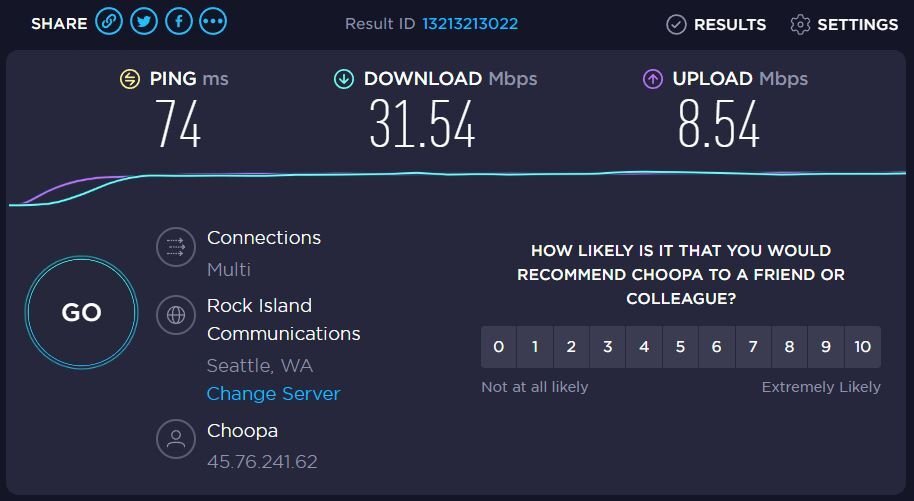
I live in an apartment on the outskirts of my town. Nope, not allowed to use an antenna. -_- Part of why I'm trying to buy a house soon, when I move I'll mount an antenna and be golden. Here's a speed update. Again, this is with a 6 Mbps / 768 kbps DSL line, 5 / 5 cell phone hotspot, and a very bad signal quality T Mobile home internet connection all bonded together before my router (with redundancy too). Speedtest was ran at my desk on my rig, at the very rear end of the network. It works! This is SOOOOOO much better than trying to pick and choose between one unreliable connection and another unreliable connection.
-
Alright, worked it out myself. So, Speedify is the program I've been using to bond and make my 3 ISP's redundant as well, so I have a somewhat "stable" connection lol. I have a 6Mbps DSL line with like 0 upload, Visible cell phone hotspot (5 down / 5 up), and T Mobile Home Internet that only seems to work at night, but I get anywhere from 20-80 ish Mbps down and 3-40 Mbps up depending on cell signal and load on the tower. So with Speedify I was able to bond / redundant those 3 connections on my main rig for a reliable enough connection with both download and upload. The problem, as mentioned in my OP was Windows Internet Connection Sharing. So with Speedify doing the grunt of the work there bonding, and VPN'ing and whatnot, they happen to also have another bit of software. Connectify. Connectify works just like Windows Internet Connection Sharing is supposed to, you can create a "wifi hotspot" or a wired ethernet router out of your computer basically so long as you have enough NIC's. Set Connectify up to share the Speedify connection over another LAN connection, plugged that LAN into the WAN on my main network's router, and boom. Done! Now, anytime I connect ANY internet connection to that 2u piece in my rack, any connection at all, it will automatically be bonded, VPN'd, and added for redundancy to the ISP pool in my house, and automatically shared out to the router which provides that as internet for everything! Now I just gotta get port forwarding to work, and I'm absolutely golden!