Welcome to ExtremeHW
Welcome to ExtremeHW, register to take part in our community, don't worry this is a simple FREE process that requires minimal information for you to signup.
Registered users can:
- Start new topics and reply to others.
- Show off your PC using our Rig Creator feature.
- Subscribe to topics and forums to get updates.
- Get your own profile page to customize.
- Send personal messages to other members.
- Take advantage of site exclusive features.
- Upgrade to Premium to unlock additional sites features.

pio
-
Posts
1,780 -
Joined
-
Last visited
-
Days Won
109 -
Feedback
0%
Content Type
Forums
Store
Events
Gallery
Profiles
Videos
Marketplace
Tutorials
Everything posted by pio
-

AMD Driver problem crashing Microsoft photo viewer... solved
pio replied to Minotaurtoo's topic in AMD
Like PCSarge said above, DDU full clean AMD / Nvidia drivers from your system in safe mode. Make sure you do it in safe mode (and then reboot after cleaning). Get your new drivers installing IMMEDIATELY after your reboot, before Windows decides to grab a driver from Win Update. If you're still having problems, try the BIOS switch. If you're still having problems, you might've gotten unlucky with a bad card....RMA it. There is absolutely no excuse for the problems you're having with that card, I agree. I just don't think its necessarily a driver problem, its more likely a card problem or BIOS issue. I'll happily take it off your hands for the right price though. I'd rather see you keep it and enjoy it though. One thing not mentioned lately either, you can also make sure that your motherboard BIOS is fully up to date as well. Might even check the firmware on your GPU, and see if there's any updates to that from the manufacturer too. Sometimes odd issues like these pop up, and they've already been addressed with BIOS updates for board or GPU. I have a 7970 that wasn't working (correctly) on any machine that lacked UEFI. Found out it needed a later BIOS revision installed to enable both BIOS and UEFI operation as the card released as only UEFI at first. I've used just about every ATI / AMD GPU to date (except current high end). Now, if you were complaining about AMD's "final" drivers for older cards, then yeah I'd agree with you on driver problems. No reason a 290x shouldn't be at least usable today, and with MODDED drivers they are. But their current gen lineups? No, they take pretty good care of ironing out MOST issues on current generation in their drivers. Not saying it doesn't happen, but actual driver problems tend to be more rare than a google search might lead you to believe. -
Wanna ship me that Voodoo I know you have on hand? If so, I'll buy a 486DX2 rig to put it in. For real though, I can't even get this stupid Socket A to recognize drives yet. Haven't even started on the 2 older ones I have on hand yet.
-
pc gamer Intel releases the ATX 3.0 power supply spec
pio replied to ENTERPRISE's topic in Hardware News
Yes, because we totally need a new PSU standard to deliver a whopping 600w to a GPU........ It's not like we don't have that capability already with 650w+ units being capable of 650w+ on the 12v rails alone or anything. Obviously if you have a higher TDP GPU, you're going to need more than a 650w unit, but still. My Seasonic 1000w is absolutely MORE than capable of this. It just doesn't have the fancy pants new 12 pin connector, that's all. The article states that there's also new efficiency standards with the new ATX spec on idle and low usage scenarios. Okay.....but we have that already...... Leave it to Intel to decide the standards for us, even though we've all been on the same standard for 20 years. (Yes, I understand that the original ATX standard is Intel's standard) What does this ACTUALLY mean though? Does it mean we're going to see a drastic increase in GPU power consumption, something we haven't seen to date? We already know they're reaching the limits of the die sizes. So maybe since they can't make things smaller, maybe now they'll start getting bigger and more power? Or is it just a way to sell more PSU's in an inflated market? Guess we'll see when future GPU's start popping up. Until we have GPU's actually pulling 600w+, then personally, I feel this new "standard" is a little silly, and telling somebody to hold off on buying a PSU in anticipation of these is even worse. -
Bust it out and join our cpuz bench off! Oldest I've gotten going so far has been my 939 opteron 180 set up. I haven't been pushing people to enjoy old rigs or anything...... Nooooo.
-
He has to stick around for a little while since I've got dinosaur hardware that he wants me to bench off.
-
Want!!!!!!! Seriously, I just want the cooler. I can hardly tell a difference with modern NVME drives, but man I want that pod racer cooler.
-
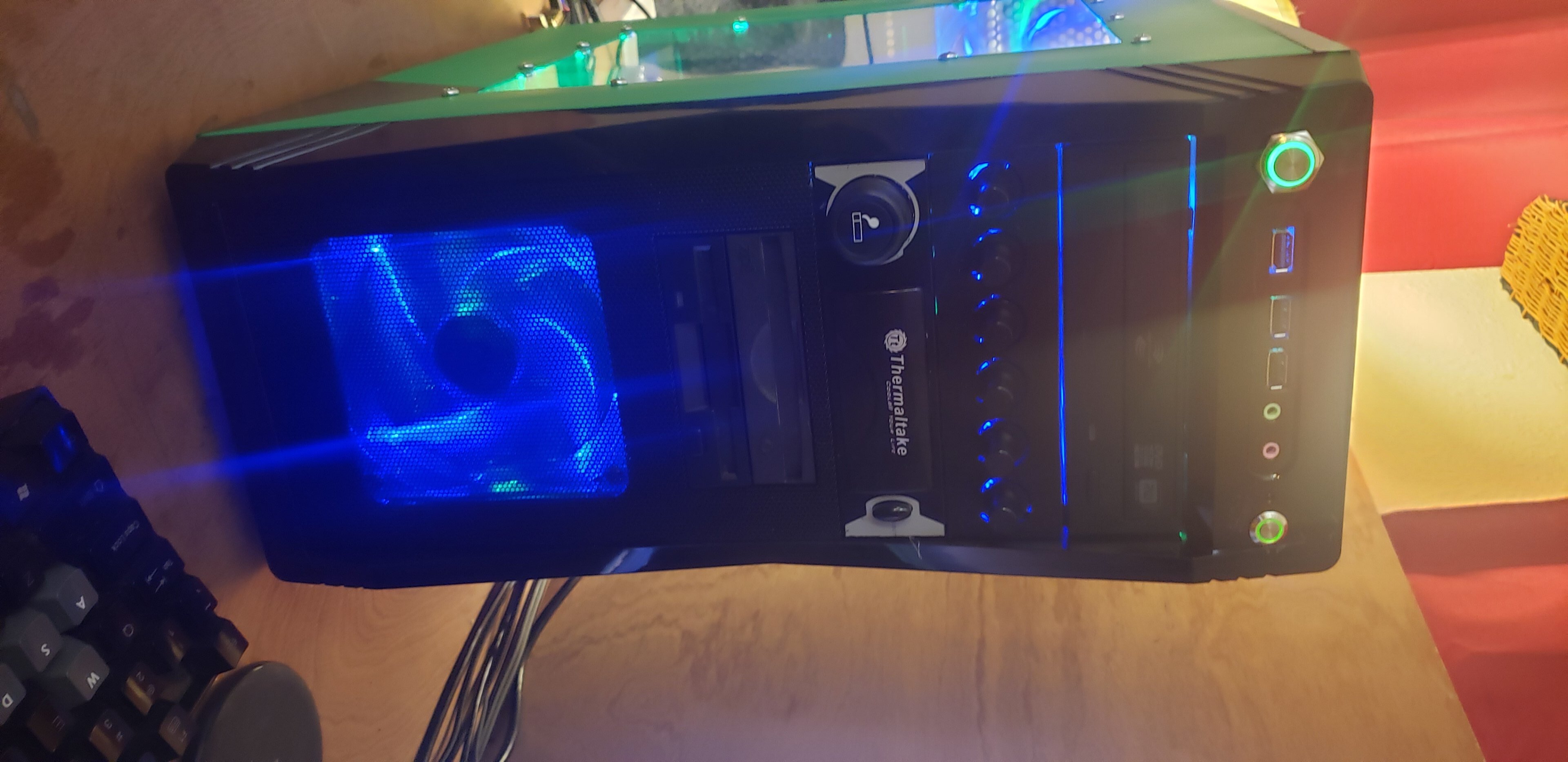
Time travel back 20 years and buy yourself one of these Thermaltake 12v cig lighters........ (Why the odd rotation......ugh) Nah but seriously though, as others already said, its your "Earth Ground". Have you ever seen a household lamp connected with 2 prongs instead of 3? There's your answer. Yes, it will work. HOWEVER, that "earth ground" is there to keep your chassis of your device (in this case your AC to DC power supply) from becoming the ground and electrifying it. If your home wiring has earth grounds already, you probably should use it as a safety measure. Some homes still do not have the ground wire though. Either way is fine. If I was wiring something custom up to AC power though, I know I'd want that ground wire in tact, just in case.

-
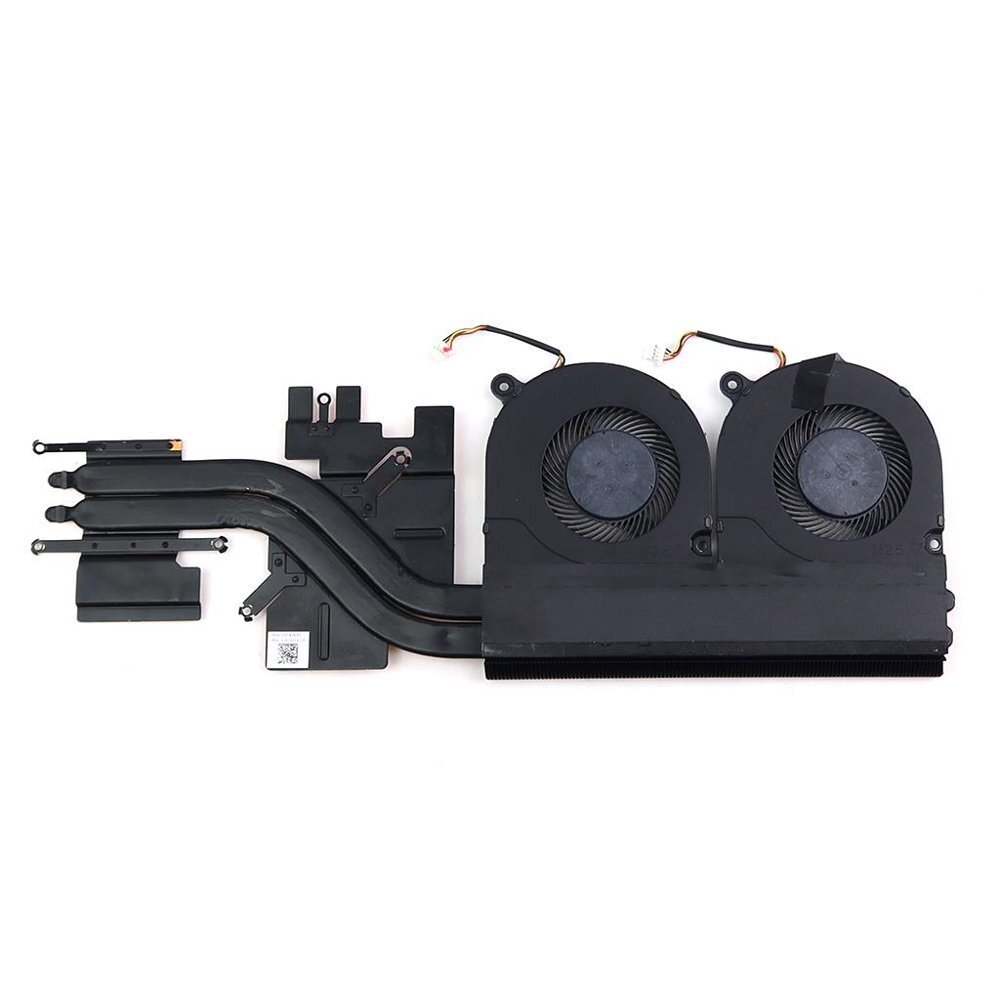
I don't have any unfortunately. Did this a few years back, 2019 I think? But its this cooler here off the Nitro 5: The factory heatsink on my Aspire 3 was aluminum and only had 1 fan on it. I don't have it on me anymore, and the laptop is put up on my shelf of junk until I get around to replacing the battery again lol. The Nitro was solid copper with 2 fans on it, rated for a higher TDP / wattage. It fit, so I put it in there lol. My particular model Aspire 3 came with the 2500u in it, and its identical to the Nitro that had the 2500u / 2700u + GTX 1660 or whatever GPU it was in there. Wired in the second fan to a USB header 5v and put it on a toggle switch so I could turn it on or off (full speed only for the second fan). Used liquid metal for TIM (VERY carefully surrounding the area with tape). I was hitting about 61*C full CPU load, and in the low 70's p95 + furmark load with the CPU locked at 3.6GHz and the Vega 8 locked at 1.2GHz.
-
You can force the Vega 8 to stay at 1200MHz, just like the CPU can be stuck at 3.6GHz on the 2500u. I think its called Ryzen Adj or it might've been Ryzen Controller. I forget, I'd have to hop on my laptop and find out, but the battery is dead lol. Yeah, don't use it on a laptop unless you are 110% sure the laptop's power setup and battery can handle it. Found that out the hard way. Killed my battery, actually dead, in just a few months of my laptop being overclocked. I have a 45w laptop, with a 150w power brick, upgraded battery (well it was new), and upgraded CPU / GPU cooler on it. Took the parts off an Acer Nitro to put into my Aspire. (Grabbed the screen too) Thought that was enough to handle it fine. Turns out, the DC plug / jack on the side is only rated at 45w though. So even though everything ELSE can handle the load, my DC jack cannot. -_- As such, it burned out the battery from being drained faster than it was being charged constantly.
-
I have a modded Acer laptop with a 2500u in it funny enough. Once setup and overclocked, that darn thing does things I never expected to see a budget laptop do! Your rig should be handily beating my laptop, looks like it probably is. So yay! The GPU in the 2500u is just BARELY underneath an RX 550 in performance, and your CPU is definitely stronger even with the 2500u at 3.6GHz speeds.
-
Considering you're at 2560x1440 @ 144Hz with G sync / Freesync (I think they both work on GSync screens right?)....... I'd almost vote to just hold onto your 1080Ti a little longer. It's still a very very decent card for 1440p. Not great, but decent. However if you want to keep absolutely pegged at that 144 FPS range for your screen, a 6800XT / 6900XT wouldn't be a bad way to go either if RT capabilities being lacking doesn't bother you. Otherwise, yeah seems like a 3070ti / 3080 would be in range too. But even that will struggle with RT enabled on some titles. Personally, I just can't stomach it when we used to be able to get this kind of performance around $300-500 just a few very short years ago. Being on a 5700XT myself though, I understand why you'd want to scratch that upgrade itch though. Both options are solid. The higher AMD cards tend to have more VRAM, the Nvidia cards tend to do a little better at RT. If you do score a new GPU, well congratulations....enjoy it. Don't forget to let us know what you picked up in the post your last purchase thread! (or here lol)
-
Usually you'd set the multiplier in BIOS. The turbo clocks are just that though, turbo. It's meant for low to moderate loads to help get a single task done a little faster than it normally would. Full system loads, you'll typically knock down to the "stock" clock speeds. If there's no multiplier option in BIOS (which I'm not sure on that board), it might not be an option for you with that setup. The CPU has to be "unlocked" to allow it since around the switch to DDR memory, well just after that. Aftermarket "enthusiast" desktop type systems, the motherboards allow these kind of things, but they're really not supposed to. Server boards are USUALLY (not always) treated a little more strictly in what they allow for adjustments, just like with OEM's like Dell and HP. TBH, its probably not an option on server type boards. I've never seen it on the ones I've played with, but that doesn't mean its impossible. The PCIe SATA adapter thing, keep in mind too that your PCIe lanes also get overclocked with FSB speeds. Everything does. You might be able to lock the PCIe bus to 100MHz though, a lot of boards do that automatically, and some have the option to lock it at whatever you want. FSB overclocking, without auto or manual locks, will overclock literally everything. The CPU, RAM, PCIe lanes, PCI lanes (if applicable), your HT Link, NB and SB speeds, SATA controllers, IDE controllers, all of it. Not saying that's going to be the case in your instance, just something to be aware of. Again, the board MIGHT lock some of those to speed automatically. Usually you'll run into instabilities or data corruption long before you damage something though. And to be honest, the PCIe lanes CAN be overclocked to some degree and not hurt anything. Doesn't really help anything either though, but it doesn't hurt. I've ran my PCIe lanes at 115MHz before. That would net you 230MHz HT Clock (FSB). Data will get corrupted on SATA drives long before an actual instability would be noticed, assuming all else is fine. So its really not going to harm anything on a system without important data on it (yet). Want to know what'll hurt your setup? Heat. You're never going to overvolt the snot out of it without proper BIOS adjustments, so voltage can be ruled out. I don't see a volt mod being successful in this instance, since the adjustments just aren't really there anyway to make use of extra voltage. You can't harm it by FSB overclocking since its also not really a thing except with software. FSB clocking doesn't HURT anything anyway, revert back and its fine. Seriously, the worst thing you'll do software overclocking is crash, general instability, or the worst thing....data corruption. So long as you're not worried about any of those (short term) problems, then FSB overclock away! I wouldn't be, none of them are system threatening. Voltage and heat are the two things that kill components, and with AMD especially, voltage itself really doesn't do much damage, its the heat that goes with it. Hopefully that helps clear a few of your questions up. I know its not much, and probably not the answers you were hoping for. But you're also delving into areas that most of us don't do that often lol.
-
Yup, we're all grumpy old people here........ Nah, seriously though, Welcome!!!!
-
That makes a lot of sense! Thanks for clarifying guys.
-
Can do!
-
Could be. I'm not versed in that whole situation at all, just recall the news stories about it recently that's all. I had thought the FTC sued them stating they couldn't use ARM as they'd be a monopoly though. Maybe it was more just that Nvidia couldn't OWN them? Idk.
-
That's bannable over there these days? WOW! Back when I was a mod over there, I'd just have laughed my butt off at your comment, sent you a PM saying, "Hey, I agree with you, but you probably shouldn't say that publicly LOL", and we'd have been on our way. Where's the leniency at? Where's the care for the members that I was told to have when I signed up as staff? E!!!!???? You have some 'splainin to do! (j/k, I know that wasn't your area). On topic of bans, E can you ban me off OCN? I've forgotten my password now, and I'm never going to be bothered to submit for a new one. It's too reddit over there.
-
You should get a custom made headphone stand too...
pio replied to GanjaSMK's topic in Computer Audio
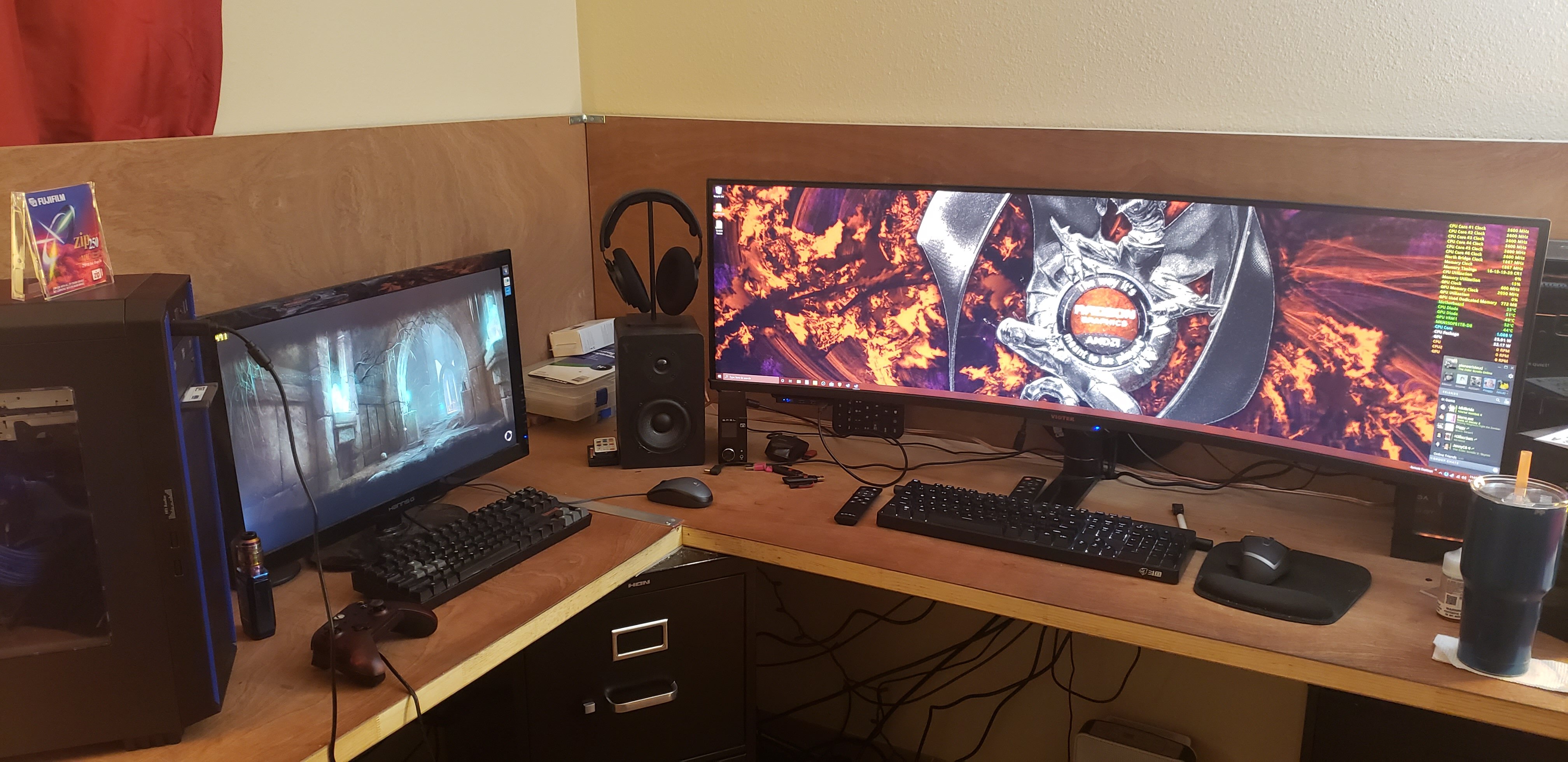
My desk is from 4x not solid oak doors (I wanted "fake walls" behind it). Nice choice! I definitely wish mine was solid now though lol, already punctured in one spot. Too many people sleep on the idea of using doors. -
I thought Nvidia was told no, they couldn't acquire ARM? I mean they publicly announced just a month ago that they were not going to acquire ARM. The FTC sued them for monopolistic practices. Links to both stories (I just skimmed). So.....now, a month later, they're announcing ARM based 144 core processors? K. I'm so confused these days. -_- Nvidia calls off its efforts to acquire ARM: Nvidia calls off its efforts to acquire Arm TECHCRUNCH.COM Nvidia has walked away from its deal to acquire Arm from SoftBank. FTC Sues to block Nvidia's Merger: The FTC Sues to Block Nvidia’s Merger; New Study Shows Non-Consensual Tracking - ExchangeWire.com WWW.EXCHANGEWIRE.COM The FTC sue to block Nvidia's merger; reports show non-consensual tracking; China assemble a blocklist; the head of Instagram testifies...
-
-
Yes, its most definitely a "legacy" BIOS. I know you can get RX 480's and RX 580's to work on legacy systems with some BIOS mods. Not sure about anything newer than those though, never tried with my 5700XT.........yet. The 6600XT, yeah that one probably won't work. Depends fully on how old of a "legacy" BIOS it is really. I have legacy systems that won't even work with an HD7970. Others (like my servers) seem to work fine with my RX580's. I have used an RX 580 in my own server setup which is of similar age (also Supermicro). If I had to take a wild guess, I'd say Polaris is the upper end of compatibility. But if you're getting another 6600XT back from RMA, there's no reason why you can't try it! Worst case, it won't work.
-
I don't know, mine couldn't do that either. I believe I was stuck at 1280x1024 with mine. Running Windows 10. I just accepted its limitations and didn't need it anyway lol. I have a 17" 4:3 / 1280x1024 screen attached to the rack anyway since its what I had laying around for the server box lol. I really really doubt its DDR2 memory onboard, but I suppose it could be. The originals were 8MB of SGRAM, hard telling what server board manufacturers have done to them over the years. It's still only 16MB, that's going to be tough to get a higher resolution out of regardless. Modernized or not, the core is still from 1998. Didn't know Windows 11 could even function with 16bit color either, Windows 10 doesn't have the option to drop it that low on mine. You might be stuck with whatever 32bit color options the card allows, or going with a different OS maybe. Not entirely sure, you're attempting to do things I gave up on since I can just toss a GPU in if I need it lol. Not saying its a bad thing, by all means rock on! This is how drivers get tweaked, and fixed, even on old ancient systems. On the plus side, if you're using it actually as a server type system, you can RDP into it and get whatever resolution you want remotely without the Matrox being bothered at all. So there is that.
-
I'm due for a grocery store run here soon anyway, I'll check next time I'm at the store. You have me curious now lol.
-
Stahp it! Last time I checked 6900XT's were $1500-1600. Seeing them at $1299 is only making me want to buy one!!!! IMO, you got the card at a fair enough price. It's a good card. The other one is also a good card. You didn't do "wrong". Enjoy your ASRock card. Personally I like the MSI one better because less rainbow puke and I'd assume a better cooler by a tiny margin. I'd assume the lights can be disabled or changed using proprietary ASRock software, just a hunch. If it works with other software though that's even better. I've debated on buying that same exact card from ASRock several times myself.
-
It's a Matrox 2D video accelerator from like the 1990's lol. It's going to be laggy. Look at your DAC speed, 175MHz. That's like GeForce 2 / ATI Radeon 7000 series from way back in the day speeds. My AGP 4x ATI Radeon 8500 is clocked at 250MHz / 250MHz for comparison using DX8.1. Be happy you found a driver that even worked on Win11 lol. I think mine on my Xeon setups are just using a generic Microsoft Display Adapter driver just because that's all I could find for Win10. I don't use the video outputs at all though except troubleshooting. EDIT: Yeah, the Matrox G200 is from 1998 and features 8MB of SGRAM onboard. It's one of the VERY FIRST 3d accelerators ever, so yeah.....its basically a fancy 2d accelerator lol. Source where I found date below, the rest of the specs can be found on wiki if you search "Matrox G200". You're going to be hard pressed to get those to function AT ALL for daily tasks today using modern Windows outside of viewing the desktop and troubleshooting. Exploring the G200 - Matrox Millennium G200 WWW.ANANDTECH.COM