Welcome to ExtremeHW
Welcome to ExtremeHW, register to take part in our community, don't worry this is a simple FREE process that requires minimal information for you to signup.
Registered users can:
- Start new topics and reply to others.
- Show off your PC using our Rig Creator feature.
- Subscribe to topics and forums to get updates.
- Get your own profile page to customize.
- Send personal messages to other members.
- Take advantage of site exclusive features.
- Upgrade to Premium to unlock additional sites features.

pio
-
Posts
1,780 -
Joined
-
Last visited
-
Days Won
109 -
Feedback
0%
Content Type
Forums
Store
Events
Gallery
Profiles
Videos
Marketplace
Tutorials
Everything posted by pio
-
This is what makes us "Extreme". Thank you for sharing your progress over the years on this case and build. It's looking even more beautiful than it was 20 years ago, and that's what case modding is all about. Seriously, such an awesome build.
-

techpowerup Linus Media Group YouTube Channels Hacked
pio replied to Memmento Mori's topic in Software News
Okay, now I'm curious. You can't say * on EHW? Apparently not.... -
Dude, those are some great results from that Zotac 4070! Thing's a freaking beast, wow. Absolutely great review!
-
[Official] Microsoft Flight Simulator 2020 Information & Discussion Thread
pio replied to J7SC_Orion's topic in PC Gaming
So here's what's interesting..... The model joystick I have, specifically, is a "Thrustmaster USB Joystick". It claims Win98SE, 2000, and XP support on the box, with no CD required installation. Obviously, not using it on an old rig for Flight Sim 2020, its plugged into my sig rig running Windows 11. Yes, Windows recognizes it. The game itself recognizes the 3 different analogue inputs just fine and gives me dead zone adjustments. But..... it does absolutely nothing within the game, and there's no "profile" selected for it, its an unknown type of input per the controls menu. My XBox One wired controller works fine in the game. Plugged it in, it just works. I have NOT tried my wheel, as who uses a steering wheel for a flight sim? -
[Official] Microsoft Flight Simulator 2020 Information & Discussion Thread
pio replied to J7SC_Orion's topic in PC Gaming
Thrustmaster USB joystick doesn't work on Flight Sim btw. Kind of a bummer, game seems like it'd be a lot of fun. -
Yessir, and you were right. It passed 12 hours earlier today at bone stock PBO / DDR4-3000 / 1500 FCLK. Have it going now again for another 12 hours with a slight undervolt on the CPU, to bring the all core boost back up over 4GHz. It "should" pass here (just a measly -0.100v). It hasn't frozen once since changing these settings last night (before the undervolt). I think the memory speeds / FCLK were exactly the problem, even though I was just using the XMP / DOCP profile.
-
[Official] Microsoft Flight Simulator 2020 Information & Discussion Thread
pio replied to J7SC_Orion's topic in PC Gaming
Just picked this up on sale on Steam. Already tinkered with it a little bit in the XBox Game Pass thingy (mine was expiring, so bought Flight Sim / Wreckfest). I already have one or two joysticks laying around, I'll have to dig them out..... Any advice on how to set this up with a joystick? Only time I've played was just with a regular game controller (XBox pad). -
Okay, so far its passed 10 hours of blended p95 (with AVX). Hasn't frozen yet *knocks on wood. Stock PBO, stock vcore, stock multiplier (so like 3.95GHz all core boost). RAM at DDR4-3000 / 1500 FCLK, 1.125v SOC. I was trying to get a good overclock, but 4.1GHz was taking near 1.40v and temps were getting a little too high with the Hyper 212 Halo Black on there, so yeah, not overclocking with that cooler. Figured that was going to be the case, but tried anyway. I'll let this continue running for a little bit longer, probably a nice round 12 hours to be safe. I guess I'll call it good if it makes it that far, everything at basically bone stock. Still better than 3.8GHz for a 4c / 8t part, like it was set to before (and still crashing). Definitely looks like RAM speed and FCLK were the problem though. XMP profile puts it at 3200 / 1600, and clearly this chip doesn't like that.
-
Test and Experience with GPURisers 20 W/mK Thermal Pads on 6900XT
pio replied to Memmento Mori's topic in Air Coolers
I haven't tried replacing pads on my card (yet). What's interesting is the delta between core and hotspot temps. You have about a 12*C delta. I have over a 50*C delta on mine. MSI says its fine. I dunno man, your temperatures seem to be fantastic on your card. -
Stock JEDEC would be what, 2933 right? Yeah, I can plop it down another notch. That might finish getting it more stable, it does seem knocking it down to 3000 helped.
-
I didn't think 1800 was possible on 2000 series either, but it does it lol. I was just curious its limitations. Definitely probably not stable. 1500 FCLK / DDR4-3000 is where its sitting at right now still, I haven't seen it freeze since changing it down to there, but I also haven't been running it as heavily now either. Yes, Base Clock is at stock 100. Literally was a "PBO and Go" setup, and was originally using XMP for the RAM at 1600 / DDR4-3200 (hence thinking maybe memory was too high).
-
Right now its at 1500 / 1500. What's weird, the thing has the appearance of stability even at DDR4-3800 / 1800 FCLK, but I'm sure that can't be right on a 2600x.
-
EXTREMEHW First Annual 96 Hour Folding Challenge, March 17th-20th 00:00 UTC
pio replied to damric's topic in Folding@Home
QFT. That right there is what its all about. EDIT: Borrowed your quote btw. That'll be my quote for the month in my user status. -
EXTREMEHW First Annual 96 Hour Folding Challenge, March 17th-20th 00:00 UTC
pio replied to damric's topic in Folding@Home
IN (pioneerisloud) / USA Pls and ty. -
Yeah I haven't checked the Asus BIOS update page as of yet, but the ASRock B450 that I replaced.....finding the right version BIOS for a 2600x was a pain. I even called ASRock support, and they sent me the "right" BIOS for the chip. It didn't matter though.
-
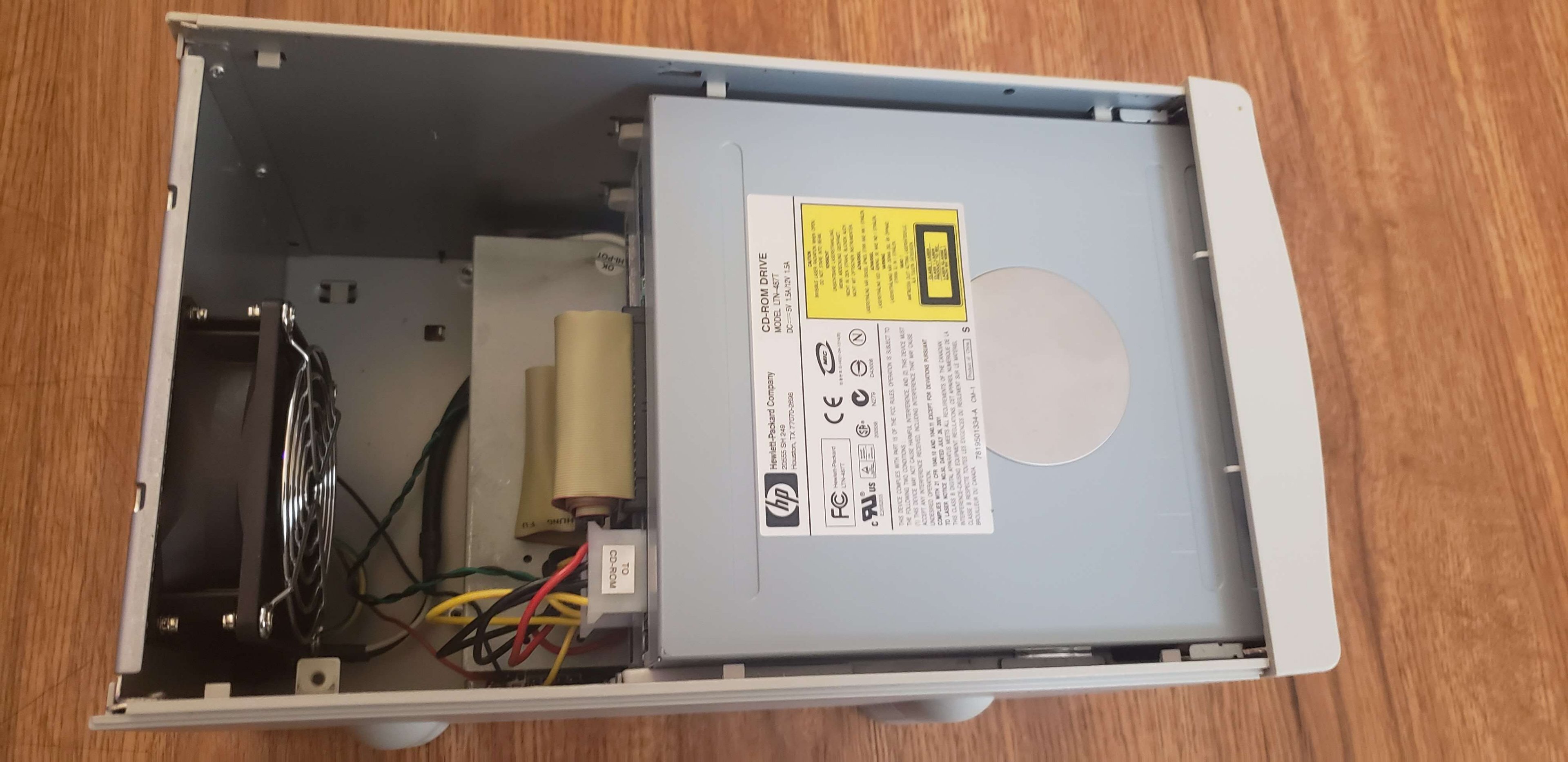
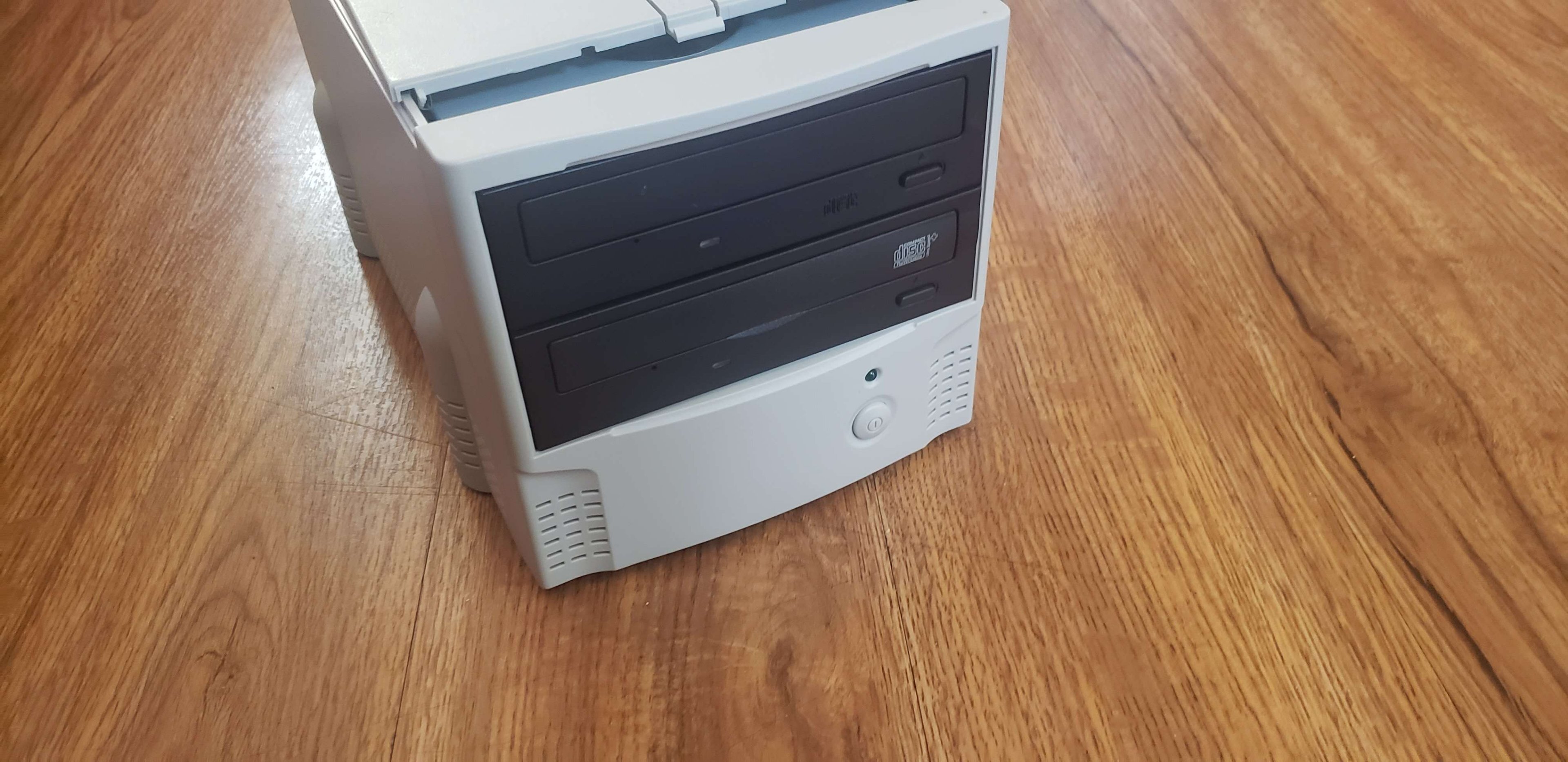
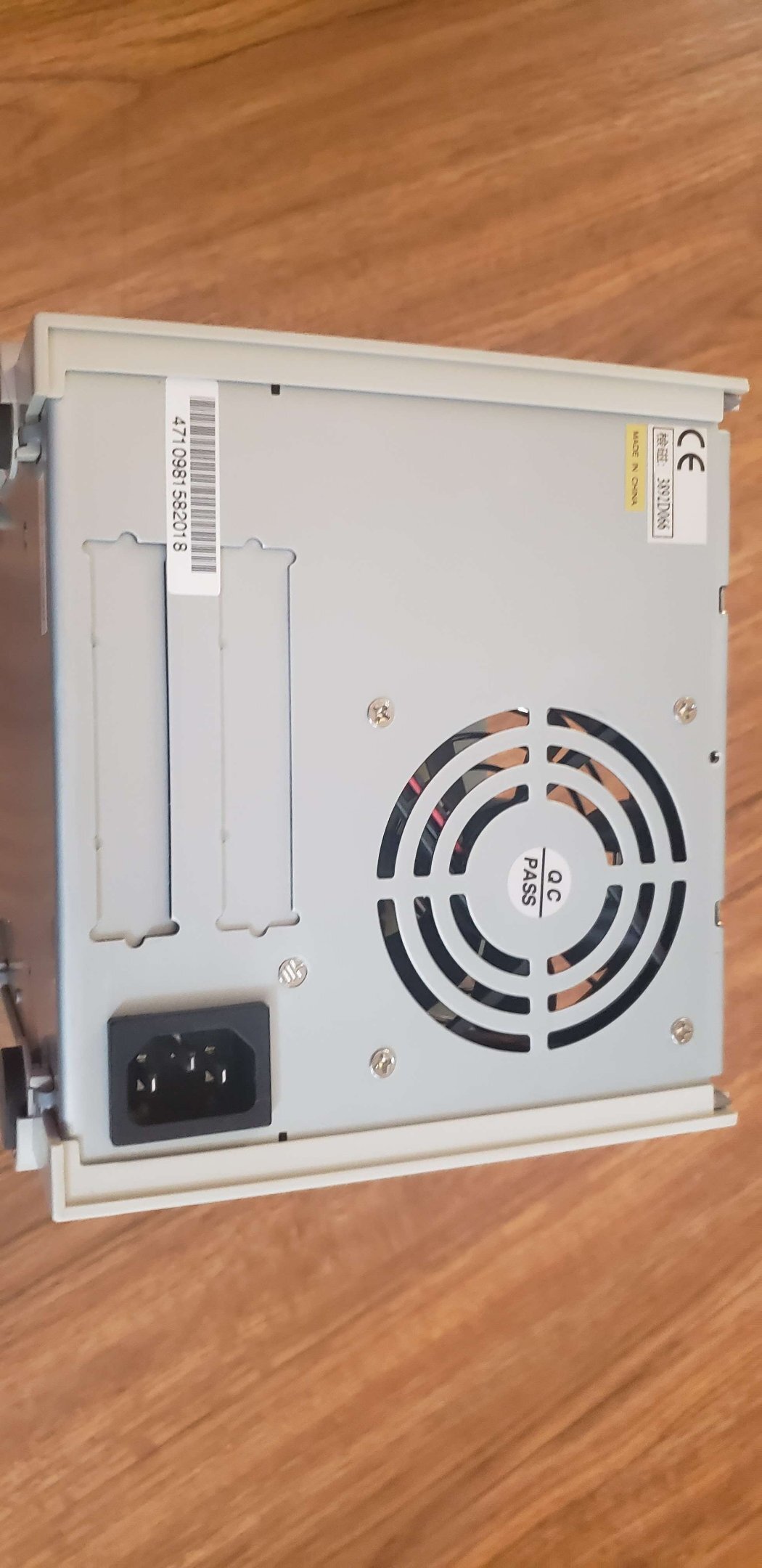
Scored for $8.99 at the thrift store. No idea what it even is. I thought maybe an external CD copier, but there's no buttons other than a power button. No connections either, except a power connection. I'm stumped. But its beige.

-
That certainly would've made for a little better of a read. Regardless, its good to know the budget offerings from Crucial are still sufficient for 6200. Those results really weren't all that bad at all! Seems like a solid budget kit.
-
I had tried a few different BIOS's on the ASRock board. I also had tried a variety of settings, and figured it was the board, hence replacing the board. On the current Asus B450M-AII board its on, I haven't touched the BIOS yet. It's all defaults / PBO / XMP. I DID, however, try changing RAM down to 3000 from 3200 last night after making this post. The machine hasn't crashed as of yet. So, its made it a full sleep cycle for me without freezing. That's actually progress!
-
Okay, so I have replaced everything in my kid's machine, quite literally. And absolutely nothing has fixed it. The problem: Random freezing, sound stops, computer unresponsive and display stays on. The rig specs: Cooler Master TD500 Mesh v2 Asus Prime B450M-A II (upgraded from ASRock B450m Pro4) AMD Ryzen 5 2600x (upgraded from Ryzen 2600) Cooler Master Hyper 212 Halo Black (upgraded from Wraith Prism) 2x16GB Crucial Ballistix DDR4-3200 (have tried 2 different sets of similar 3200 sticks) Sapphire RX Vega 64 (have used RX 580, GTX 960, GTX 970, and Vega64) Cooler Master v 850 i Gold PSU (previous eVGA GT650) I'm curious if perhaps having DDR4-3200 at 16-18-18-36-1T is maybe the cause? I recall there being high speed DDR4 issues on earlier Ryzen systems. It seems to pass all stability tests though. All Unigine benchmarks, it'll run through fine. 3d things like stress tests and games seem to make it freeze faster, but its completely random. It can be 5 minutes in playing a game to hours of playing a game. Or it can freeze at idle when I'm not paying any attention at all. P95 and Cinebench lead to no results either, its performing fantastically in Cinebench and P95 seems to run fine for hours. But after swapping all this hardware out, I'm out of ideas other than maybe a RAM speed compatibility problem or something. Thoughts?
-
I can hear voices coming from the "subwoofer" on this set. They're really not that good lol. For the purpose of why I bought them though, they'll work.
-
EXTREMEHW First Annual 96 Hour Folding Challenge, March 17th-20th 00:00 UTC
pio replied to damric's topic in Folding@Home
Just tweaked my 6900XT, hopefully more core clock helps. We'll see how my PPD looks here in a few hours, see if it updates any faster. -
EXTREMEHW First Annual 96 Hour Folding Challenge, March 17th-20th 00:00 UTC
pio replied to damric's topic in Folding@Home
I'm using somewhere between 1.5-2kw right now, and barely breaking 3m PPD lol. -
EXTREMEHW First Annual 96 Hour Folding Challenge, March 17th-20th 00:00 UTC
pio replied to damric's topic in Folding@Home
Clearly AMD isn't the right choice here. My whole fleet is online (anything worth running), and I'm barely getting like 2.6-2.8m PPD across 5 systems. -_- And this is why after this fold-a-thon, I'm out lol. -
There are so many options that are not only cheaper, but also perform better, look better, whatever the case may be. I agree whole heartedly that they're trying to sell this cooler based off the naming alone. Considering the older $30 cooler that they released a decade ago performs better in the same foot print, I just can't say much good about this one. I'll try though. The MF120 Halo fan included LOOKS really nice........once setup and configured, assuming you don't need to buy a 5v ARGB controller just to make it work. I mean I guess that's why they didn't include older socket compatibility on the box, but they must've forgotten that not many AM4 motherboards came out with ARGB hookups either. There's lost sales right there on Socket AM3 / AM2 potentially since this would bolt right onto those too the same way it does AM4. Not many sales, sure, but its just yet another oversight made. I'd still say the Hyper 212 Halo Black is better than a stock cooler, it absolutely is. My kiddo's rig with that Ryzen 2600x went from 3.8GHz boost as a 4c / 8t part with the stock AMD Wraith cooler installed, to boosting to over 4GHz as a proper full on 6 core. So it wasn't a complete waste. It boosted higher, more consistently with the Hyper 212 Evo v2 though, especially with upgraded fans. However, for any stock boosting CPU, the new 212 Halo Black is fine. Review is done with, I've still got the cooler installed on his machine, with the stock ARGB fan now. It works fine, the CPU boosts properly enough, it does what its supposed to do. But that's about all it does. With the older Evo, I'd be running a good overclock, but honestly the new one does look better and mounts easier. To be 100% honest here, had the MSRP on this cooler been $29.99 or even $34.99, AND had it included an ARGB controller or at LEAST a 12v RGB header adapter cable; just something to allow the fan to be connected properly to all capable RGB era motherboards......I'd have a lot more nicer things to say about it, even if the performance is worse than the 212 Evo v2. At least then its a fair price for its performance and would be being compared to similarly priced competitors. Sorry /rant I guess. Stuff I really wanted to put into the article, but it was just too much bias. I really did try to like the cooler, and I do. It suits a purpose, and it does "work". Just grrrr Cooler Master, I know they're capable of better than this. TY. This one there was a LOT of thought put into it. I'll just put it that way.
-
EXTREMEHW First Annual 96 Hour Folding Challenge, March 17th-20th 00:00 UTC
pio replied to damric's topic in Folding@Home
Sandbagging........or was I just not willing to put up with the power bill increase? -_- Whatever, I have my entire "fleet" of useful folding equipment online. GPU's: 6900XT, 5700XT, Vega 64, FuryX, and a GTX 970 for good measure CPU's: Ryzen 3600, Ryzen 2600x, Ryzen 1400 I'd have more things online, but my 5800x rig is my ETF rig (with the 6900xt), so passkey issues there. The rest of my gear is too old to really help with any sort of placing, so meh...better to just leave the 290x, 7970, FX, Thuban, and the rest of the old gear alone probably. I was confused too, otherwise I'd have got my equipment online yesterday. To be fair, I didn't pay too much attention to what TIME it started, I saw the dates of 3/17-3/20 and just assumed we were starting Friday. Instead we started Thursday around 5pm. Yeah, that was a little confusing. Again though, I hadn't noticed 0:00 UTC either, and if I did I probably confused UTC for EST just out of habit.